
Forwarding Policy Configuration
Forwarding strategy is the most commonly used function in traffic diversion scenarios. Its core function is to forward the specified traffic after ACL filtering from the input port or LAG to the output port. It can be output to the LAG group or copy multiple copies of traffic for different scenarios, and can be used in combination with tunnel stripping, timestamping , etc.
Summary of Forwarding Policy Configuration Tasks
Section titled “Summary of Forwarding Policy Configuration Tasks”| Configuration order (from top to bottom) | Configuration Content | Configuration |
|---|---|---|
| Creating a LAG (Optional) | If the output is to LAG, you need to create LAG and add ports first. | |
| Creating a Mirror Session (Optional) | If the output is to mirror session, you need to create mirror session first. | |
| Configure EM/EMV6 template | Before creating EM/EMv6 policies, you need to configure the global template | |
| Creating an ACL Rule Group | Create an ACL rule group based on the type of filtering to be performed | |
| Adding rules | Add a rule to the rule group and specify the egress port or LAG (optionally configure rule-based actions) | |
| Binding rule groups to input ports | Attach the rule group to the input port or LAG to complete the configuration. |
Creating a LAG
Section titled “Creating a LAG”Add multiple ports to LAG, and traffic will be load balanced when it is output from LAG.
Table 1 Create LAG
| Operation | Command | Description |
|---|---|---|
| Enter system configuration view | configure | |
| Create lag and enter lag view | interface link-aggregation LAG-ID | Create a lag group |
| Select lag mode | mode { static|flex|weight|standby } | static: When a lag member is down, all traffic is reloaded to other UP members. flex: When a member of the lag is down, only the down port is reloaded to other members that are up. Weight: The weight ratio of each port can be set on an elastic basis. The sum of the weight ratios of each port is not greater than 64. standby: you can additionally configure the master and standby ports and some LACP functions on top of the weight. |
| Submit selected mode | commit | Submit after selecting the mode to take effect |
Table 2 Add members to a LAG group
| Operation | Command | Description |
|---|---|---|
| Enter system configuration view | configure | |
| Enter interface view | interface Ethernet ID | Enter the port where you want to add LAG members. |
| Add LAG common members | link-aggregation-group LAG-ID | |
| Add LAG weight member | link-aggregation-group LAG-ID weight WEIGHT | Distribute traffic based on weights. The sum of the weight ratios of each port is not greater than 64. |
Creating a standby LAG (optional)
Section titled “Creating a standby LAG (optional)”Table 3 Creating a standby LAG
| Operation | Command | Description |
|---|---|---|
| Enter system configuration view | configure | |
| Create lag and enter lag view | interface link-aggregation LAG-ID | Create a lag group |
| Select lag mode | mode standby | standby: you can additionally configure the master and standby ports and some LACP functions on top of the weight. |
| Setting the maximum and minimum members in a standby lag | standby {min-links|max-links } NUM | min-links:the minimum number of UP members in the lag, if it is smaller than this value, the LAG will be down as a whole. max-links:Maximum number of UPs in the LAG, if it is greater than this value, other low priority ports will be used as standby ports. |
| Enable LACP preemption | preempt eable | After port preemption is turned on, the primary port switches to the standby port and then cuts back to the primary port when the primary port is re-UP |
| preempt delay | preempt delay TIME | TIME: Delay for the standby port to switch back to the master port, in seconds, 0-300 |
| Switching Port Priority Method | standby select {priority|speed } | priority: Sets the alternate ports with the same weight to be selected in order of port priority; alternate ports without the same weight are not switched. speed: the device selects spare ports with the same weight according to the rate and priority first, if there is no same rate, the spare ports are selected according to the priority. Spare ports without the same weight are not switched. |
| Submit selected mode | commit | Commit to take effect after selecting the mode, standby mode needs to commit to take effect after adding ports, other modes do not need to commit to add ports. |
Table 4 Adding members to a standby LAG group
| Operation | Command | Description |
|---|---|---|
| Enter system configuration view | configure | |
| Enter interface view | interface Ethernet ID | Enter the port where you want to add LAG members. |
| Adding a port to a lag group | link-aggregation-group LAG-ID | |
| Add port member priority and weight | link-aggregation-group LAG-ID port-priority PRIORITY weight WEIGHT | PRIORITY: set the priority for the members of the added standy lag, the greater the priority the higher the priority, the smaller the port id the higher the priority when the priority is the same. Distribute traffic based on weights. The sum of the weight ratios of each port is not greater than 64. |
Configure Inline Bypass (optional)
Section titled “Configure Inline Bypass (optional)”Table 5 Configure Inline Bypass
| Operation | Command | Description |
|---|---|---|
| Enter system configuration view | configure | |
| Create lag and enter lag view | interface link-aggregation LAG-ID | Create a lag group |
| Open inline detection | inline-bypass enable | Open inline detection |
| Configure detection timeout | inline-bypass detection timeout time | Enable the Lag-bound passthrough policy if Lag stays down past the timeout |
| Configure revert delay | inline-bypass revertdelay time | Disable the Lag-bound passthrough policy and revert traffic to the original policy if Lag stays up past the revert delay |
| Bind bypass policy | inline-bypass bindpolicy policy_name | Bind a bypass policy with a higher priority than the Lag’s applied policy |
Notes:
- This configuration takes effect only when global inline bypass is enabled. Refer to Inline Bypass.
- The priority of the bypass policy must be higher than that of the policy applied to the LAG; otherwise, traffic cannot be restored when the inline bypass feature is triggered.
- Multiple LAGs cannot bind to the same bypass policy.
- If a policy’s egress includes a LAG with inline bypass enabled, this policy cannot be used as a bypass
Configure EM/EMV6 template
Section titled “Configure EM/EMV6 template”| Operation | Command | Description |
|---|---|---|
| Enter system configuration view | configure | |
| Configure EM/EMV6 template | exactrulemask {src-ip|dst-ip|src-port|dst-port|ip-protocol|ipv6-src-ip|ipv6-src-port|ipv6-dst-port|ipv6-ip-protocol}* | Before creating EM/EMv6 policies, you must configure the global template. If the rule match items do not align with the template, the policy cannot be applied. If EM/EMv6 policies are already applied, the template cannot be modified; you must delete the policies first before making changes to the template. |
Create a Mirror Session
Section titled “Create a Mirror Session”Port mirroring means to copy an additional traffic based on the port without affecting the original service .
SPAN Mirroring
| Operation | Command | Description |
|---|---|---|
| Enter system configuration view | configure | |
| Configure span mirroring | mirror session ID span direction {rx|tx|both} [src -ethernet SRC-ETHERNET ] dst -ethernet DST-ETHERNET [slice enable] |
Span mirroring description
ID: used to maintain mirror groups, supporting up to 7 groups.
direction: The direction of the mirrored port traffic. You can select input direction, output direction, or both input and output directions.
SRC-ETHERNET : Select the inbound port for the mirrored traffic. This command can be entered multiple times to add multiple inbound ports, also can be skipped if mirror session is used for acl mirror-action.
DST-ETHERNET: Select the outbound port for the mirrored traffic. This command can be used to add multiple outbound ports.
slice enable: Enables message truncation, with a fixed truncation limit of 128 bytes
RSPAN Mirroring
| Operation | Command | Description |
|---|---|---|
| Enter system configuration view | configure | |
| Create a vlan for rspan use | vlan VLANID | Create a vlan for rspan |
| Configure rspan mirroring | mirror session ID rspan direction {rx|tx|both} [src-ethernet SRC-ETHERNET ] dst-ethernet DST-ETHERNET remote-vlan VLANID [slice enable] |
Rspan mirroring description
ID: used to maintain mirror groups, supporting up to 7 groups.
direction: The direction of the mirrored port traffic. You can select input direction, output direction, or both input and output directions.
SRC-ETHERNET : Select the inbound port for the mirrored traffic. This command can be entered multiple times to add multiple inbound ports, also can be skipped if mirror session is used for acl mirror-action.
DST-ETHERNET: Select the outbound port for the mirrored traffic. only sopprt one outbound port.
slice enable: Enables message truncation, with a fixed truncation limit of 128 bytes
Create an ACL group and add rules
Section titled “Create an ACL group and add rules”ACL Table
Section titled “ACL Table”ACL table is port specific. Binding ports means that the ACL table is valid for traffic on those ports. A single ACL table can bind multiple ports, and multiple ACL tables can exist on a single port, i.e. a “many-to-many” relationship.
ACL table naming rule
The ACL tables’ name is supposed to be different.
ACL table direction
The ACL table stage indicates the direction, optionally ingress and egress, which corresponds to whether the ACL table is applied to the rx and tx direction respectively.
ACL table type
ACL table type affects the match fields of the ACL, in other words, determines which characteristics are used to match traffic. ACL table type is available as L2, L3, L3v6, EX. The egress direction only supports L3/L3V6 type.
ACL rule
Section titled “ACL rule”ACL rule action
- Ingress
Table 5 ACL rule ingress action
| Action | Key words | Description |
|---|---|---|
| packet-action | {permit|deny} | permit means forward; deny means the packet is not forwarded but can be normally trapped |
| mirror-action | mirror-session ID | used to maintain mirror groups |
| redirect-action | {ethernet PORT | ethernets [PORT1,PORT2..] | link-aggregation LAGID | link-aggregations [LAGID,LAGID …]}* | support redirecting to an interface or multi-interfaces or a lag or lags. Ports and lags can be added together. |
| add-vlan | VLAN ID | Add new vlan, range 1-4094. Not support for multi-redirections. |
| modify-vlan | VLAN ID | Modify outer-vlan, range 1-4094. Not support for multi-redirections |
| pop-vlan | - | Pop outer-vlan |
| add-timestamp | - | Add timestamp, ptp needs to open manually, see Timestamp Function Description |
| set-dmac | DMAC | Modify dst-mac: nn:nn:nn:nn:nn:nn |
- Egress
Table 6 ACL rule egress action
| Action | Key words | Description |
|---|---|---|
| packet-action | {permit|deny} | permit means forward; deny means the packet is not forwarded but can be normally trapped |
ACL rule match fields
The supported match fields for different types of ACL tables vary, and the specific match fields for each type of ACL table are described below.
- L2 ACL
Table 7 L2 match fields
| Key words | Description of parameters | Notes |
|---|---|---|
| src-mac | Specify source mac address: nn:nn:nn:nn:nn:nn | Supported only in the ingress direction. |
| dst-mac | Specify destination mac address: nn:nn:nn:nn:nn:nn | Supported only in the ingress direction. |
| ethernet-type | Specify ethernet protocol type, range: 0-FFFF | Supported only in the ingress direction. |
| outer-vlan | Specify outer VLAN id, range: 1-4094 | Supported only in the ingress direction. |
- L3 ACL
Table 8 L3 match fields
| Key words | Description of parameters | Notes |
|---|---|---|
| src-mac | Specify source mac address: nn:nn:nn:nn:nn:nn | Supported only in the ingress direction. |
| outer-vlan | Specify outer VLAN id, range 1-4094 | |
| vlan-pri | Specify outer VLAN priority, range 0-7 | |
| ip-protocol | Specify IP protocol, range0-255 | |
| src-ip | Specify source IP address: A.B.C.D(/mask) | |
| dst-ip | Specify destination IP address: A.B.C.D(/mask) | |
| icmp-type | Specify type of ICMP, range 0-16 | Supported only in the ingress direction. |
| icmp-code | Specify code of ICMP, range 0-5 | Supported only in the ingress direction. |
| src-port | Specify L4 source port, range 0-65535 | |
| dst-port | Specify L4 destination port, range 0-65535 | |
| ip-fragment | Specify IP Fragment: ANY, All ip-fragment packets | Supported only in the ingress direction. |
| src-port-range | Specify Src port range, eg:1024-65535 | Supported only in the ingress direction. |
| dst-port-range | Specify Dst port range, eg:1024-65535 | Supported only in the ingress direction. |
| src-port-exclude | Specify L4 source port, range: 0-65535 | Supported only in the ingress direction. |
| dst-port-exclude | Specify L4 destination port, range: 0-65535 | Supported only in the ingress direction. |
| dscp | Specify DSCP of IP header, range: 0-63 | Supported only in the ingress direction. |
- L3V6 ACL:
Table 9 L3V6 match fields
| Key words | Description of parameters | Notes |
|---|---|---|
| src-mac | Specify source mac address: nn:nn:nn:nn:nn:nn | Supported only in the ingress direction. |
| outer-vlan | Specify outer VLAN id, range 1-4094 | |
| vlan-pri | Specify outer VLAN priority, range 0-7 | |
| ip-protocol | Specify IP protocol, range0-255 | |
| src-ipv6 | Specify source IP address: A::B(/mask) | |
| dst-ipv6 | Specify destination IP address: A::B(/mask) | |
| icmpv6-type | Specify type of ICMP, range 0-16 | Supported only in the ingress direction. |
| icmpv6-code | Specify code of ICMP, range 0-5 | Supported only in the ingress direction. |
| src-port | Specify L4 source port, range 0-65535 | |
| dst-port | Specify L4 destination port, range 0-65535 | |
| src-port-range | Specify Src port range, eg:1024-65535 | Supported only in the ingress direction. |
| dst-port-range | Specify Dst port range, eg:1024-65535 | Supported only in the ingress direction. |
| src-port-exclude | Specify L4 source port, range: 0-65535 | Supported only in the ingress direction. |
| dst-port-exclude | Specify L4 destination port, range: 0-65535 | Supported only in the ingress direction. |
| dscp | Specify DSCP of IP header, range: 0-63 | Supported only in the ingress direction. |
- EX ACL
Table 10 EX match fields
| Key words | Description of parameters | Notes |
|---|---|---|
| src-mac | Specify source mac address: nn:nn:nn:nn:nn:nn | Supported only in the ingress direction. |
| dst-mac | Specify destination mac address: nn:nn:nn:nn:nn:nn | Supported only in the ingress direction. |
| ethernet-type | Specify ethernet protocol type, range: 0-FFFF | Supported only in the ingress direction. |
| outer-vlan | Specify outer VLAN id, range: 1-4094 | Supported only in the ingress direction. |
| src-ip | Specify source IP address: A.B.C.D(/mask) | Supported only in the ingress direction. |
| inner-src-ip | Specify inner source IP address : A.B.C.D(/mask) | Supported only in the ingress direction. |
| inner-dst-ip | Specify inner destination IP address : A.B.C.D(/mask) | Supported only in the ingress direction. |
| inner-src-ipv6 | Specify inner source IP : A::B(/mask) | Supported only in the ingress direction. |
| inner-dst-ipv6 | Specify inner destination IP : A::B(/mask) | Supported only in the ingress direction. |
| inner-ip-protocol | Specify inner IP protocol, range 0-255 | Supported only in the ingress direction. |
| inner-src-port | Specify inner source port, range 0-65535 | Supported only in the ingress direction. |
| inner-dst-port | Specify inner destination port, range 0-65535 | Supported only in the ingress direction. |
| tcp-flags | Specify TCP flags, range: 0-FF(flags)/0-FF(masks) | Supported only in the ingress direction. |
| vni | Specify VNI, range: 1-16777215 | Supported only in the ingress direction. |
- EM ACL
Table 11 EM match fields
| Key words | Description of parameters | Notes |
|---|---|---|
| src-ip | Specify source IP address: A.B.C.D(/mask) | |
| dst-ip | Specify destination IP address: A.B.C.D(/mask) | |
| ip-protocol | Specify IP protocol, range0-255 | |
| src-port | Specify L4 source port, range 0-65535 | |
| dst-port | Specify L4 destination port, range 0-65535 |
- EMV6 ACL
Table 12 EMV6 match fields
| Key words | Description of parameters | Notes |
|---|---|---|
| src-ipv6 | Specify source IP address: A::B(/mask) | |
| ip-protocol | Specify IP protocol, range0-255 | |
| src-port | Specify L4 source port, range 0-65535 | |
| dst-port | Specify L4 destination port, range 0-65535 |
ACL Configuration
Section titled “ACL Configuration”Table 13 Create an ACL group and add rules
| Operation | Command | Description |
|---|---|---|
| Enter system configuration view | configure | |
| Create an ACL group and enter ACL group view | access-list {L2|EX|L3|L3V6 } ACL_NAME { ingress|egress} [des_crip] DES_CRIP [priority] PRIORITY | ACL_NAME: The name of the ACL group. DES_CRIP: Optionally add a description for the ACL group. The description can be modified, but acl name cannot be modified. PRIORITY: ACL group can add a priority. The larger the PRORITY, the higher the priority. The priority is only valid for the same type. Among different types, the priority of EX/L2 is higher than that of L3/L3V6 |
| Add rules | rule ID action_options [rule_options] | ID also indicates the priority level, in the range 0-500. rule_options: see [ACL rule match fields] for details. action_options: see [ACL rule action] for details. |
| Enter the interface view | {interface Ethernet ID | interface link-aggregation LAG-ID } | |
| Apply the ACL table to the interface. | acl ACL_NAME | Bind acl to an interface or a link-aggregation group |
Notes:
- LAG members cannot be bound to EM/EMv6 policies.
- If an interface has active EM rules bound to it, it cannot be added to a LAG.
- If an interface is already part of a LAG, any disabled EM rules bound to it cannot be enabled.
Timestamp Function Description
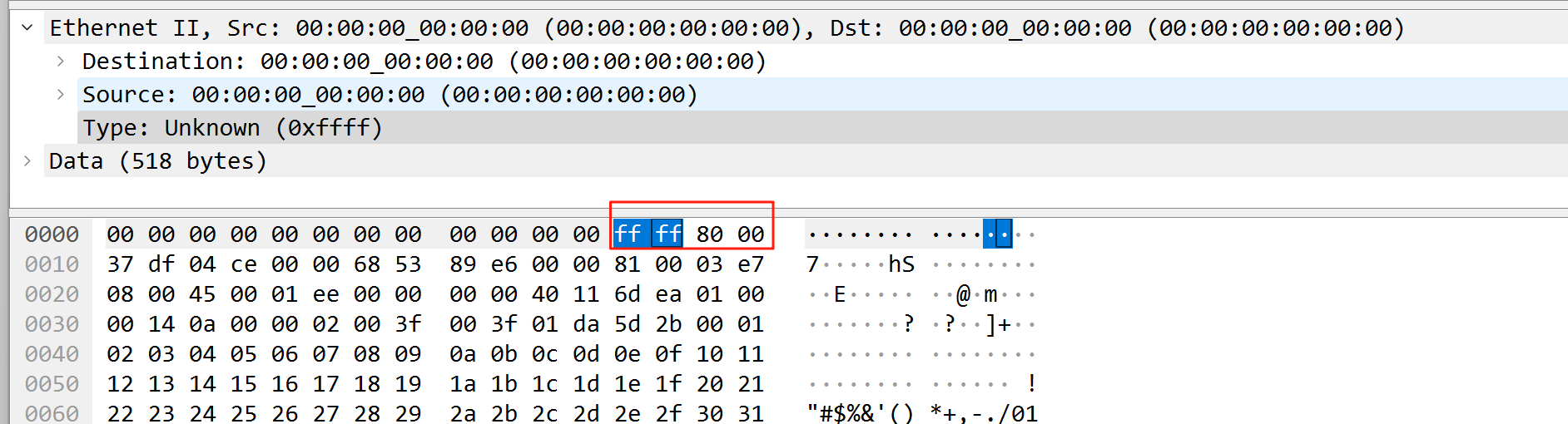
Section titled “Timestamp Function Description”Before using the timestamp, you need to turn on the global switch of PTP first, and then enable PTP on the port for the traffic input port, so that the traffic entering from the port can obtain the ability to obtain the timestamp. This function is generally used together with the timestamp function. Both port PTP and global PTP must be configured. When used with the timestamp , the current effective time and time zone shall prevail. If the time/ time zone is modified, the device needs to be restarted to take effect.
Table 14 Enable the global PTP function
| Operation | Command | Description |
|---|---|---|
| Enter system configuration view | configure | - |
| Configure the ptp profile | ptp profile 1588v2 | - |
| Enable the global PTP function | ptp enable | Enable PTP globally |
Table 15 Enable the PTP function on ingress port
| Operation | Command | Description |
|---|---|---|
| Enter system configuration view | configure | - |
| Enter interface view | interface Ethernet ID | Enter the traffic input port where timestamp is to be added |
| Enable the PTP function on the port | ptp enable | Enable port PTP |
Maintenance interface
Section titled “Maintenance interface”| Operation | Command | Description |
|---|---|---|
| View ACL hitcounts | show counters acl | - |
| Clear ACL hitcounts | clear counters acl | - |
| View lag group | show link-aggregation summary | - |