
Querier Configuration
此内容尚不支持你的语言。
Introduction
Section titled “Introduction”In an IGMP-enabled multicast network, devices can assume one of two roles within a network segment:
Querier:
- Responsible for sending Query messages
- Receives and processes Host Membership Reports (join messages) and Leave Group messages from hosts
- Maintains awareness of which multicast groups have active receivers (group members) on the segment connected to its interface
- Determines when group members leave by monitoring responses to its queries
Non-Querier:
- Passively receives Host Membership Reports from hosts
- Tracks which multicast groups have active receivers on its connected segment
- Relies on the Querier’s activity to determine when group members leave
- Does not initiate queries itself
Explanation of Principles
Section titled “Explanation of Principles”A network segment can have only one querier, so multicast devices must elect the querier through a selection process. The election rules are as follows:
After enabling the querier function, multicast Device A will default to being the querier for the current network segment during the IGMP protocol startup phase and begin sending query messages to the segment.If Device A receives a query message from multicast Device B with a smaller IP address than its own,Device A will switch from querier to non-querier status,Start the Other Querier Present Timer,Record Device B as the current querier for the segment.
When Device A is in non-querier status and receives query messages from querier Device B,It will update the Other Querier Present Timer.If the received query message comes from a new multicast Device C (not the previously recorded querier B) and C has a smaller IP address than B,Update the querier to Device C,Refresh the Other Querier Present Timer.
If Device A is in non-querier status and the Other Querier Present Timer expires:Device A will switch to querier status,Assume the responsibilities of the querier.
Querier Configuration
Section titled “Querier Configuration”| Operation | Command | Description |
|---|---|---|
| Enter the VLAN view | Vlan ID | - |
| Enable IGMP Snooping | igmp-snooping enable | - |
| Enable Querier Configuration | igmp-snooping querier enable | - |
Configuration Example
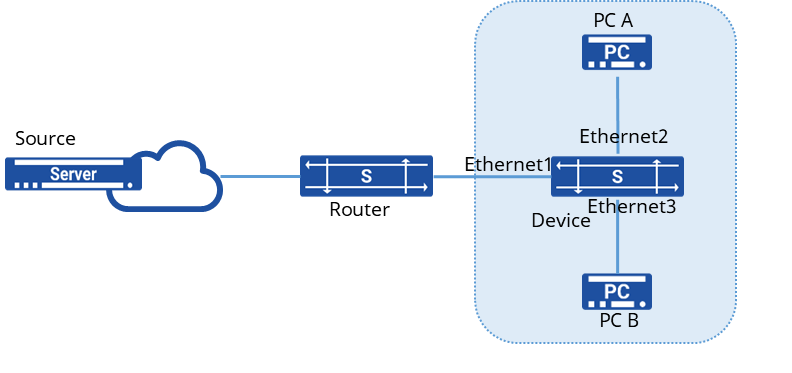
Section titled “Configuration Example”The router connects to the user network through a Device. Key configurations and operational status are as follows:
Router Configuration:
IGMP querier functionality is enabled,Querier IP address has been modified
Network Components:
Two end-user devices: PC A and PC B,Intermediate Device running IGMP Snooping
Multicast Operations:
Multicast sources are transmitting data to groups 224.1.1.1 and 225.1.1.1
The router successfully:
Receives join messages from terminals,Receives leave messages from terminals,Multicast data from sources is properly forwarded to target PCs as designed.
Procedure
- Create VLANs on the router and add interfaces connected to the Device
sonic(config)# vlan 100sonic(config-vlan-100)# igmp snooping enablesonic(config-vlan-100)# igmp-snooping querier enablesonic(config)# interface ethernet 1sonic(config-if-1)# switchport access vlan 100Creating VLANs and Adding Member Interfaces
sonic(config)# vlan 100sonic(config-vlan-100)# igmp snooping enablesonic(config)# port-group ethernet 1-2sonic(config-port-group-1-2)# switchport access vlan 100Change Querier IP to 100.1.1.1
sonic(config)# vlan 100sonic(config-vlan-100)# igmp-snooping querier-ip 100.1.1.1Verify configuration
- View multicast VLAN configuration
sonic(config)# do show l2-multicast-tableTotal L2_multicast_forwarding_group counters: 4(Source,Group) Interface Vlan Uvlan Mode------------------- ----------- ------- ------- ------(0.0.0.0,225.1.1.1) Ethernet2 Vlan100 Vlan100 INCL Ethernet3 Vlan100 Vlan100 INCL(0.0.0.0,224.1.1.1) Ethernet2 Vlan100 Vlan100 INCL Ethernet3 Vlan100 Vlan100 INCL- Check Querier Information and Change Source Address to 100.1.1.1