
MVRP Configuration Guide
此内容尚不支持你的语言。
Introduction
Section titled “Introduction”The Multiple Registration Protocol (MRP) serves as a carrier for attribute registration protocols, enabling the propagation of attribute information. The Multiple VLAN Registration Protocol (MVRP) is an application of MRP, used to disseminate and learn VLAN configuration information among devices. Through MVRP, devices within a LAN can automatically synchronize VLAN information, significantly reducing the VLAN configuration workload for network administrators.
Implementation Mechanism
Section titled “Implementation Mechanism”Each port participating in the MRP protocol on a device is considered an Application Entity. Once an MRP application (such as MVRP) is enabled on a port, that port becomes an MRP application entity for that specific application.
The MVRP protocol facilitates the automatic registration and deregistration of VLAN attributes:
- VLAN Registration: A port joins a VLAN
- VLAN Deregistration: A port leaves a VLAN
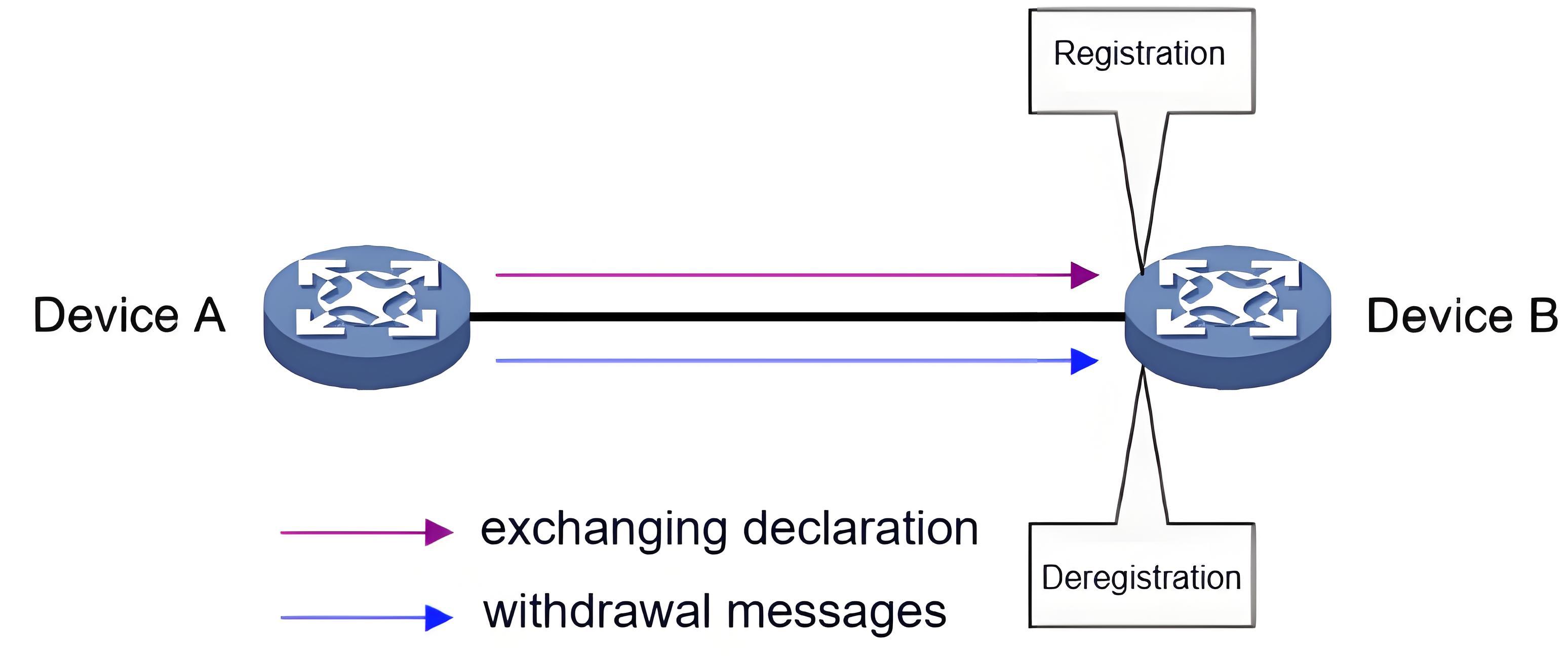
MVRP achieves the registration and deregistration of VLAN attributes by exchanging declaration and withdrawal messages:
- When a port receives a VLAN attribute declaration, it registers the VLAN information contained within that declaration (the port joins the VLAN)
- When a port receives a VLAN attribute withdrawal, it deregisters the VLAN information contained within that withdrawal (the port leaves the VLAN)
It is important to note that the registration and deregistration of attributes by the MVRP protocol only applies to the port that receives the MVRP protocol messages.
MRP Message Introduction
Section titled “MRP Message Introduction”MRP messages primarily include Join, New, Leave, and LeaveAll. These messages interact to facilitate the registration and deregistration of attributes.
- Join and New messages are classified as Declarations
- Leave and LeaveAll messages are classified as Withdrawals
Join Messages
Section titled “Join Messages”When an MRP application entity is configured with certain attributes and requires its peer entity to register those attributes, it sends a Join message to the peer.
Upon receiving a Join message from a peer entity, an MRP entity performs the following actions:
- It registers the attribute contained in the Join message
- It propagates this Join message to other MRP entities within the same device
- Upon receiving the propagated Join message, these other entities subsequently send Join messages to their respective peers Join messages exchanged between MRP entities are further categorized into JoinEmpty and JoinIn. (Note: This distinction is not made for Join messages propagated between entities on the same device). The differences between the two are as follows:
- JoinEmpty: Used to declare an attribute that is not yet registered on the MRP entity. For example: An MRP entity joins a static VLAN (a VLAN created manually is called a static VLAN, while a VLAN learned and created via MRP messages is called a dynamic VLAN). If the entity has not yet registered this VLAN via an MRP message, it will send a JoinEmpty message to its peer to declare this VLAN.
- JoinIn: Used to declare an attribute that is already registered on the MRP entity. For example: An MRP entity joins a static VLAN and has already registered this VLAN via an MRP message. Alternatively, the entity has received a propagated Join message for a VLAN from another entity within the same device and has registered that VLAN. In these cases, the entity will send a JoinIn message to its peer to declare this VLAN.
New Messages
Section titled “New Messages”The function of a New message is similar to that of a Join message, as both are used for attribute declaration. The key difference is that the New message is primarily used in response to topology changes in the Multiple Spanning Tree Protocol (MSTP).
- When an MSTP topology change occurs, the MRP application entity sends a New message to its peer entity to declare this topology change.
- When an MRP entity receives a New message from a peer entity, it registers the attribute contained in the New message and it propagates this New message to other MRP entities within the same device. Upon receiving the propagated New message, these other entities subsequently send the New message to their respective peers.
Leave Messages
Section titled “Leave Messages”When an MRP application entity deregisters certain attributes and requires its peer entity to perform a synchronized deregistration, it sends a Leave message to the peer.
Upon receiving a Leave message from a peer entity, an MRP entity performs the following actions:
- It deregisters the attribute contained in the Leave message.
- It propagates this Leave message to other MRP entities within the same device.
- Upon receiving the propagated Leave message, these other entities decide whether to send the Leave message to their respective peers, based on the state of the attribute within the local device. For example: If the attribute in the Leave message is a VLAN. If the VLAN is a dynamic VLAN and is no longer registered by any entity on the device, the VLAN is deleted from the device, and the Leave message is sent to the peer entity. If the VLAN is a static VLAN, the Leave message is not sent to the peer entity.
LeaveAll Messages
Section titled “LeaveAll Messages”Each MRP application entity starts its own LeaveAll timer upon initialization. When this timer expires, the entity sends a LeaveAll message to its peer entity.
The LeaveAll message mechanism works as follows:
- When an MRP entity either sends or receives a LeaveAll message, it starts its Leave timer.
- Based on its own attribute state, the entity decides whether it needs to send Join messages to request that its peer re-register specific attributes.
- Before the Leave timer expires, the entity re-registers any attributes received in Join messages from its peer.
- After the Leave timer expires, the entity deregisters all attributes that were not re-registered. This process periodically purges stale attributes from the network.
MRP Timers Introduction
Section titled “MRP Timers Introduction”MRP defines four types of timers to control the transmission of various MRP messages.
Periodic Timer
Section titled “Periodic Timer”Each MRP application entity starts its own Periodic timer upon initialization to govern the periodic transmission of MRP messages. Before this timer expires, the entity collects all MRP messages that need to be sent. Upon timeout, it bundles these pending messages into the fewest possible packets for transmission, thereby reducing the total number of packets sent. The entity then restarts the Periodic timer to begin a new cycle.
Join Timer
Section titled “Join Timer”The Join timer controls the transmission of Join messages. To ensure reliable delivery to the peer entity, an MRP entity starts the Join timer whenever it sends a Join message.
If, before this timer expires, the entity receives a JoinIn message from its peer, and the attribute in that JoinIn message matches the attribute in the sent Join message, it does not retransmit the Join message.
Otherwise, when this timer expires, the entity will retransmit the Join message once upon the next timeout of its Periodic timer.
Leave Timer
Section titled “Leave Timer”The Leave timer controls the deregistration of attributes. An MRP entity starts its Leave timer when it receives a Leave message from a peer entity, or when it sends or receives a LeaveAll message.
Attributes will not be deregistered by this entity if, before this timer expires, it receives a Join message from its peer where the attribute matches the one in the original Leave message (or matches one of the attributes affected by the LeaveAll message).
All other affected attributes will be deregistered after this timer expires.
LeaveAll Timer
Section titled “LeaveAll Timer”Each MRP application entity starts its own LeaveAll timer upon initialization. When this timer expires, the entity sends a LeaveAll message to its peer entity and then immediately restarts its own LeaveAll timer, beginning a new cycle. A peer entity, upon receiving a LeaveAll message, also restarts its own LeaveAll timer.
MVRP Configuration
Section titled “MVRP Configuration”Enabling MVRP
Section titled “Enabling MVRP”Enable MVRP globally.
| Operation | Command | Description |
|---|---|---|
| Enable MVRP function globally | mvrp enable |
Enable MVRP on the required interfaces.
| Operation | Command | Description |
|---|---|---|
| Enter the interface configuration view | interface ethernet interface-id | |
| Port enables MVRP function | mvrp enable |
MVRP Timer Configuration
Section titled “MVRP Timer Configuration”The intervals for the MVRP timers can be configured as needed.
| Operation | Command | Description |
|---|---|---|
| Enter the interface configuration view | interface ethernet interface-id | |
| Configure timer time | mvrp {jointimer|leavealltimer |leavetimer |periodictimer} | time-value: 10~32760 milliseconds |
Configuration Example
Section titled “Configuration Example”Network requirements
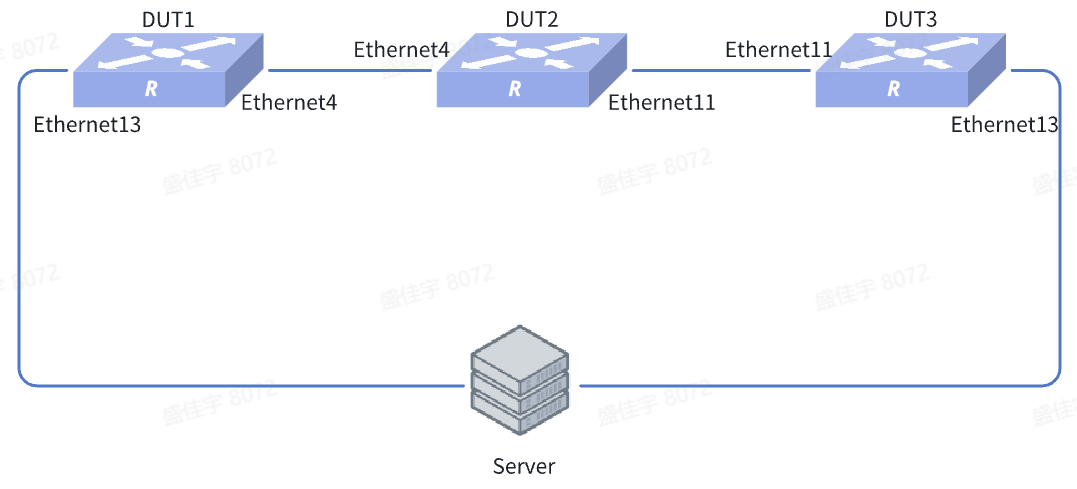
In a Layer 2 network setup, MVRP can be used to create VLANs dynamically, thereby significantly reducing configuration time.
Procedure
- The MVRP configuration is identical on all DUTs. DUT1 is used as the example here.
- Enable MVRP on all participating ports.
sonic(config)# mvrp enablesonic(config)# interface ethernet 13sonic(config-if-13)# mvrp enablesonic(config)# interface ethernet 4sonic(config-if-4)# mvrp enable- Add the ports connecting DUT1 and DUT3 to the server into VLAN 100.
sonic(config)# vlan 100sonic(config)# interface ethernet 13sonic(config-if-13)# switchport trunk vlan 100Verify configuration
All interfaces on the DUT interconnects are dynamically added to VLAN 100. Thus, packets tagged with VLAN 100 are forwarded normally.