
WireGuard Configuration Guide
此内容尚不支持你的语言。
Introduction
Section titled “Introduction”WireGuardVPN is a new VPN protocol that operates at the kernel level, delivering an efficient, secure, simple, and modern VPN solution. WireGuardVPN employs robust encryption techniques to ensure data security while delivering rapid transmission speeds. Its advantages include efficient encryption and authentication mechanisms, a lightweight protocol design, straightforward configuration and management, and high-speed data transfer. Compared to traditional VPN protocols, WireGuardVPN offers enhanced security, faster performance, greater reliability, and a superior user experience.
WireGuard Configuration
Section titled “WireGuard Configuration”Create WireGuard
Section titled “Create WireGuard”| Operation | Command | Description |
|---|---|---|
| Enter the system configuration view | configure terminal | |
| Create and enter the WireGuard configuration view | WireGuard name |
Generate keys
Section titled “Generate keys”| Operation | Command | Description |
|---|---|---|
| Enter the system configuration view | configure terminal | |
| Enter the WireGuard configuration view | wireguard name | |
| Generate keys | genkey |
Configure wireguard
Section titled “Configure wireguard”| Operation | Command | Description |
|---|---|---|
| Enter the system configuration view | configure terminal | |
| Enter the WireGuard configuration view | wireguard name | |
| Configure WireGuard’s listening port, private key, and IPv4 address | ip4 listen_port port private_key string intf_addr A.B.C.D/M | listen_port: listening port private_key: local private key intf_addr: IPv4 address of the WireGuard tunnel |
| Configure WireGuard’s listening port, private key, and IPv6 address | ip6 listen_port port private_key string intf_addr A::B/M | |
| Configure the MTU for the WireGuard tunnel | mtu value | |
| Configure NAT traversal for WireGuard tunnels | nat-zone id | IDs 1–3 indicate enabling NAT translation functionality. Note: After configuration, the original packet’s IP address will be translated. When coordinating with port NAT to translate both internal and external IP layers, static NAT must be configured on the port or used in conjunction with ACLs. See Section 13.5 for details. |
| Configure the WireGuard peer’s public key and IP address settings | peer {ip4|ip6} public_key key [endpoint_ip A.B.C.D endpoint_port port] [persistent_keepalive int] | public_key: the public key of the remote end endpoint_ip: the ip address of the remote end endpoint_port: the port of the remote end persistent_keepalive: tunnel survival time When no endpoint_ip is configured, it passively receives requests from the peer and learns the peer’s IP address and port. |
Display and Maintenance
Section titled “Display and Maintenance”| Operation | Command |
|---|---|
| Display wireguard information | show wireguard status id |
| Display wireguard configuration | show wireguard config id |
WireGuard Configuration Example
Section titled “WireGuard Configuration Example”Network Requirements
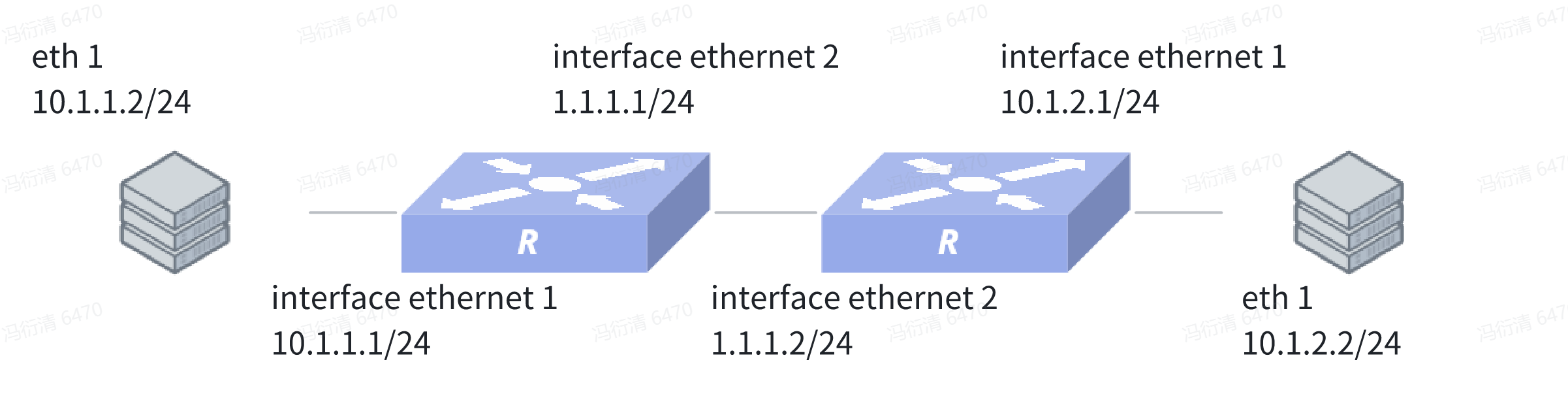
The enterprise wants to protect data flows between the branch subnet and the headquarters subnet. An WireGuard tunnel can be set up between the branch gateway and headquarters gateway because they communicate over the Internet.
Procedure
Device1:
sonic(config)# interface ethernet 1sonic(config-if-1)# ip address 10.1.1.1/24sonic(config)# interface ethernet 2sonic(config-if-2)# ip address 1.1.1.1/24sonic(config)# wireguard 1sonic(config-wireguard-1)# ip4 listen_port 51820 private_key uGsBRSHnYpiX0xKldpq6z8wAt2k6yD3yBYLmD4JE6Vg= intf_addr 10.0.0.1/24sonic(config-wireguard-1)# peer ip4 public_key h1ewr2oNeSu9ndJFvbo7pSKWNkxT5j25VL1Zit0r3ms= persistent_keepalive 300sonic(config-wireguard-1)# peer public_key h1ewr2oNeSu9ndJFvbo7pSKWNkxT5j25VL1Zit0r3ms= allowed_ip 0.0.0.0/0sonic(config)# ip route 10.1.2.0/24 10.0.0.1 wg 1Device2:
sonic(config)# interface ethernet 1sonic(config-if-1)# ip address 10.1.2.1/24sonic(config)# interface ethernet 2sonic(config-if-2)# ip address 1.1.1.2/24sonic(config)# wireguard 1sonic(config-wireguard-1)# ip4 listen_port 51820 private_key uCHpw7lMoyMMZSVkhVz88Cs/0pv8imF2Pr7WANGlE24= intf_addr 10.0.0.2/24sonic(config-wireguard-1)# peer ip4 public_key oaU/e535arzn2CpuOjHZ5i9JWV7bFkOdG3a0gTMa3V8= endpoint_ip 1.1.1.1 endpoint_port 51820 persistent_keepalive 300sonic(config-wireguard-1)# peer public_key oaU/e535arzn2CpuOjHZ5i9JWV7bFkOdG3a0gTMa3V8= allowed_ip 10.0.0.0/24,10.1.1.0/24sonic(config)# ip route 10.1.1.0/24 10.0.0.2 wg 1Example of WireGuard configuration in PPPoE scenario
Section titled “Example of WireGuard configuration in PPPoE scenario”Network Requirements
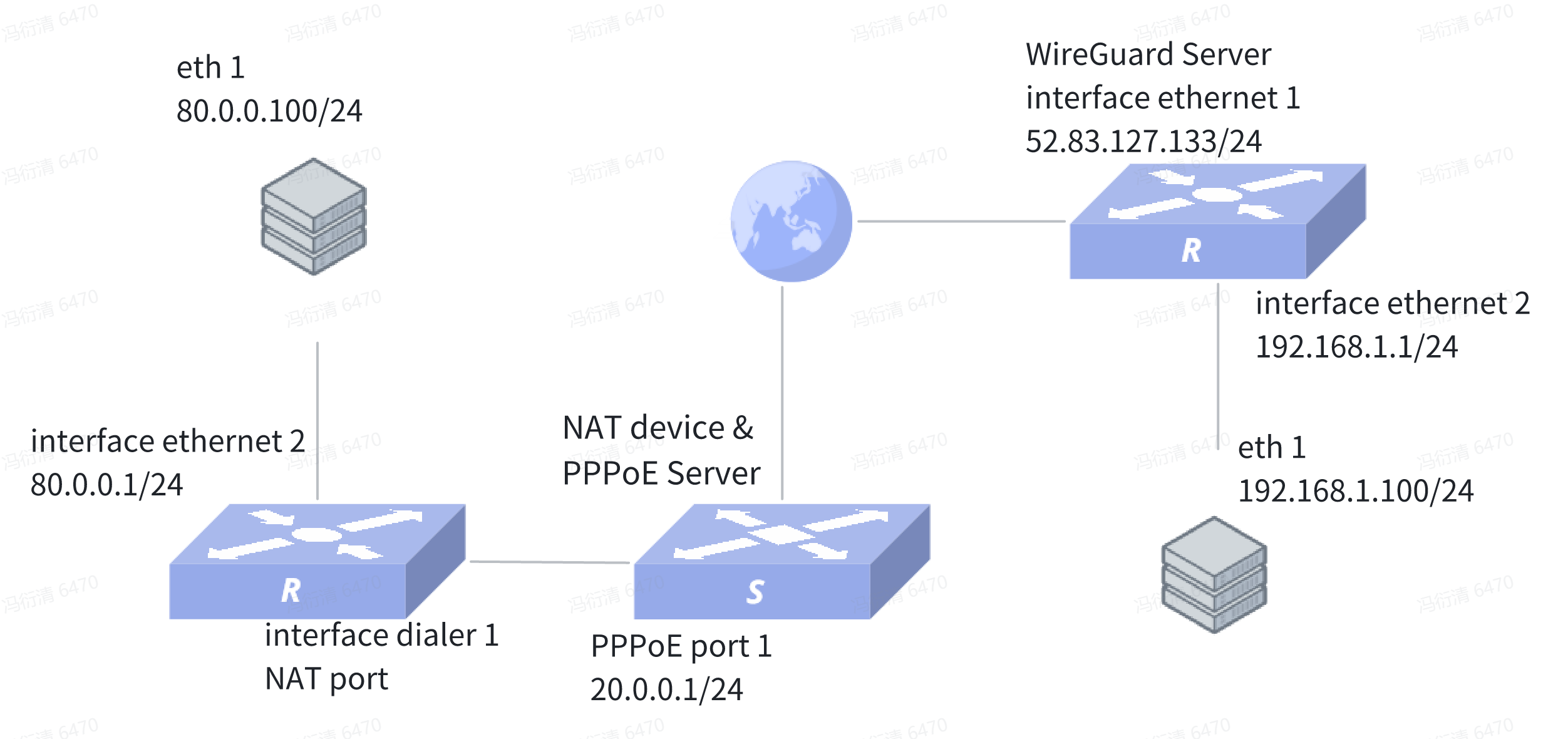
The enterprise seeks to secure traffic exchanged between branch subnets and the headquarters subnet. Since communication between branches and headquarters occurs over the public internet, establishing a WireGuard tunnel between the branch gateway and headquarters gateway can implement this security measure. Because the branch gateway obtains its IP address as a PPPoE client and enables NAT translation, the headquarters cannot obtain its IP address. Consequently, the headquarters gateway can only respond to WireGuard handshakes initiated by the branch gateway.
Procedure
sonic(config)# interface ethernet 2sonic(config-if-2)# acl testsonic(config-if-2)# ip address 80.0.0.1/24sonic(config)# interface ethernet 1sonic(config-if-1)# pppoe-client 1sonic(config)# access-list L3 test ingresssonic(config)# rule 1 dst-ip 192.168.1.0/24 packet-action permitsonic(config)# wireguard 1sonic(config-wireguard-1)# ip4 listen_port 51829 private_key IEJulvrfW8bSR6SOKbhUO0mma4QBvntGnU+9LStDS3M= intf_addr 172.16.20.22/24sonic(config-wireguard-1)# nat-zone 1sonic(config-wireguard-1)# peer ip4 public_key tD2JTqg8nkzZXDx1wQyE5eoHi/AvRdUwkpfJzRP5OVE= endpoint_ip 52.83.127.133 endpoint_port 54321sonic(config-wireguard-1)# peer public_key tD2JTqg8nkzZXDx1wQyE5eoHi/AvRdUwkpfJzRP5OVE= allowed_ip 172.16.20.0/24,192.168.1.0/24sonic(config)# nat enablesonic(config)# nat pool pool1 172.16.20.22sonic(config)# nat binding test1 pool1 testsonic(config)# interface dialer 1sonic(config-dialerif-1)# ppp chap username test1 test123sonic(config-dialerif-1)# nat-zone 1sonic(config)# ip route 52.83.127.0/24 dialer 1sonic(config)# ip route 192.168.1.0/24 172.16.20.22 wg 1