
GeoSite&GeoIP-VPP Case
此内容尚不支持你的语言。
This guide provides a step-by-step tutorial for configuring Application-Aware Routing and Security Compliance policies using the GeoSite/GeoIP capabilities of the Asterfusion ET2500 Open Intelligent Gateway running AsterNOS-VPP.
What This Guide Will Accomplish
Section titled “What This Guide Will Accomplish”By following this guide, you will upgrade a basic routed network into an intelligent, application-aware gateway. Unlike traditional Layer 3 routing based solely on IP addresses, this guide demonstrates how to route and filter traffic based on Domain Names (GeoSite) and Geographic Location (GeoIP).
The scenarios covered are:
- Smart Traffic Steering (App-Aware Routing): Configuring the gateway to intelligently identify “Office/SaaS” traffic (e.g., Google) and route it through a dedicated Premium Line, while keeping general traffic on the standard ISP Line.
- Security Compliance (GeoIP & Filtering): Implementing security policies to block employee access to “Gaming/Gambling” categories and restricting internal server access to domestic IP addresses only.
***## Phase 1: Preparation and Environmental Overview
Network Topology Plan
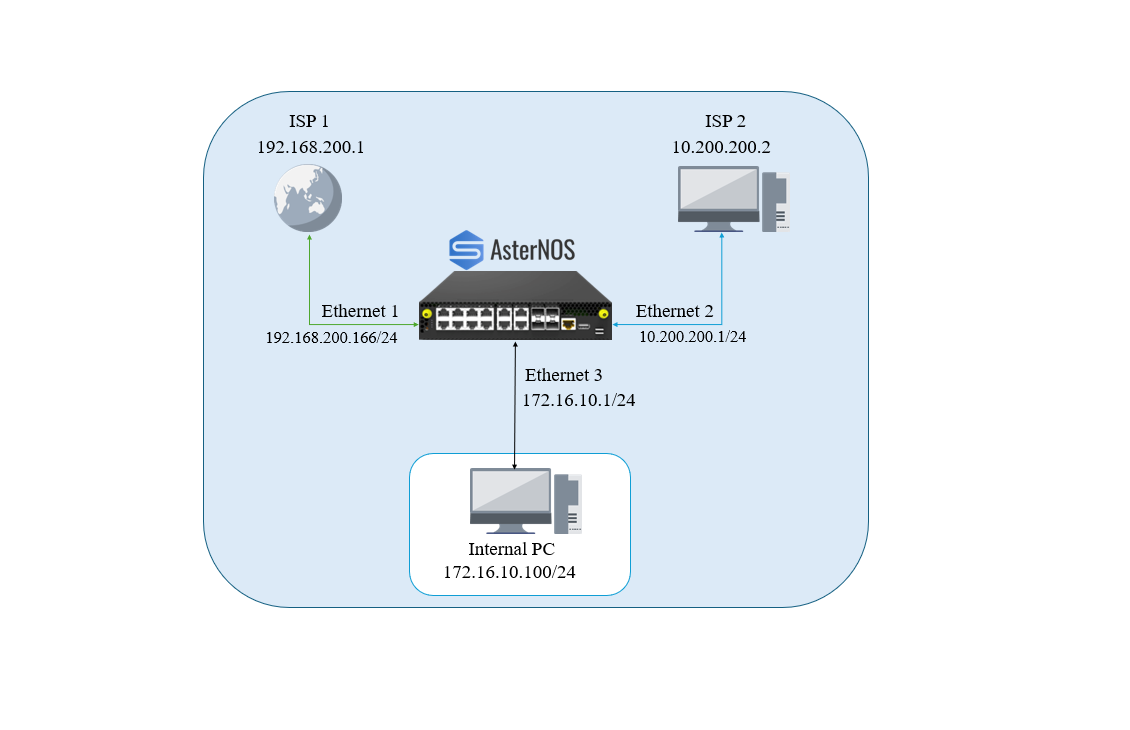
Section titled “Network Topology Plan”We will utilize the following interfaces to simulate a dual-uplink enterprise environment based on your current lab setup. We use a secondary laptop to simulate the “Premium” gateway for verification purposes.
-** Ethernet 1 (WAN 1 - ISP):** The standard internet connection (connected to upstream switch). -** Ethernet 2 (WAN 2 - Premium):** A simulated low-latency line. We will connect a** Laptop here to act as the traffic destination/analyzer. - Ethernet 3 (LAN):** The internal user network.
Target Configuration Plan
Section titled “Target Configuration Plan”The following table outlines the IP addressing scheme we will implement:
| ** Device / Interface ** | ** IP Address / Subnet ** | ** Gateway ** | ** Role ** |
|---|---|---|---|
| ** AsterNOS (Eth1)** | 192.168.200.166/24 | 192.168.200.1 | ** WAN - ISP Line **(Default Internet Access) |
| ** AsterNOS (Eth2)** | 10.200.200.1/24 | 10.200.200.2* | WAN - Premium Line |
| (Simulated Path for Baidu traffic) | |||
| AsterNOS (Eth3) | 172.16.10.1/24 | N/A | LAN Gateway |
| (Internal User Gateway) | |||
| Laptop (Eth2) | 10.200.200.2/24 | N/A | Traffic Analyzer |
| (Simulates Premium GW) | |||
| Internal PC | 172.16.10.100/24 | 172.16.10.1 | Internal User |
Required Tools
Section titled “Required Tools”- Wireshark: Installed on the Laptop (Eth2) to verify traffic steering.
- Ping / Browser: On the Internal PC to generate traffic.
***## Phase 2: Building the Basic Network
In this phase, we establish the physical connectivity and basic NAT services. We will configure** Ethernet 1** as the ISP link and** Ethernet 2** as the Premium link. Both interfaces will have NAT enabled to ensure internal users can communicate correctly with external networks (or our simulated probe).
Configuration Steps
Section titled “Configuration Steps”Step 1: Configure LAN Interface (Ethernet 3)
Section titled “Step 1: Configure LAN Interface (Ethernet 3)”Configure the interface connecting to your internal test PC.
sonic# configure terminal # Configure LAN Gatewaysonic(config)# interface ethernet 3sonic(config-if-3)# ip address 172.16.10.1/24sonic(config-if-3)# no shutdownsonic(config-if-3)# exitStep 2: Configure WAN Interfaces (ISP & Premium)
Section titled “Step 2: Configure WAN Interfaces (ISP & Premium)”We configure both WAN interfaces with their respective subnets and enable** NAT Zone 1** on both to support outbound address translation.
Configure WAN 1 (ISP Line)sonic(config)# interface ethernet 1sonic(config-if-1)# ip address 192.168.200.166/24sonic(config-if-1)# nat-zone 1sonic(config-if-1)# no shutdownsonic(config-if-1)# exit # Configure WAN 2 (Premium Line / Simulation)Connect your Laptop here (Static IP: 10.200.200.2)sonic(config)# interface ethernet 2sonic(config-if-2)# ip address 10.200.200.1/24sonic(config-if-2)# nat-zone 1sonic(config-if-2)# no shutdownsonic(config-if-2)# exitStep 3: Configure Routing and NAT Rules
Section titled “Step 3: Configure Routing and NAT Rules”We set the default route to the ISP and define NAT pools for** both **uplinks. This ensures that whichever path traffic takes (steered by PBR or Default), it gets a valid source IP.
1. Default Route (Traffic defaults to ISP)sonic(config)# ip route 0.0.0.0/0 192.168.200.1 # 2. Enable Global NATsonic(config)# nat enable # 3. Define NAT Pools # Pool for ISP Line (matches Eth1 IP)sonic(config)# nat pool ISP_POOL 192.168.200.166 # Pool for Premium Line (matches Eth2 IP)sonic(config)# nat pool PREMIUM_POOL 10.200.200.1 # 4. Bind NAT Pools to the RuleBind for ISP pathsonic(config)# nat binding SNAT_ISP ISP_POOL # Bind for Premium path (Traffic steered here will use this pool)sonic(config)# nat binding SNAT_PREMIUM PREMIUM_POOL```***
## Phase 3: Smart Traffic Steering (PBR)
We will now configure Policy Based Routing (PBR) to intelligently hijack **Baidu** traffic and force it through the **Premium Line** (Ethernet 2).
## Configuration Steps
### Step 1: Configure PBR for Smart Steering
We define the policy map.
:::note*We include *`match src-ip 0.0.0.0/0`* to satisfy the flow key requirement, combined with *`geosite BAIDU`* for application identification.*:::
```bashsonic# configure terminal # Create PBR Map matching Baidusonic(config)# pbr-map SMART_STEER seq 10 # Base Match: All Source IPs (Required for flow key)sonic(config-pbr-map)# match src-ip 0.0.0.0/0 # Application Match: Specific Domain Categorysonic(config-pbr-map)# geosite BAIDU # Action: Force Next-Hop to Premium Gateway (Laptop)sonic(config-pbr-map)# set nexthop 10.200.200.2sonic(config-pbr-map)# exit
Step 2: Apply Policy to LAN Interface
Section titled “Step 2: Apply Policy to LAN Interface”Bind the PBR policy to the interface where traffic enters the gateway (Ethernet 3).
sonic(config)# interface ethernet 3sonic(config-if-3)# pbr-policy SMART_STEERsonic(config-if-3)# exit # Save Configurationsonic(config)# exitsonic# write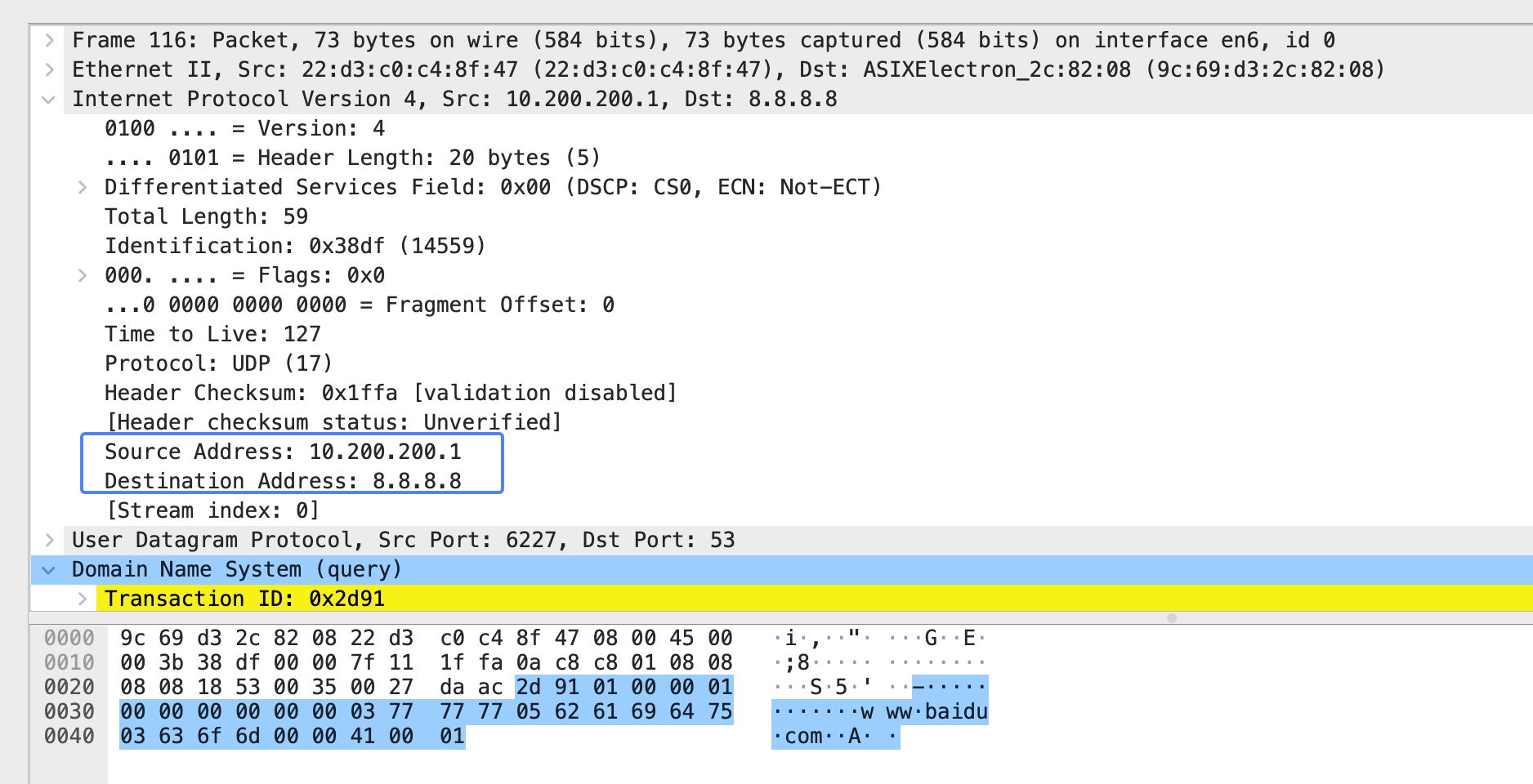
***## Phase 4: Security Compliance (ACL + GeoIP)
In this phase, we will shift focus from routing to security. We will deploy an Access Control List (ACL) to block access to specific content categories and restrict traffic based on geographic location.
Prerequisites: Clean Up PBR Policy
Section titled “Prerequisites: Clean Up PBR Policy”Before applying the new security policies, we must remove the PBR policy configured in Phase 3 to ensure a clean testing environment and avoid policy conflicts.
sonic(config)# interface ethernet 3 # Remove the PBR policy from the LAN interfacesonic(config-if-3)# no pbr-policy SMART_STEERsonic(config-if-3)# exitConfiguration Steps
Section titled “Configuration Steps”Step 1: Create Security ACL
Section titled “Step 1: Create Security ACL”We define an ACL named SECURE_ACL applied in the inbound direction.
-** Rule 10:** Blocks all websites classified as “Media” (e.g., BBC, CNN). -** Rule20:** Blocks all IP addresses located in China (CN).
- Default Behavior: Traffic not matching these rules will be permitted by default.
Create the IPv4 Layer 3 ACLsonic(config)# access-list L3 SECURE_ACL ingress # Rule 10: Block Media Applications (e.g., CNN)We use the GeoSite category 'CATEGORY-MEDIA'sonic(config-l3-acl-SECURE_ACL)# rule 10 geosite CATEGORY-MEDIA packet-action deny # Rule 20: Deny Domestic Traffic (GeoIP: China)We use the GeoIP code 'CN'sonic(config-l3-acl-SECURE_ACL)# rule 20 geoip CN packet-action denysonic(config-l3-acl-SECURE_ACL)# exitStep 2: Apply ACL to LAN Interface
Section titled “Step 2: Apply ACL to LAN Interface”We apply this security policy to the LAN interface. Crucially, we also update the NAT binding. We will replace the global NAT binding with an ACL-based NAT binding. This ensures that only traffic permitted by SECURE_ACL is translated and allowed to access the Internet.
sonic(config)# interface ethernet 3sonic(config-if-3)# acl SECURE_ACLsonic(config-if-3)# exit
sonic(config)# no nat binding SNAT_ISPsonic(config)# nat binding SECURE_BIND ISP_POOL SECURE_ACL
Step 3: Save Configuration
Section titled “Step 3: Save Configuration”sonic(config)# exitsonic# writeVerification (Phase 4)1. Verify Media Block - Action: On the Internal PC, try to access an international media site (e.g., www.cnn.com).
Section titled “Verification (Phase 4)1. Verify Media Block - Action: On the Internal PC, try to access an international media site (e.g., www.cnn.com).”-** Result:** The connection should fail/timeout. -** CLI Validation:** Check the counters to see Rule 10 incrementing.
sonic# show counters acl```**2. Verify GeoIP Permit **-** Action:** Access a China website (e.g., `www.baidu.com`).-** Result:** The connection should fail/timeout (matches Rule 20 Deny).**3. Verify Normal Access **-** Action:** Try to access a non-media, non-CN site (e.g., a US-based technical site like [`www.gnu.org`](http://www.gnu.org) or `stackoverflow.com`).-** Result:** Access successful. The traffic does not match Rule 10 or 20, so it is permitted and successfully NATed.
##****Conclusion
You have successfully transformed the AsterNOS gateway into an intelligent, application-aware edge device.
-** Routing:** Traffic is steered based on Application Identity (Google -> Premium Line) using PBR.-** Security:** Traffic is filtered based on Content Category (Games) and Geography (CN) using ACLs.