
NAT Configuration Guide
Introduction
Section titled “Introduction”NAT (Network Address Translation) is a technology that maps one IP address space to another and is primarily used to allow multiple internal network devices to share fewer public IP addresses to communicate with external networks when existing IP address resources are limited.
Basic Concepts and Principles
Section titled “Basic Concepts and Principles”A Network Address Translation (NAT) device, often a router or firewall, has an internal interface to the internal network and an external interface to an external network, such as the Internet. When a device on the internal network sends a packet out, the NAT device replaces the internal source IP address in the packet with one of its own external IP addresses, and records this translation relationship in the NAT table. When an external network device receives a packet and returns a response, the NAT device restores the destination IP address to the IP address of the internal device that originally initiated the request according to the records in the NAT table, thus forwarding the response packet to the internal device.
- Static NAT: This type maps an internal IP address to a fixed external IP address at all times. It is typically used in scenarios where you need to provide fixed accessibility for an internal server on an external network. For example, a company with an internal web server can use static NAT to make it accessible from the outside with a fixed public IP address on the Internet.
- Dynamic NAT: Dynamic NAT maintains a pool of available external IP addresses from which internal devices are dynamically assigned an external IP address for address translation when they need to access the external network. When used, the external IP address is released back into the address pool for use by other internal devices.
- Port Address Translation (PAT): Also known as NAPT (Network Address Port Translation), PAT is the most commonly used NAT technology. It translates not only IP addresses, but also port numbers (TCP or UDP ports). Multiple internal devices can share one or a few external IP addresses, distinguished by different port numbers on the NAT device. For example, if there are multiple devices on an internal network that need to access the Internet, PAT can use a single public IP address to establish a communication link for each device through a different port number, enabling “many-to-one” IP address translation.
NAT Configuration
Section titled “NAT Configuration”Configure Port Domains
Section titled “Configure Port Domains”| Operation | Command | Description |
|---|---|---|
| Enter the system configuration view | configure terminal | - |
| Enter the interface configuration view | interface type interface-number | Type has ethernat, vlan, lag, loopback,sub-ethernet |
| Enable port nat output | nat-zone 1 | |
| Disable port nat output | no nat-zone |
Configure the nat function
Section titled “Configure the nat function”| Operation | Command | Description |
|---|---|---|
| Enter the system configuration view | configure terminal | - |
| Enable nat function | nat enable | |
| Disable nat function | no nat enable | |
| Configure static nat | nat static basic global_ip local_ip type | Global_ip is public network address, local_ip is private network address, and the type has snat and dnat. |
| Delete static nat | no nat static basic global_ip local_ip type | |
| Configure static napt | nat static {tcp|udp} global_ip global_port local_ip local_port type | Global_port is public network port, local_port is private network port. |
| Delete static napt | no nat static {tcp|udp} global_ip global_port local_ip local_port | |
| Configure a dynamic nat address pool | nat pool pool_name start_ip [end_ip] | Pool_name is the name of nat address pool, start_ip is the start ip of nat address pool, end_ip is the end ip of nat address pool, Configuring only start_ip means using a single address. |
| Delete a dynamic nat address pool | no nat pool pool_name | |
| Configure a binding dynamic address pool | nat binding binding_name pool_name [acl_name] | Binding_name is the name of bind operation, pool_name if the name of nat address pool, acl_name is the name of acl name. |
| Delete a binding dynamic address pool | no nat binding binding_name |
Display and Maintenance
Section titled “Display and Maintenance”| Operation | Command | Description |
|---|---|---|
| Display nat config infomation | show nat config | - |
| Display nat translations | show nat translations | |
| Display nat translations count | show nat translations_count | |
| Display nat statistics | show nat statistics |
Static nat Typical Scenario Configuration Example
Section titled “Static nat Typical Scenario Configuration Example”Network requirements
The IP address of the router’s outgoing interface 2 is 2.2.2.2/24 and the gateway address on the LAN side is 192.168.0.1/24. The address at the opposite end on the carrier side is 2.2.2.1/24. The host’s intranet address is 192.168.0.2/24 and a static address of 2.2.2.3/24 must be used. The company must be able to convert the private address internally to a public address for connection to the WAN.

Procedure
1.Router configuration
# Configure the port ip address and set port 2 as the nat conversion output port
sonic(config)# interface ethernet 1sonic(config-if-1)# ip address 192.168.0.1/24sonic(config-if-1)# exitsonic(config)# interface ethernet 2sonic(config-if-2)# ip address 2.2.2.2/24sonic(config-if-2)# nat-zone 1# Configure static routes
sonic(config)# ip route 0.0.0.0/0 2.2.2.1# Configure static nat
sonic(config)# nat enablesonic(config)# nat static basic 2.2.2.3 192.168.0.1 snatVerify configuration
sonic(config)# do show nat configGlobal ValuesAdmin Mode : enabledGlobal Timeout : 600 secsTCP Timeout : 86400 secsUDP Timeout : 300 secsStatic EntriesNat Type IP Protocol Global IP Global Port Local IP Local Port Twice-NAT Id---------- ------------- ----------- ------------- ----------- ------------ ---------------snat all 2.2.2.3 --- 192.168.0.1 --- ---Pool EntriesPool Name Global IP Range Global Port Range----------- ----------------- -------------------NAT BindingsBinding Name Pool Name Access-List Nat Type Twice-NAT Id-------------- ----------- ------------- ---------- --------------NAT ZonesPort Zone---------- ------Ethernet1 0Ethernet2 1sonic(config)# do show nat translationsStatic NAT Entries ..................... 2Static NAPT Entries ..................... 0Dynamic NAT Entries ..................... 0Dynamic NAPT Entries ..................... 0Static Twice NAT Entries ..................... 0Static Twice NAPT Entries ..................... 0Dynamic Twice NAT Entries ..................... 0Dynamic Twice NAPT Entries ..................... 0Total SNAT/SNAPT Entries ..................... 1Total DNAT/DNAPT Entries ..................... 1Total Entries ..................... 2Protocol Source Destination Translated Source Translated Destination---------- ----------- ------------- ------------------- ------------------------all --- 2.2.2.3 --- 192.168.0.1all 192.168.0.1 --- 2.2.2.3 ---sonic(config)# do show nat statisticsProtocol Source Destination Packets Bytes---------- ----------- ------------- --------- -------all --- 2.2.2.3 0 0all 192.168.0.1 --- 0 0Dynamic nat Typical Scenario Configuration Example
Section titled “Dynamic nat Typical Scenario Configuration Example”Network requirements
The users of a company’s private network are connected to the Internet, and interface 3 on the router has a public address of 2.2.2.2/24 and a carrier-side address of 2.2.2.1/24. The users want to use addresses in the public address pool (2.2.2.100 to 2.2.2.200) to replace the internal host address (segment 192.168.20.0/24) with NAT to access the Internet.
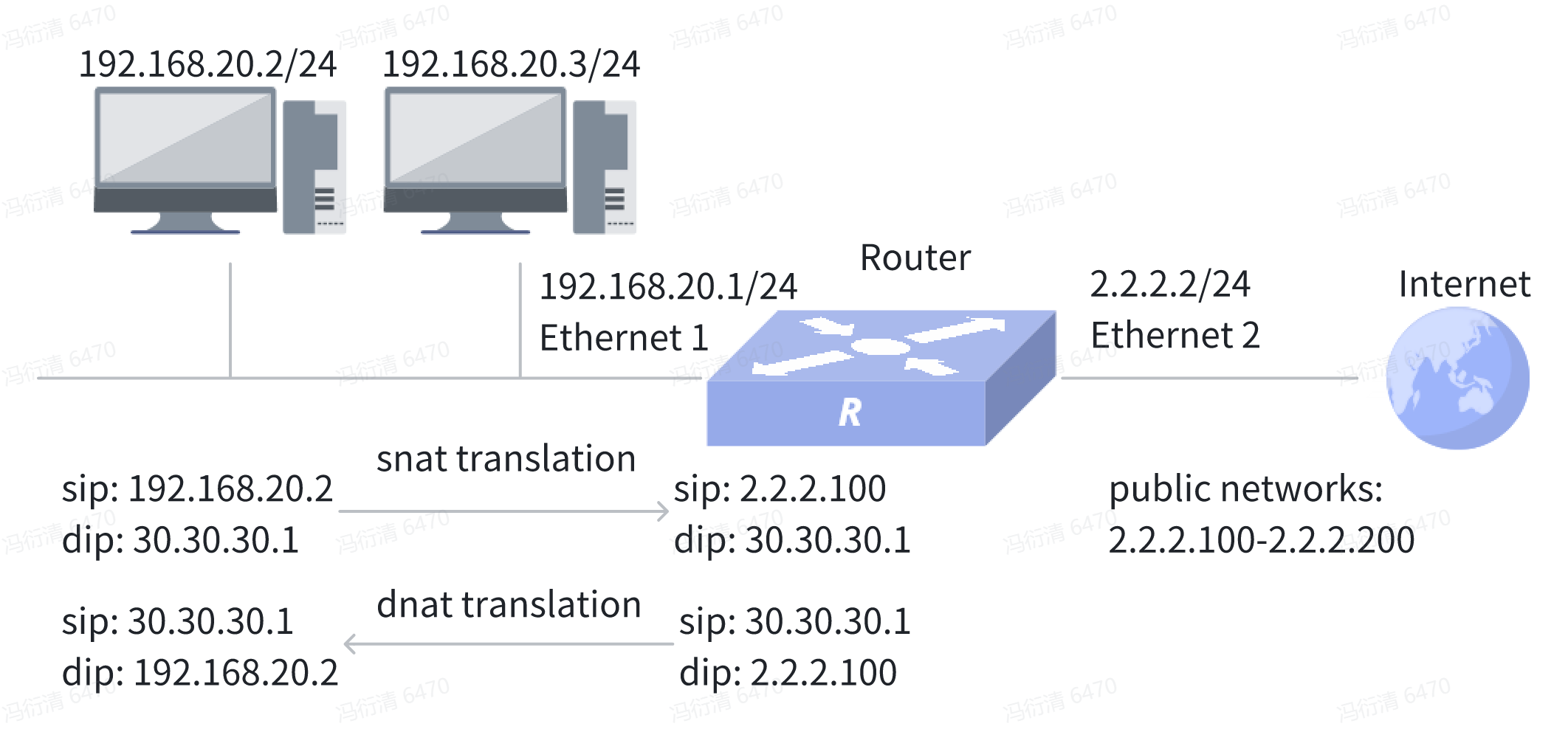
Procedure
1.Router configuration
# Configure the port ip address and set port 2 as the nat conversion output port
sonic(config)# interface ethernet 1sonic(config-if-1)# ip address 192.168.20.1/24sonic(config-if-1)# exitsonic(config)# interface ethernet 2sonic(config-if-2)# ip address 2.2.2.2/24sonic(config-if-2)# nat-zone 1# Configure static routes
sonic(config)# ip route 0.0.0.0/0 2.2.2.1# Configure dynamic nat
sonic(config)# nat enablesonic(config)# nat pool nat_pool 2.2.2.100 2.2.2.200sonic(config)# nat binding test nat_poolVerify configuration
sonic(config)# do show nat configGlobal ValuesAdmin Mode : enabledGlobal Timeout : 600 secsTCP Timeout : 86400 secsUDP Timeout : 300 secsStatic EntriesNat Type IP Protocol Global IP Global Port Local IP Local Port Twice-NAT Id---------- ------------- ----------- ------------- ---------- ------------ ---------------Pool EntriesPool Name Global IP Range Global Port Range----------- ------------------- -------------------nat_pool 2.2.2.100-2.2.2.200 1024-65534NAT BindingsBinding Name Pool Name Access-List Nat Type Twice-NAT Id-------------- ----------- ------------- ---------- --------------test nat_pool snat ---NAT ZonesPort Zone---------- ------Ethernet1 0Ethernet2 1sonic(config)# do show nat translationsStatic NAT Entries ..................... 0Static NAPT Entries ..................... 0Dynamic NAT Entries ..................... 0Dynamic NAPT Entries ..................... 0Static Twice NAT Entries ..................... 0Static Twice NAPT Entries ..................... 0Dynamic Twice NAT Entries ..................... 0Dynamic Twice NAPT Entries ..................... 0Total SNAT/SNAPT Entries ..................... 0Total DNAT/DNAPT Entries ..................... 0Total Entries ..................... 0Protocol Source Destination Translated Source Translated Destination---------- -------- ------------- ------------------- ------------------------tcp --- 2.2.2.100 --- 192.168.20.2tcp 192.168.20.2 --- 2.2.2.100 ---sonic(config)# do show nat statisticsProtocol Source Destination Packets Bytes---------- ----------- ------------- --------- -------tcp --- 2.2.2.100 0 0tcp 192.168.20.2 --- 0 0