
ACL Configuration Guide
Introduction
Section titled “Introduction”Communication between information points and internal and external networks are essential business requirements in enterprise network. In order to ensure the security of the intranet, security policy is needed to ensure that unauthorized users can only access specific network resources. ACL (Access Control List) is packet processing policy consisting of a series of rules, which are generally judgment statements describing the matching conditions of packets, such as the source MAC, destination MAC, source IP, destination IP, source port number, destination port number, etc. The switch filters packets based on these rules. After configuring ACL rules, the switch will allow certain packets to pass and block certain packets to achieve the purpose of access control and traffic filtering. In short, ACL as a network technology means to control access, improve the security of the network environment and the reliability of network transmission.
Basic Concepts
Section titled “Basic Concepts”ACL Table
Section titled “ACL Table”ACL table is port specific. Binding ports means that the ACL table is valid for traffic on those ports. A single ACL table can bind multiple ports, and multiple ACL tables can exist on a single port, i.e. a “many-to-many” relationship.
ACL table naming rule
The ACL tables’ name is supposed to be different.
ACL table type
ACL table type affects the match fields of the ACL, in other words, determines which characteristics are used to match traffic. ACL table type is available as L2, L3, L3v6, MIRROR, MIRRORv6, FLOW_CONTROL. In particular, FLOW_CONTROL is used as a special ACL table type in combination with the traffic behavior module for the speed-limiting of specific flows.
ACL table direction
The ACL table stage indicates the direction, optionally ingress and egress, which corresponds to whether the ACL table is applied to the ingress or egress direction respectively. If stage is not specified, the default is ingress. Currently, the same ACL table does not support matching in both the ingress and egress directions. For the CX family, the matches available in different directions are different. The ACL match fields in the ingress direction are not available in the egress direction, and there are fewer types of match fields for egress than for ingress. See ACL rule match fields for a detailed description of the match fields.
ACL Rule
Section titled “ACL Rule”ACL rule is table-specific rule that defines the priority of the rule, the matching conditions and the action to be taken if the match is successful. An ACL rule can only be added to one table, but a table can have multiple rules, i.e. the rule and the table are in a “many-to-one” relationship. The match field of an ACL rule must match the match field of the table in which it is located, and cannot exceed the match field defined by the table.
ACL rule naming rule
The ACL rules’ name is supposed to be different.
ACL rule priority
Priority indicates the priority of rule, the higher the value, the higher the priority, and is specified to be less than 500. Priority is used to match the highest priority rule when there are multiple rules to match. The same table does not allow rules of the same priority to be configured.
ACL rule action
-Ingress
Table 1 ACL rule ingress action
| Action | Key words | Description |
|---|---|---|
| Basic actions | packet_action | Optional permit|deny|drop|trap-to-cpu|copy-to-cpu, permit means forward; deny means the packet is not forwarded but can be normally trapped; drop means the packet is neither forwarded nor trapped; trap-to-cpu means the packet is only sent to the CPU without forwarding; copy means the packet is sent to the CPU and also forwarded. |
| Modify DSCP | set_dscp | Modify the packet dscp value, range 0-63 |
| Modify PCP | set_pcp | Modify the packet pcp value, range 0-7 |
| Modify TC | set_tc | Modify the tc value, range 0-7, generally used in conjunction with forcing modification of the packet DSCP ingress. |
| Redirection | redirect_action | Redirect, which support redirecting to an interface or to the next hop, are available in the following forms.Interface name, e.g. “Ethernet10”.Lag name, e.g. “PortChannel0005”.The global IP of the next hop, e.g. “10.0.0.1”.The IP and VRF of the next hop, e.g. “10.0.0.2@Vnet2”.The IP and interface name of the next hop, e.g. “10.0.0.3@Ethernet1”.Next hop group, e.g. “10.0.0.1,10.0.0.3@Ethernet1” |
| Traffic behavior | traffic-behavior | ACLs and traffic behavior are used to limit the speed of specific traffic on a port. |
-Egress
Table 2 ACL rule egress action
| Action | Key words | Description |
|---|---|---|
| Basic actions | packet_action | Optional permit|deny, forward means forward, permit means forward; deny means the packet is not forwarded. |
| Modify DSCP | set_dscp | Modify the packet dscp value, range 0-63 |
| Modify PCP | set_pcp | Modify the packet pcp value, range 0-7 |
ACL rule match fields
The supported match fields for different types of ACL tables vary, and the specific match fields for each type of ACL table are described below.
-L2 match fields
Table 3 L2 Keywords
| Key words | Description of parameters | Notes |
|---|---|---|
| vlan-pri | 3-bit VLAN priority value, range 0-7 | - |
| ethernet-type | 16-bit Ethernet type value, HEX<0-FFFF>, for example 0800 | Supported only in the ingress direction. |
| outer-vlan | VLAN ID value, supports mask: vlan-id(1-4094)/mask(0x01-0x0fff) or vlan-id(1-4094). | - |
| source-mac | Source MAC, supports mask: HH:HH:HH:HH:HH:HH or HH:HH:HH:HH:HH:HH/mask(HH:HH:HH:HH:HH:HH) | Supported only in the ingress direction. |
| destination-mac | Destination MAC, supports mask: HH:HH:HH:HH:HH:HH or HH:HH:HH:HH:HH:HH/mask(HH:HH:HH:HH:HH:HH) | Supported only in the ingress direction. |
-L3 match fields
Table 4 L3 Keywords
| Key words | Description of parameters | Notes |
|---|---|---|
| ethernet-type | 16-bit Ethernet type value, HEX<0-FFFF>, for example 0800 | Supported only in the ingress direction. |
| outer-vlan | VLAN ID value, supports mask: vlan-id(1-4094)/mask(0x01-0x0fff) or vlan-id(1-4094). | - |
| ip-type | IP packtet type, optional any|ip|non_ip|ipv4any|non_ipv4|ipv6any|non_ipv6|arp|arp_request|arp_reply. | Not supported on CX308P-48Y-N-V2 and CX532P-N-V2; supported on other device models. |
| ip-protocol | 8-bit IP protocol value, range 0-255 | - |
| tcp-flags | tcp_flag value, range 0-63 | - |
| source-ip | Source IPv4 address (can with prefix), e.g. “10.1.1.1/24” | - |
| destination-ip | Destination IPv4 address (can with prefix), e.g. “10.1.1.1/24” | - |
| icmp-type | 8-bit icmp type value, range 0-16 | - |
| icmp-code | 8-bit icmp code value, range 0-5 | - |
| source-port | source port,range 0-65535 | - |
| destination-port | destination port,range 0-65535 | - |
| dscp | Value of Dscp, range 0-63 | - |
| ip-precedence | IP Precedence value, range 0-7 | - |
| ecn | The value of ecn, in the range 0-3 | - |
| vlan-pri | vlan priority, range0-7 | - |
| vxlan-vni | VXLAN VNI, range 1-16777215 | Supported only in the ingress direction. |
-L3v6 match fields
Table 5 L3v6 Keywords
| Key words | Description of parameters | Notes |
|---|---|---|
| ip-protocol | 8-bit IP protocol value, range 0-255 | Supported only in the ingress direction. |
| source-ipv6 | Source IPv6 address (can with prefix), e.g. “2001::1/128” | - |
| destination-ipv6 | Destination IPv6 address (can with prefix), e.g. “2001::1/96” | - |
| icmpv6-type | 8-bit icmpv6 type value, range 1-137 | Supported only in the ingress direction. |
| icmpv6-code | 8-bit icmpv6 code value, range 0-4 | Supported only in the ingress direction. |
| source-port | source port,range 0-65535 | Supported on CX308P-48Y-N-V2 and CX532P-N-V2; not supported on other device models. |
| destination-port | destination port,range 0-65535 | Supported on CX308P-48Y-N-V2 and CX532P-N-V2; not supported on other device models. |
-MIRROR match fields
Table 6 MIRROR Keywords
| Key words | Description of parameters | Notes |
|---|---|---|
| in-ports | Ingress traffic interface; multiple interfaces separated by commas. | Supported only in the ingress direction. |
| outer-vlan | VLAN ID value, supports mask: vlan-id(1-4094)/mask(0x01-0x0fff) or vlan-id(1-4094). | - |
| ip-type | IP packtet type, optional any|ip|non_ip|ipv4any|non_ipv4|ipv6any|non_ipv6|arp|arp_request|arp_reply. | - |
| tcp-flags | tcp_flag value, range 0-63 | - |
| source-ip | IP address range with prefix, e.g. “1.1.1.1/32” | - |
| destination-ip | IP address range with prefix, e.g. “1.1.1.0/24” | - |
| icmp-type | 8-bit icmp type value, range 0-16 | - |
| icmp-code | 8-bit icmp code value, range 0-5 | - |
| source-port | source port,range 0-65535 | - |
| destination-port | destination port,range 0-65535 | - |
| dscp | Value of Dscp, range 0-63. | - |
| ip-precedence | IP Precedence value, range 0-7 | - |
| bth-opcode | Value of bth-opcode, range 0-255 | Not supported on CX308P-48Y-N-V2 and CX532P-N-V2; supported on other device models. |
| aeth_syndrome | aeth_syndrome value, supports mask, aeth_syndrome(0-255)/mask(0x01-0xff) or aeth_syndrome(0-255) | Not supported on CX308P-48Y-N-V2 and CX532P-N-V2; supported on other device models. |
-MIRRORv6 match fields
Table 7 MIRRORv6 keywords
| Key words | Description of parameters | Notes |
|---|---|---|
| source-ipv6 | Source IPv6 address (can with prefix), e.g. “2001::1/128” | - |
| destination-ipv6 | Destination IPv6 address (can with prefix), e.g. “2001::1/96” | - |
| bth-opcode | Value of bth-opcode, range 0-255 | Not supported on CX308P-48Y-N-V2 and CX532P-N-V2; supported on other device models. |
| aeth_syndrome | eth_syndrome value, supports mask, aeth_syndrome(0-255)/mask(0x01-0xff) or aeth_syndrome(0-255) | Not supported on CX308P-48Y-N-V2 and CX532P-N-V2; supported on other device models. |
-Flow Control match fields
Table 8 Flow Control Keywords
| Key words | Description of parameters | Notes |
|---|---|---|
| in-ports | List of bound interfaces, multiple interfaces separated by commas | Supported only in the ingress direction. |
| out-ports | List of bound interfaces, multiple interfaces separated by commas | Supported only in the egress direction. |
| source -mac | Source MAC, supports mask: HH:HH:HH:HH:HH:HH or HH:HH:HH:HH:HH:HH/mask(HH:HH:HH:HH:HH:HH) | Supported only in the ingress direction. |
| destination-mac | Destination MAC, supports mask: HH:HH:HH:HH:HH:HH or HH:HH:HH:HH:HH:HH/mask(HH:HH:HH:HH:HH:HH) | Supported only in the ingress direction. |
| outer-vlan | VLAN ID value, supports mask: vlan-id(1-4094)/mask(0x01-0x0fff) or vlan-id(1-4094). | Supported only in the ingress direction. |
| ip-protocol | 8-bit IP protocol value, range 0-255 | - |
| source-ip | Source IPv4 address (can with prefix), e.g. “10.1.1.1/24” | - |
| destination-ip | Destination IPv4 address (can with prefix), e.g. “10.1.1.1/24” | - |
| source-port | source port,range 0-65535 | - |
| destination-port | destination port,range 0-65535 | - |
| vxlan-vni | VXLAN VNI, range 1-16777215 | Supported only in the ingress direction. |
ACL Configuration
Section titled “ACL Configuration”Configure L2 ACL Table
Section titled “Configure L2 ACL Table”Table 9 Configure L2 ACL Table
| Purpose | Commands | Description |
|---|---|---|
| Enter global configuration view. | configure terminal | - |
| Create an ACL table and enter the configuration view. | access-list table_name l2 {ingress|egress} | - |
| Apply the ACL table to the interface. | bind interface {ethernet interface-name|link-aggregation lag-id|all} | all: Binds to all interfaces. |
| Create an ACL rule. | rule rule-id [rule_options] action_options | rule-id also indicates the priority level, in the range 0-500. rule_options: see ACL rule match fields for details. action_options: see ACL rule action for details. |
Configure L3 ACL Table
Section titled “Configure L3 ACL Table”Table 10 Configure L3 ACL Table
| Purpose | Commands | Description |
|---|---|---|
| Enter global configuration view. | configure terminal | - |
| Create an ACL table and enter the configuration view. | access-list table_name l3 {ingress|egress} | - |
| Apply the ACL table to the interface. | bind interface {ethernet interface-name|link-aggregation lag-id|all} | all: Binds to all interfaces. |
| Create an ACL rule. | rule rule-id [rule_options] action_options | rule-id also indicates the priority level, in the range 0-500. rule_options: see ACL rule match fields for details. action_options: see ACL rule action for details. |
Configure L3v6 ACL Table
Section titled “Configure L3v6 ACL Table”Table 11 Configure L3v6 ACL Table
| Purpose | Commands | Description |
|---|---|---|
| Enter global configuration view. | configure terminal | - |
| Create an ACL table and enter the configuration view. | access-list table_name l3v6 {ingress|egress} | - |
| Apply the ACL table to the interface. | bind interface {ethernet interface-name|link-aggregation lag-id|all} | all: Binds to all interfaces. |
| Create an ACL rule. | rule rule-id [rule_options] action_options | rule-id also indicates the priority level, in the range 0-500. rule_options: see ACL rule match fields for details. action_options: see ACL rule action for details. |
Configure ACL redirection
Section titled “Configure ACL redirection”ACL redirection can be configured to a specified interface, next hop, or next hop group.
Table 12 Configure ACL redirection
| Purpose | Commands | Description |
|---|---|---|
| Enter global configuration view. | configure terminal | - |
| Create an ACL table and enter the configuration view. | access-list table_name {l3|l3v6} ingress | - |
| Apply the ACL table to the interface. | bind interface {ethernet interface-name|link-aggregation lag-id|all} | all: Binds to all interfaces. |
| Create an ACL rule. | rule rule-id [rule_options] action_options | rule-id also indicates the priority level, in the range 0-500. rule_options: see ACL rule match fields for details. action_options: see ACL rule action for details. |
Configure ACL redirection next-hop-group
Section titled “Configure ACL redirection next-hop-group”ACL redirection can be configured to a specified interface, next hop, or next hop group.
Table 13 Configure ACL redirection next-hop-group
| Purpose | Commands | Description |
|---|---|---|
| Enter global configuration view. | configure terminal | - |
| Create an ACL redirection next-hop-group. | access-list nexthop-group group_number | group_number: the range is 1-12. |
| Add next hop. | ip-address {A.B.C.D|A::B} | Multiple next hops can be configured; the next hops must be reachable. |
| Commit | commit | - |
| Exit | exit | - |
| Create an ACL table and enter the configuration view. | access-list table_name {l3|l3v6} ingress | - |
| Apply the ACL table to the interface. | bind interface {ethernet interface-name|link-aggregation lag-id|all} | all: Binds to all interfaces. |
| Create an ACL rule. | rule rule-id [rule_options] redirect-action nexthop-group group_number | rule-id also indicates the priority level, in the range 0-500. rule_options: see ACL rule match fields for details. |
Configure ACL-Based Complex Traffic Behavior
Section titled “Configure ACL-Based Complex Traffic Behavior”Please refer to* Configure ACL-Based Complex Traffic Behavior***in Traffic Behavior Configuration Guide for details.
Configure User-defined ACL
Section titled “Configure User-defined ACL”Table 14 Configure user-defined ACL Type
| Purpose | Commands | Description |
|---|---|---|
| Enter global configuration view. | configure terminal | - |
| Create a user-defined ACL type. | access-list user-defined-type{ipv4|ipv6|non_ip} type-name | type-name: the name of user-defined ACL type. |
| Configure the type of bound interface. | bind-points {port|switch} | port:indicates that the port must be specified in the ACL Table. |
| switch:indicates that it is applied to the entire device. | ||
| Configure match options | matches match_options | 500.rule_options: see for details. |
| Configure action | actions action_options | action_options: see ACL rule action for details. |
Use user-defined ACL Type to configure the ACL Table.
Table 15 Configure ACL Table
| Purpose | Commands | Description |
|---|---|---|
| Enter global configuration view. | configure terminal | - |
| Create an ACL table and enter the configuration view. | access-list table_name u ser-define-type type-name {ingress|egress} | - |
| (Optional) Apply the ACL table to the interface. | bind interface {ethernet interface-name|link-aggregation lag-id|all} | all: Binds to all interfaces. This command is available only when the bind-ports field in the user-defined Type is set to “port”. |
| Create an ACL rule. | rule rule-id [rule_options] action_options | rule-id also indicates the priority level, in the range 0-500. rule_options: see ACL rule match fields for details. action_options: see ACL rule action for details. |
Configure Control Plane ACL
Section titled “Configure Control Plane ACL”Table 16 Configure ACL Table
| Purpose | Commands | Description |
|---|---|---|
| Enter global configuration view. | configure terminal | - |
| Create an ACL table and enter the configuration view. | access-list table_name ctrlplane {SSH|SNMP|TELNET|NTP|BGP} | - |
| (Optional) Apply the ACL table to the interface. | bind interface {ethernet interface-name|link-aggregation lag-id|all} | all: Binds to all interfaces. |
| Create an ACL rule. | rule {default_drop [interface all]}|rule-id {source-ip|source-ipv6} packet-action {deny|accept} | default_drop means drop all packets. rule-id indicates the rule index, in the range 0-500. |
Configure Packet Remarking
Section titled “Configure Packet Remarking”Please refer to Configure Packet Remarking in ACL Configuration Guide for details.
Display and Maintenance
Section titled “Display and Maintenance”Table 17 ACL Display and Maintenance
| Purpose | Commands | Description |
|---|---|---|
| Show ACL rules | show acl rule [table_name] [rule_id ] | Table, rule can be specified |
| Show ACL tables | show acl table [table_name] | Table can be specified |
| Show ACL matches | show counters acl [acl-table-name] [rule-id ] | Show hit count, you can specify table, rule. |
| Clear ACL match count | clear counters acl | Clear hit count |
Typical Configuration Example
Section titled “Typical Configuration Example”L3 IPv4 ACL Configuration example
Section titled “L3 IPv4 ACL Configuration example”- Networking Requirements A company interconnects its departments via the switch. The Server stores confidential technical information about the company and also backs it up to the cloud. To ensure information security, it is required that ACL rules are correctly configured to achieve:
- Prohibit Department A from accessing resources on the server or in the cloud.
- Department B is prohibited from accessing the server resources directly, but can access the information by accessing the cloud.
- Topology
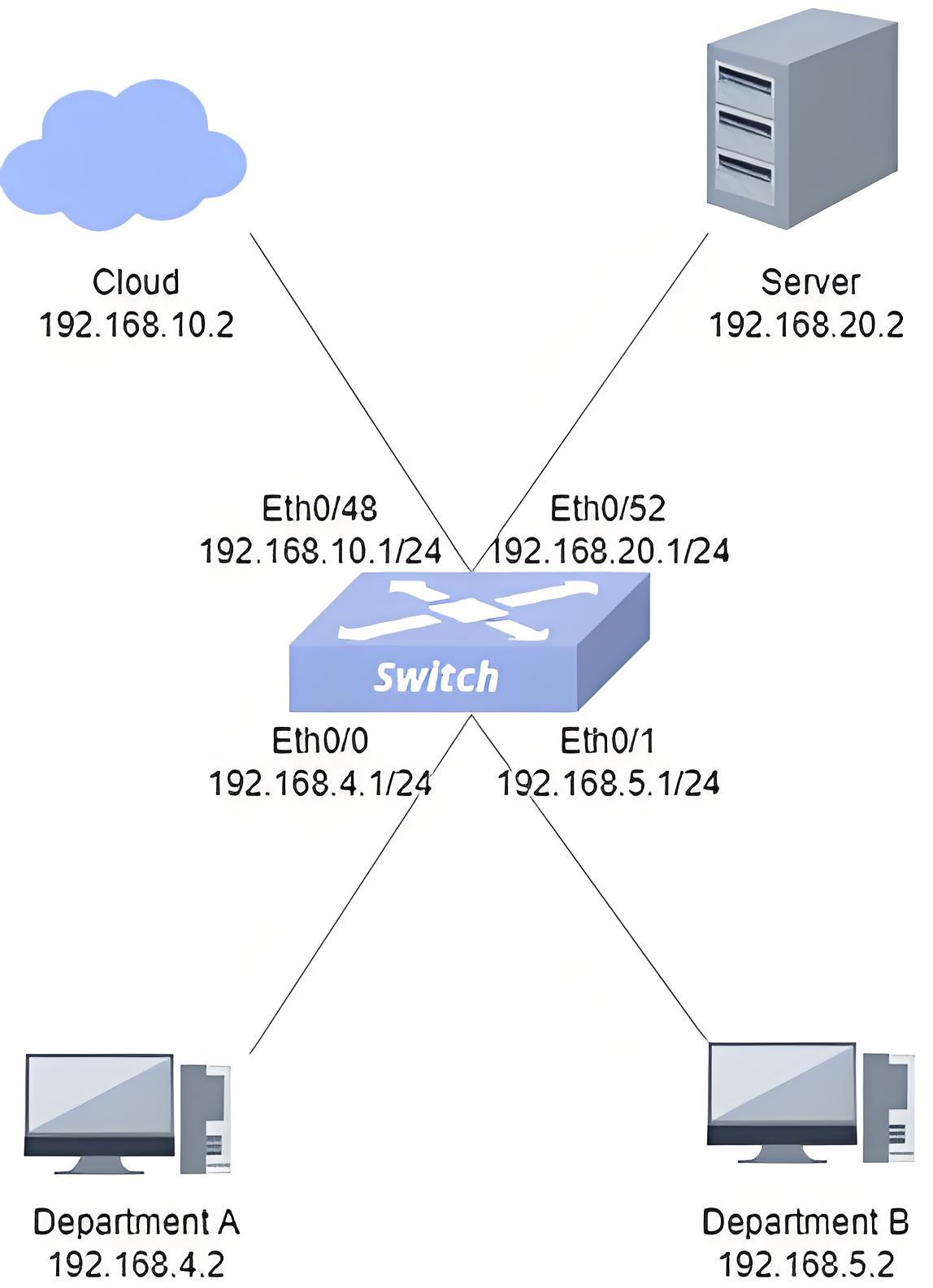
- Procedure
#Configure the IP of each port of the switch
sonic# configure terminalsonic(config)# interface ethernet 0/0sonic(config-if-0/0)# ip address 192.168.4.1/24sonic(config-if-0/0)# exsonic# configure terminalsonic(config)# interface ethernet 0/1sonic(config-if-0/1)# ip address 192.168.5.1/24sonic(config-if-0/1)# exsonic# configure terminalsonic(config)# interface ethernet 0/48sonic(config-if-0/48)# ip address 192.168.10.1/24sonic(config-if-0/48)# exsonic# configure terminalsonic(config)# interface ethernet 0/52sonic(config-if-0/52)# ip address 192.168.10.2/24sonic(config-if-0/52)# ex#Configure ACL rules Ethernet0 ingress direction: packets with destination IP 192.168.20.2 received are discarded
sonic# configure terminalsonic(config)# access-list TABLE_A l3 ingresssonic(config-l3-acl-TABLE_A)# bind interface ethernet 0/0sonic(config-l3-acl-TABLE_A)# rule 100 destination-ip 192.168.20.2 packet-action denysonic(config-l3-acl-TABLE_A)# ex#Ethernet1 ingress direction: received packet with destination IP 192.168.20.2 redirected to Ethernet48sonic# configure terminalsonic(config)# access-list TABLE_B l3 ingresssonic(config-l3-acl-TABLE_B)# bind interface ethernet 0/1sonic(config-l3-acl-TABLE_B)# rule 200 destination-ip 192.168.20.2 redirect-action 192.168.10.2sonic(config-l3-acl-TABLE_B)# ex- Verify the configuration. Verify that the ACL rule is configured successfully.
sonic# show acl tableName Type Binding Description Stage------ ------ --------- ------------- -------TABLE_B L3 0/1 TABLE_B ingressTABLE_A L3 0/0 TABLE_A ingresssonic# show acl ruleTable Rule Priority Action Match------- ------ ---------- --------------------------------- -------------------TABLE_B rule_200 200 DROP DST_IP: 192.168.20.2TABLE_A rule_100 100 DROP DST_IP: 192.168.20.2TABLE_A rule_101 101 DROP DST_IP: 192.168.10.2A PC pinging the server from department A does not work, and when pinging the server from a PC in department B the packets go to Ethernet48.