
Best Practices for Small-Scale AI Compute Backend Fabric
Preface
Section titled “Preface”This guide provides a detailed introduction to the standardized networking solution, configuration guidance, and maintenance manual for small-scale AI computing backend fabric. The solution implements a single-tier Clos network using Asterfusion data center switches, based on Rail-only architecture.
Target Audience
Section titled “Target Audience”Intended for solution planners, designers, and on-site implementation engineers who are familiar with:
- Asterfusion data center switches
- RoCE, PFC, ECN, and related technologies
Overview
Section titled “Overview”The Rail-only architecture is the ideal design for small-scale AI backend fabric.
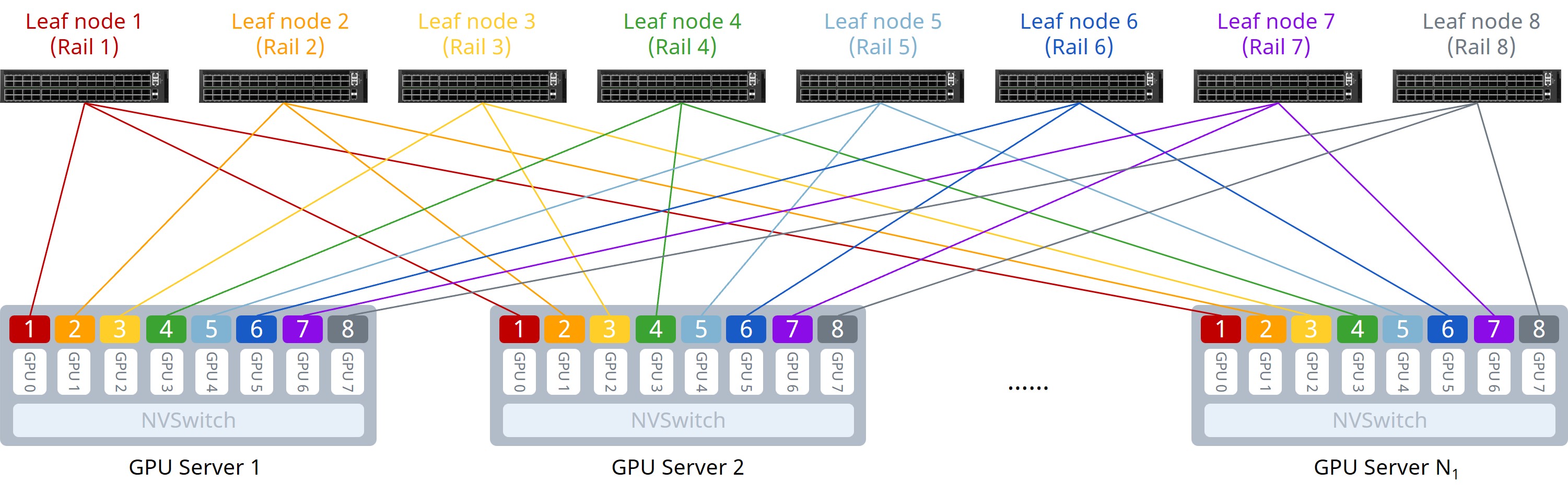
As shown in the figure above, the Rail-only architecture adopts a single-tier network design, physically partitioning the entire cluster network into 8 independent rails. Communication between GPUs of different nodes is intra-rail, achieving single-hop connectivity.
Compared to the traditional Clos architecture, the Rail-only architecture eliminates the Spine layer. By reducing network tiers, it saves on the number of switches and optical modules, thereby reducing hardware costs. It is a low-cost, high-performance network architecture specifically tailored for large AI model training in small-scale compute clusters.
Typical Configuration Example
Section titled “Typical Configuration Example”Network Topology
Section titled “Network Topology”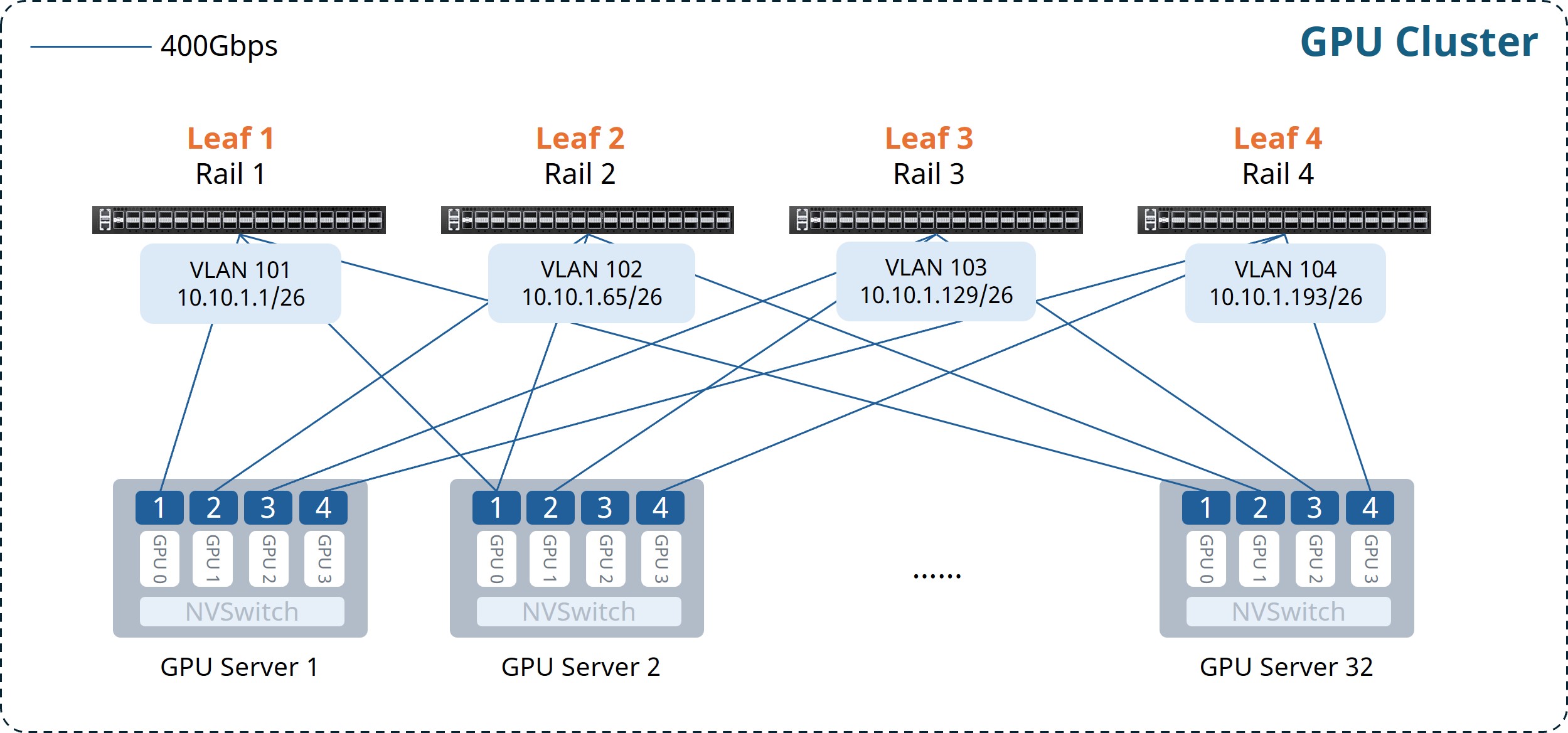
This example illustrates an AI cluster consisting of 32 compute nodes (128 GPUs total, 4 per server), with 4 CX732Q-N switches deployed as Leaf nodes. The key design principles are summarized as follows:
- Each GPU connects to a dedicated NIC; NICs follow the “NIC N to Leaf N” rule. Independent subnets per Rail.
- Single-tier Clos architecture.
- Easy RoCE enabled on Leaf switches.
The Gateway VLAN IP address planning is as follows:
Table 1: Gateway VLAN IP Address Planning
| Device Name | VLAN | Gateway IP Address |
|---|---|---|
| Leaf1 | 101 | 10.10.1.1/26 |
| Leaf2 | 102 | 10.10.1.65/26 |
| Leaf3 | 103 | 10.10.1.129/26 |
| Leaf4 | 104 | 10.10.1.193/26 |
Configuration Overview
Section titled “Configuration Overview”Table 2: Configuration Overview
| Task | Configuration Roadmap |
|---|---|
| Configure Leaf Switch | (Optional) Configure NIC-side interface breakout |
| Configure Gateway VLAN and IP address | |
| Enable Easy RoCE |
Configuring Leaf Switches
Section titled “Configuring Leaf Switches”(Optional) Configure NIC-side Interface Breakout
Section titled “(Optional) Configure NIC-side Interface Breakout”When connecting 400G NICs to CX864E-N switches, split each 800G port into two 400G interfaces.
Table 3: Interface Breakout Configuration
| Step | Leaf1 |
|---|---|
| Enter global configuration mode | configure terminal |
| Configure breakout for 800G interfaces | interface range ethernet 0/0-0/504 |
| breakout 2x400G[200G] | |
| ! | |
| If the current version does not support batch configuration: | interface ethernet 0/0 |
| breakout 2x400G[200G] | |
| ! | |
| … |
After completing the configuration, verify the interface status using the show interface summary command.
Configure Gateway VLAN and IP Address
Section titled “Configure Gateway VLAN and IP Address”Table 4: Configuring VLAN and Interface IP Addresses
| Step | Leaf1 |
|---|---|
| Configure hostname. | hostname Leaf1 |
| Enter global configuration mode. | configure terminal |
| Create Gateway VLAN and configure IP. | vlan 101 |
| ! | |
| interface vlan 101 | |
| ip address 10.10.1.1/26 | |
| exit | |
| ! | |
| Add interfaces to the VLAN. | interface range ethernet 0/0-0/248 |
| switchport access vlan 101 | |
| ! | |
| If the current version does not support batch configuration: | interface ethernet 0/0 |
| switchport access vlan 101 | |
| ! | |
| … |
Verify VLAN configuration using the show vlan summary command.
Enable Easy RoCE
Section titled “Enable Easy RoCE”The CX-N series switches support queues 0-7 (8 queues in total). Queue 3 and queue 4 are lossless (supporting up to two lossless queues), while others are lossy.
The default template uses system-default DSCP mapping. PFC and ECN are enabled for queue 3 and queue 4, and Strict Priority (SP) scheduling is set for queues 6 and 7.
When creating a template, you can specify three parameters:
- cable-length: Specifies the cable length, affecting PFC and ECN parameter calculations. Options:
5m/40m/100m/300m. If the exact length is unavailable, choose the closest value (e.g., choose5mfor a 10m cable). - incast-level: Specifies the traffic Incast model, affecting PFC parameters calculation. Options:
low(e.g. 1:1) /medium(e.g. 3:1) /high(e.g. 10:1).Lowis typically used for GPU backend fabric. - traffic-model: Specifies the business type: throughput-sensitive, latency-sensitive, or balanced. This affects ECN parameters calculations. Options:
throughput/latency/balance.balanceandthroughputare typically used for GPU backend fabric.
If the provided lossless RoCE configuration does not fully suit your scenario, refer to RoCE Parameter Adjustment/Optimization for fine-tuning.
Table 5: Enabling Easy RoCE
| Step | Leaf1 |
|---|---|
| (Optional) Modify lossless queues; requires save and reload to take effect. | no priority-flow-control enable 3 |
| no priority-flow-control enable 4 | |
| priority-flow-control enable queue-id | |
| write | |
| reload | |
| Select Easy RoCE template and apply to all interfaces. | qos roce lossless cable-length 5m incast-level low traffic-model throughput |
| qos service-policy roce_lossless_5m_low_throughput |
Verify RoCE configuration using the show qos roce command.
Maintenance
Section titled “Maintenance”RoCE Parameter Adjustment/Optimization
Section titled “RoCE Parameter Adjustment/Optimization”When default configurations are insufficient, use the following commands to optimize performance.
Modify DSCP Mapping
Section titled “Modify DSCP Mapping”Table 6: Modifying DSCP Mapping
| Step | Command |
|---|---|
| Check running-config for DSCP map name | show running-config |
| Enter global configuration mode | configure terminal |
| Enter DSCP map configuration view | diffserv-map type ip-dscp roce_lossless_diffserv_map |
| Map specific DSCP to COS value | ip-dscp dscp_value cos cos_value |
| Map all DSCP to a default COS | default cos_value |
| Use system default DSCP mapping | default copy |
Modify Queue Scheduling Policy
Section titled “Modify Queue Scheduling Policy”If the interface has been bound to a lossless RoCE policy, unbind it before modifying.
Table 7: Modifying Queue Scheduling Policy
| Step | Command |
|---|---|
| Check running-config for policy name | show running-config |
| Enter global configuration mode | configure terminal |
| Enter lossless RoCE policy view | policy-map roce_lossless_name |
| Configure SP mode scheduling | queue-scheduler priority queue queue-id |
| Configure DWRR mode scheduling | queue-scheduler queue-limit percent queue-weight queue queue-id |
Adjust PFC and ECN Thresholds
Section titled “Adjust PFC and ECN Thresholds”ECN thresholds are adjusted via min_th, max_th, and probability:
min_thsets the lower absolute value for ECN marking (Bytes).max_thsets the upper absolute value for ECN marking (Bytes).probabilitysets the maximum marking probability [1-100].
PFC thresholds are adjusted via the dynamic threshold coefficient dynamic_th:
Other parameters can remain unchanged during modification.
Recommended values for CX864E-N:
PFC dynamic_th: 1, 2, 3WRED min(Bytes): 1,000,000 / 2,000,000 / 3,000,000WRED max(Bytes): 8,000,000 / 10,000,000 / 12,000,000WRED probability(%): 10, 30, 50, 70, 90
Recommended values for other models:
PFC dynamic_th: 1, 2, 3WRED min(Bytes): 1,000,000 / 2,000,000 / 3,000,000WRED max(Bytes): 4,000,000 / 5,000,000 / 6,000,000WRED probability(%): 10, 30, 50, 70, 90
Table 8: Adjusting PFC and ECN Thresholds
| Step | Command |
|---|---|
| Get WRED and Buffer template names | show running-config |
| Enter global configuration mode | configure terminal |
| Enter ECN configuration view | wred roce_lossless_ecn |
| Adjust ECN thresholds | mode ecn gmin min_th gmax max_th gprobability probability |
| Enter PFC configuration view | buffer-profile roce_lossless_profile |
| Adjust PFC thresholds | mode lossless dynamic dynamic_th size size xoff xoff xon-offset xon-offset |
Common O&M Commands
Section titled “Common O&M Commands”Interface Status Maintenance
Section titled “Interface Status Maintenance”Table 9: Interface Status Information
| Step | Command |
|---|---|
| View interface status | show interface summary |
| View L3 interface IP and status | show ip interfaces |
| View VLAN configuration | show vlan summary |
| View interface counters | show counters interface |
Common Table Entry Maintenance
Section titled “Common Table Entry Maintenance”Table 10: Common Table Entries
| Step | Command |
|---|---|
| View LLDP neighbors | show lldp neighbo r {summary|interface interface-name} |
| View local MAC address table | show mac-address |
| View local ARP table | show arp |
RoCE Statistics Maintenance
Section titled “RoCE Statistics Maintenance”Table 11: RoCE Statistics
| Step | Command |
|---|---|
| View RoCE configuration | show qos roce [all|summary|RoCE_profile_name] |
| View interface-policy bindings | show interface policy-map |
| View RoCE statistics by queue | show counters qos roce interface ethernet interface-name queue queue-id |
| Clear all RoCE counters | clear counters qos roce |
| View PFC counters | show counters priority-flow-control |
| View ECN counters | show counters ecn |
Appendix: Configuration Files (Sample)
Section titled “Appendix: Configuration Files (Sample)”Leaf1
!hostname Leaf1!interface loopback 0 ip address 10.1.0.111/32!interface vlan 101 ip address 10.10.1.1/26exit!interface range ethernet 0/0-0/248 switchport access vlan 101!qos roce lossless cable-length 5m incast-level low traffic-model throughputqos service-policy roce_lossless_5m_low_throughput!Leaf2
!hostname Leaf2!interface loopback 0 ip address 10.1.0.112/32!interface vlan 102 ip address 10.10.1.65/26exit!interface range ethernet 0/0-0/248 switchport access vlan 102!qos roce lossless cable-length 5m incast-level low traffic-model throughputqos service-policy roce_lossless_5m_low_throughput!Leaf3
!hostname Leaf3!interface loopback 0 ip address 10.1.0.113/32!interface vlan 103 ip address 10.10.1.129/26exit!interface range ethernet 0/0-0/248 switchport access vlan 103!qos roce lossless cable-length 5m incast-level low traffic-model throughputqos service-policy roce_lossless_5m_low_throughput!Leaf4
!hostname Leaf4!interface loopback 0 ip address 10.1.0.114/32!interface vlan 104 ip address 10.10.1.193/26exit!interface range ethernet 0/0-0/248 switchport access vlan 104!qos roce lossless cable-length 5m incast-level low traffic-model throughputqos service-policy roce_lossless_5m_low_throughput!