
DCB Configuration Guide
此内容尚不支持你的语言。
After network convergence in a data center, three types of traffic exist: LAN traffic, SAN traffic, and IPC traffic, each with distinct QoS requirements:
- SAN traffic is highly sensitive to packet loss and requires in-order delivery of packets during transmission.
- LAN traffic allows packet loss and only requires Best Effort (BE) service from the network.
- IPC traffic (used for server-to-server communication) demands low latency. Data Center Bridging (DCB) is a set of IEEE 802.1 bridging enhancements that meet these QoS requirements by creating a lossless Ethernet infrastructure for converged data center networks.
DCB features primarily include PFC, ETS, and DCBX.
PFC (Priority-based Flow Control) consists of priority-based flow control and PFCWD (PFC Watchdog). For details, please refer to PFC in QoS configuration guide.
In a converged data center network, the coexistence of LAN, SAN, and IPC traffic imposes stringent QoS demands. For example:
- SAN traffic is sensitive to packet loss and requires ordered delivery.
- IPC traffic demands ultra-low latency for server communication.
- LAN traffic only requires Best Effort service, where packet loss and reordering can be handled by end hosts, minimizing network intervention. Traditional QoS mechanisms cannot meet these requirements. Enhanced Transmission Selection (ETS) addresses this by enabling flexible traffic scheduling for converged networks. ETS defines a priority-based processing model and bandwidth allocation model for endpoints and bridges in DCB environments. This allows differentiated services and bandwidth allocation for different traffic types.
- For scheduling details, Please configure according to the relevant sections of the configuration guide.
- For priority mapping details, Please configure according to the relevant sections of the configuration guide.
Data Center Bridging Exchange Protocol (DCBX) is a component of DCB. It operates in DCB environments to enable devices on both ends of a link to discover and exchange DCB configuration parameters, significantly reducing administrative overhead. Key DCBX Functions:
- Discover the DCB configuration of peer devices.
- Detect DCB configuration errors on peer devices.
- Configure DCB parameters on peer devices. DCBX Exchangeable Parameters:
- ETS scheduling and priority information
- PFC configurations DCBX uses LLDP (Link Layer Discovery Protocol) to exchange information. DCB configuration parameters are encapsulated into TLVs (Type-Length-Value fields) within LLDP frames, enabling automatic DCB parameter negotiation between devices.
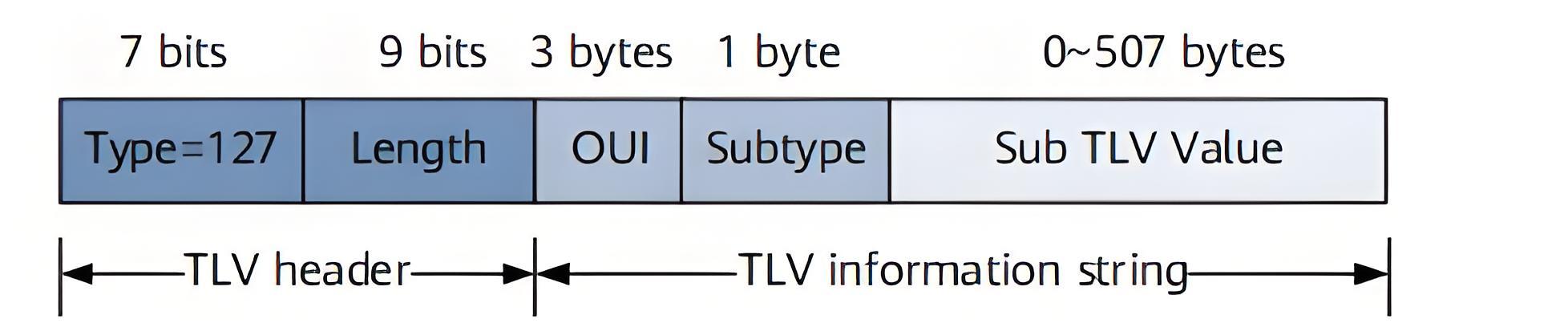
Configure DCB
Section titled “Configure DCB”Configure PFC
Section titled “Configure PFC”Please configure according to the relevant sections of the configuration guide.
Configure PFCWD
Section titled “Configure PFCWD”Please configure according to the relevant sections of the configuration guide.
Configure ETS
Section titled “Configure ETS”Please configure according to the relevant sections of the configuration guide.
Configure DCBX
Section titled “Configure DCBX”Table 1 Configure DCBX
| Purpose | Commands | Description |
|---|---|---|
| Enter global configuration view | configure terminal | - |
| Enter interface configuration view. | interface ethernet interface_name | - |
| Enable DCBX | lldp dcbx enable | - |
| Enable PFC configuration synchronization | lldp dcbx pfc-willing | - |
| Enable ETS configuration synchronization | lldp dcbx ets-willing | - |
Display and Maintenance
Section titled “Display and Maintenance”PFC Information
Section titled “PFC Information”Please configure according to the relevant sections of the configuration guide.
PFCWD Information
Section titled “PFCWD Information”Please configure according to the relevant sections of the configuration guide.
ETS Information
Section titled “ETS Information”Please configure according to the relevant sections of the configuration guide.
DCBX Information
Section titled “DCBX Information”Table 2 DCBX Information
| Purpose | Commands | Description |
|---|---|---|
| Display DCBX Configuration and Status | show lldp dcbx | - |
Typical Configuration Example
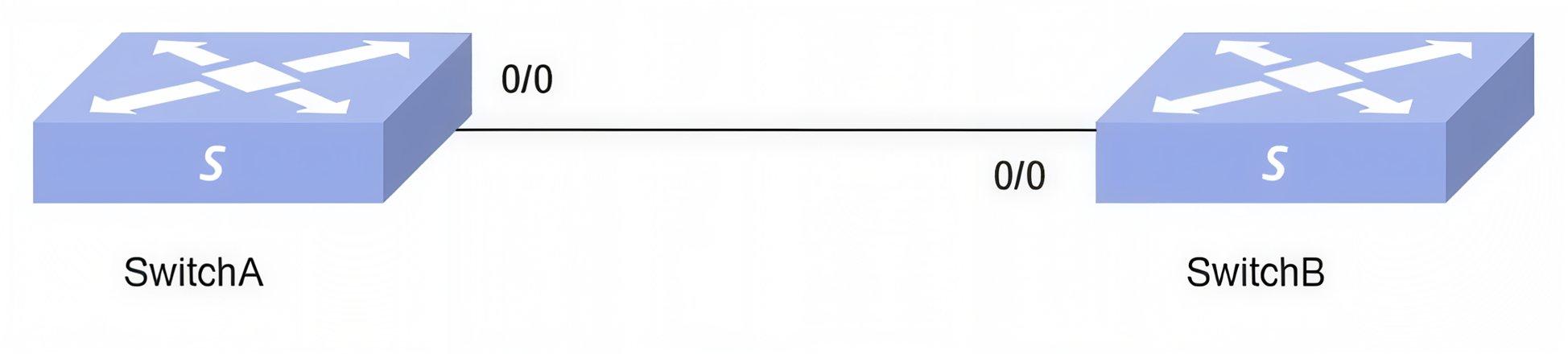
Section titled “Typical Configuration Example”- Networking Requirement In the data center network, two data center switches (Switch A and Switch B) are interconnected, under which servers are running storage traffic, IPC traffic (802.1p priority 7) and general data traffic; it is necessary to achieve no packet loss for storage traffic, low latency for ICP, and best effort forwarding for general traffic.
- Topology
- Configuration Roadmap
- Configure DCBX (Data Center Bridging Exchange Protocol) on Switch A to automatically negotiate DCB capabilities with peer devices at both ends of the link.
- Activate Priority-based Flow Control (PFC) on Switch A to ensure lossless transmission for storage traffic (e.g., SAN traffic).
- Set up Enhanced Transmission Selection (ETS) with priority mapping and scheduling policies. Ensure low latency for IPC traffic and guaranteed bandwidth allocation for storage traffic.
- Procedure
#Configure DCBX
Switch A
sonic# configuresonic(config)# interface ethernet 0/0sonic(config-if-0/0)# lldp dcbx enableSwitch B
sonic# configuresonic(config)# interface ethernet 0/0sonic(config-if-0/0)# lldp dcbx enablesonic(config-if-0/0)# lldp dcbx ets-willingsonic(config-if-0/0)# lldp dcbx pfc-willing#Configure PFC Enable the PFC function for priority 3 queues. By default, the global PFC function is enabled, and the priority 3 queue has already enabled the PFC function, so this configuration step is omitted.
sonic# configuresonic(config)# priority-flow-control enable3#Configure ETS Create priority mapping
sonic# configuresonic(config)# diffserv-map type 8021p etssonic(config-diffservmap-ets)# 8021p 7 cos 7Create policy-map and bind diffserv-map
sonic# configuresonic(config)# policy-map etssonic(config-pmap-ets)# set cos 8021p diffserv etsConfigure queue-scheduler
sonic(config-pmap-ets)# queue-scheduler queue-limit percent 40 queue 0sonic(config-pmap-ets)# queue-scheduler priority queue 7Bind policy-map to interface
sonic# configuresonic(config)# interface ethernet 0/0sonic(config-if-0/0)# service-policy ets- Verify the Configuration
#PFC configure
sonic# show interface priority-flow-controlInterface Lossless priorities----------- ---------------------0/0 3,40/1 3,40/2 3,40/3 3,40/4 3,40/5 3,40/6 3,40/7 3,40/8 3,40/12 3,40/13 3,40/14 3,40/15 3,40/16 3,40/20 3,40/24 3,40/28 3,40/32 3,40/33 3,40/34 3,40/35 3,40/36 3,40/37 3,4...#policy-map configure
sonic# show policy-map ets!policy-map etsqueue-scheduler priority queue 7queue-scheduler queue-limit percent 40 queue 0set cos dscp diffserv ets#diffserv-map configure
sonic# show diffserv-map type 8021p etsDiffserv Map ets:Type 8021p from 7 to 7#DCBX configure and statussonic# show lldp dcbxInterface ETS Willing PFC Willing ETS Accepted PFC Accepted----------- ------------- ------------- -------------- --------------0/0 True True False False