
CX864E-N Best Practices for Medium-to-Large Scale AI Compute Backend Fabric
此内容尚不支持你的语言。
Preface
Section titled “Preface”This guide provides a detailed standardized networking solution, configuration guidance, and maintenance manual for building medium-to-large scale AI compute backend fabric. The solution implements a 2-tier Clos network using Asterfusion CX864E-N switches, based on Rail-optimized architecture.
Target Audience
Section titled “Target Audience”Intended for solution planners, designers, and on-site implementation engineers who are familiar with:
- Asterfusion data center switches
- RoCE, PFC, ECN, and related technologies
Overview
Section titled “Overview”The Rail-optimized architecture is recommended for the deployment of backend fabric in medium-to-large scale AI clusters.
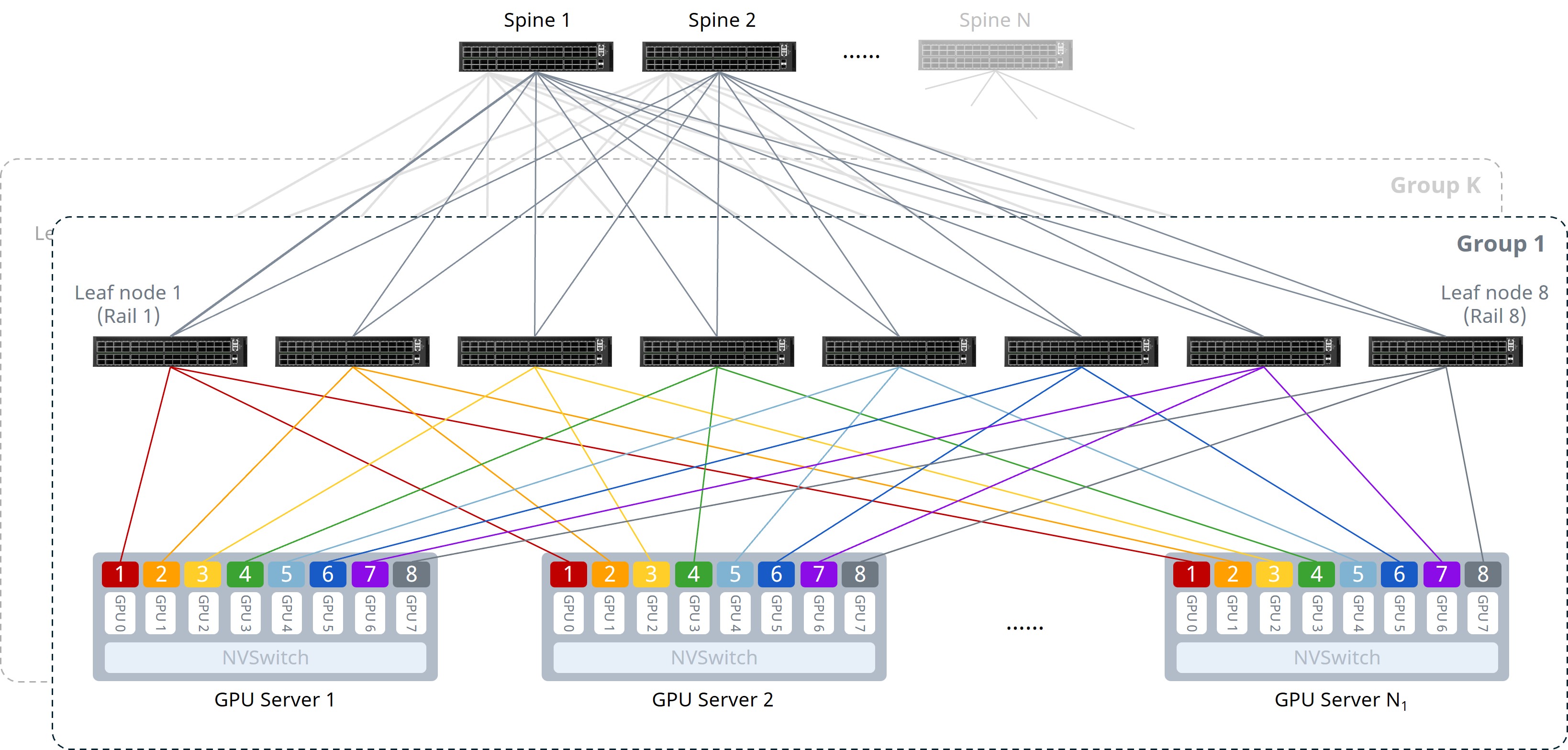
As shown above, the key design of the Rail-optimized architecture is to connect the same-indexed NICs of every server to the same Leaf switch, ensuring that multi-node GPU communication completes in the fewest possible hops. In this design, communication between GPU nodes can utilize internal NVSwitch paths, requiring only one network hop to reach the destination without crossing multiple switches, thus avoiding additional latency. The details are as follows:
- Intra-server: 8 GPUs connect to the NVSwitch via the NVLink bus, achieving low-latency intra-server communication and reducing Scale-Out network transmission pressure.
- Server-to-Leaf: All servers follow a uniform cabling rule: NICs are connected to multiple Leaf switches according to the “NIC1-Leaf1, NIC2-Leaf2…”.
- Network Layer: Leaf and Spine switches are fully meshed in a 2-tier Clos architecture.
Typical Configuration Example
Section titled “Typical Configuration Example”This example illustrates an AI cluster consisting of 64 compute nodes (256 GPUs total, 4 per server). The deployment includes 6 CX864E-N: 2 Spine nodes and 4 Leaf nodes. Key design principles include:
- Each GPU connects to a dedicated NIC; NICs follow the “NIC N to Leaf N” rule. Independent subnets per Rail.
- 2-Tier Clos Fabric: Leaf and Spine switches are fully meshed. Leveraging IPv6 Link-Local, unnumbered BGP neighbors are established to exchange Rail subnet routes, eliminating the need for IP planning on interconnect interfaces.
- 1:1 Oversubscription: To ensure non-blocking transport, the oversubscription ratio on Leaf switches is strictly maintained at 1:1.
- Unified Lossless Fabric: Easy RoCE and advanced load balancing features are enabled on both Leaf and Spine nodes.
Network Topology
Section titled “Network Topology”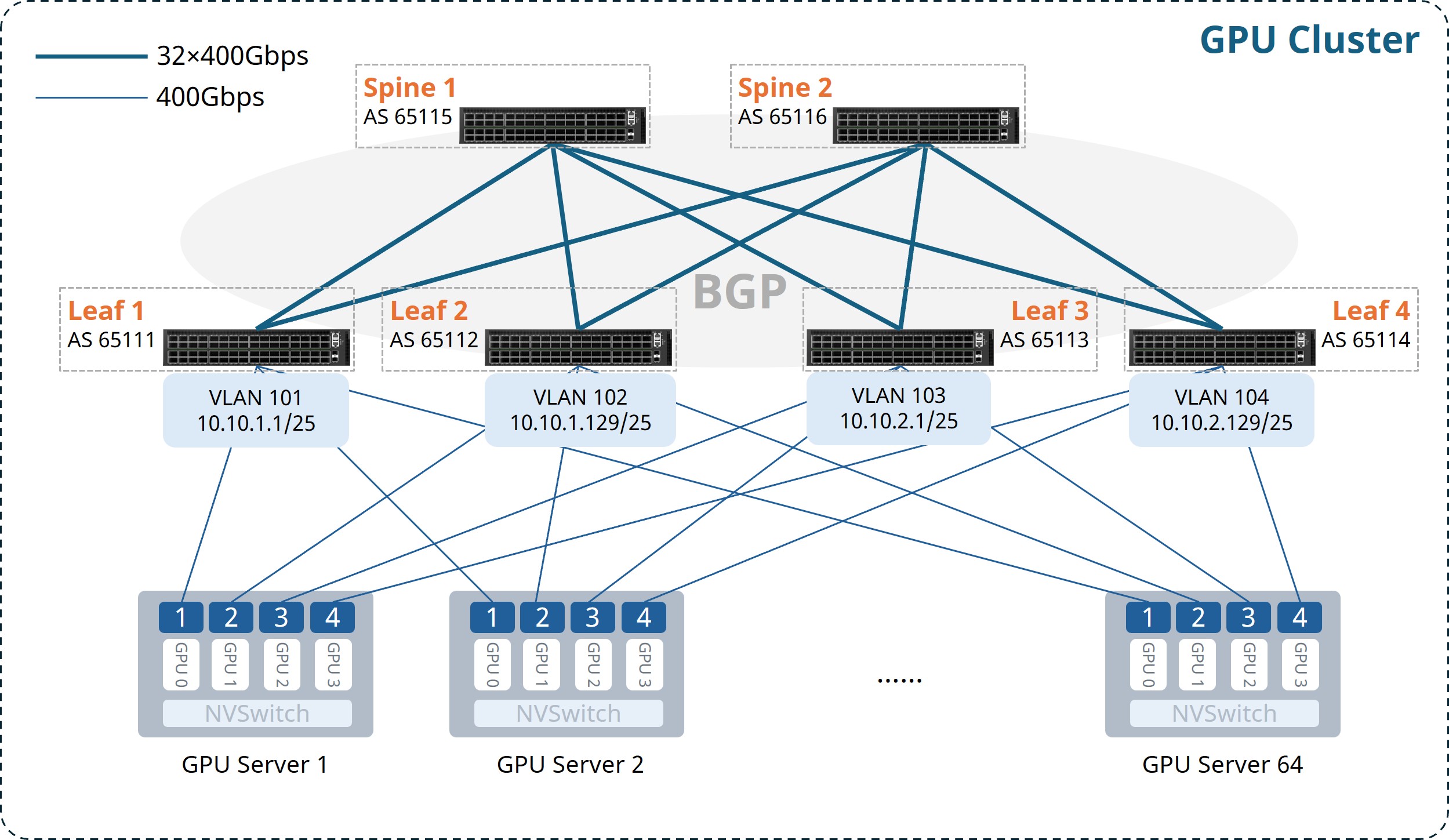
The AS numbers, Loopback, and Gateway VLAN IP planning for each node are as follows:
Table 1: AS Number and Loopback IP Planning
| Device Name | AS Number | Loopback 0 IP Address |
|---|---|---|
| Leaf1 | 65111 | 10.1.0.111/32 |
| Leaf2 | 65112 | 10.1.0.112/32 |
| Leaf3 | 65113 | 10.1.0.113/32 |
| Leaf4 | 65114 | 10.1.0.114/32 |
| Spine1 | 65115 | 10.1.0.115/32 |
| Spine2 | 65116 | 10.1.0.116/32 |
Table 2: Gateway VLAN IP Planning
| Device Name | VLAN ID | Gateway IP Address |
|---|---|---|
| Leaf1 | 101 | 10.10.1.1/25 |
| Leaf2 | 102 | 10.10.1.129/25 |
| Leaf3 | 103 | 10.10.2.1/25 |
| Leaf4 | 104 | 10.10.2.129/25 |
Configuration Overview
Section titled “Configuration Overview”Table 3: Configuration Overview
| Task | Configuration Roadmap |
|---|---|
| Leaf Node | 1. (Optional) Configure NIC-side interface breakout |
| 2. Configure Gateway VLAN and IP addresses | |
| 3. Configure BGP for L3 connectivity | |
| 4. Enable Easy RoCE | |
| 5. Configure ARS | |
| Spine Node | 1. Configure BGP for L3 connectivity |
| 2. Enable Easy RoCE | |
| 3. Configure ARS and Hash seed |
Configuring Leaf Switches
Section titled “Configuring Leaf Switches”(Optional) Configure NIC-side Interface Breakout
Section titled “(Optional) Configure NIC-side Interface Breakout”When connecting 400G NICs to CX864E-N switches, split each of the downlink 800G port into two 400G interfaces.
Table 4: Interface Breakout Configuration
| Step | Leaf1 |
|---|---|
| Enter global config | configure terminal |
| Breakout upper 800G ports | interface range ethernet 0/0-0/248 |
| breakout 2x400G[200G] | |
| ! | |
| Single port alternative | interface ethernet 0/0 |
| breakout 2x400G[200G] | |
| ! | |
| … |
After completing the configuration, verify the interface status using the show interface summary command.
Gateway VLAN and IP Configuration
Section titled “Gateway VLAN and IP Configuration”Table 5: VLAN and Interface IP Configuration
| Step | Leaf1 |
|---|---|
| Set hostname | hostname Leaf1 |
| Configure Gateway VLAN | vlan 101 |
| ! | |
| interface vlan 101 | |
| ip address 10.10.1.1/25 | |
| ! | |
| Assign downlink ports | interface range ethernet 0/0-0/252 |
| switchport access vlan 101 | |
| ! | |
| If the current version does not support batch configuration: | interface ethernet 0/0 |
| switchport access vlan 101 | |
| ! | |
| … |
Verify VLAN configuration using the show vlan summary command.
BGP Configuration for L3 Connectivity
Section titled “BGP Configuration for L3 Connectivity”Enable the IPv6 link-local feature on Leaf-Spine interfaces to establish unnumbered BGP neighbors.
Table 6: BGP Neighbor Configuration on Leaf
| Step | Leaf1 |
|---|---|
| Enable IPv6 link-local | interface range ethernet 0/256-0/504 |
| ipv6 use-link-local | |
| ! | |
| If the current version does not support batch configuration: | interface ethernet 0/256 |
| ipv6 use-link-local | |
| ! | |
| … | |
| Configure Loopback 0 | interface loopback 0 |
| ip address 10.1.0.111/32 | |
| ! | |
| Global BGP settings | router bgp 65111 |
| bgp router-id 10.1.0.111 | |
| no bgp ebgp-requires-policy | |
| bgp bestpath as-path multipath-relax | |
| bgp max-med on-startup 120 | |
| bgp graceful-restart | |
| Unnumbered Peer Group | neighbor PEER_unnumber_BGP peer-group |
| neighbor PEER_unnumber_BGP remote-as external | |
| neighbor range ethernet 0/256-0/504 interface peer-group PEER_unnumber_BGP | |
| If the current version does not support batch configuration: | neighbor PEER_unnumber_BGP peer-group |
| neighbor PEER_unnumber_BGP remote-as external | |
| neighbor ethernet 0/256 interface peer-group PEER_unnumber_BGP | |
| neighbor ethernet 0/264 interface peer-group PEER_unnumber_BGP | |
| … | |
| Route advertisement | address-family ipv4 unicast |
| redistribute connected | |
| exit-address-famil | |
| ! |
Verify BGP configuration and status using the show bgp summary command.
Easy RoCE Configuration
Section titled “Easy RoCE Configuration”The CX-N series switches support queues 0-7 (8 queues in total). Queue 3 and queue 4 are lossless (supporting up to two lossless queues), while others are lossy.
The default template uses system-default DSCP mapping. PFC and ECN are enabled for queue 3 and queue 4, and Strict Priority (SP) scheduling is set for queues 6 and 7.
When creating a template, you can specify three parameters:
- cable-length: Specifies the cable length, affecting PFC and ECN parameter calculations. Options:
5m/40m/100m/300m. If the exact length is unavailable, choose the closest value (e.g., choose5mfor a 10m cable). - incast-level: Specifies the traffic Incast model, affecting PFC parameters calculation. Options:
low(e.g. 1:1) /medium(e.g. 3:1) /high(e.g. 10:1).Lowis typically used for GPU backend fabric. - traffic-model: Specifies the business type: throughput-sensitive, latency-sensitive, or balanced. This affects ECN parameters calculations. Options:
throughput/latency/balance.balanceandthroughputare typically used for GPU backend fabric.
If the provided lossless RoCE configuration does not fully suit your scenario, refer to RoCE Parameter Adjustment/Optimization for fine-tuning.
Table 7: Enabling Easy RoCE
| Step | Leaf1 |
|---|---|
| (Optional) Modify lossless queues; requires save and reload to take effect. | no priority-flow-control enable 3 |
| no priority-flow-control enable 4 | |
| priority-flow-control enable queue-id | |
| write | |
| reload | |
| Select Easy RoCE template and apply to all interfaces. | qos roce lossless cable-length 5m incast-level low traffic-model throughput |
| qos service-policy roce_lossless_5m_low_throughput |
Verify RoCE configuration using the show qos roce command.
Leaf1# show qos roceNotice: Displaying configurations of in-use RoCE profiles==> RoCE Profile: roce_lossless_5m_low_throughput | RoCE Policy Map: roce_lossless_5m_low_throughput_400g <==+--------------------+-----------------+-----------------------------------------------------+| | Operational | Description |+====================+=================+=====================================================+| Mode | Lossless | QoS RoCE mode |+--------------------+-----------------+-----------------------------------------------------+| Status | Bind: 0/0-0/252 | QoS RoCE binding status |+--------------------+-----------------+-----------------------------------------------------+| Cable Length | 5m | Cable length in meters for QoS RoCE lossless config |+--------------------+-----------------+-----------------------------------------------------+| Congestion-Control | - | - || - Congestion Mode | ECN | Congestion control mode || - Enabled TC | 3,4 | Congestion control config enabled traffic class || - Max Threshold | 10094080 | Congestion control config max threshold || - Min Threshold | 2000000 | Congestion control config max threshold |+--------------------+-----------------+-----------------------------------------------------+| PFC | - | - || - PFC Priority | 3,4 | PFC enabled switch priority || - TX Status | Enabled | PFC RX status || - RX Status | Enabled | PFC TX status |+--------------------+-----------------+-----------------------------------------------------+| Trust | - | - || - Trust Mode | DSCP | Trust setting for packet classification |+--------------------+-----------------+-----------------------------------------------------+====> RoCE DSCP->SP Mapping Configurations <====+-------------------------+-------------------+| DSCP | Switch Priority |+=========================+===================+| 0,1,2,3,4,5,6,7 | 0 || 8,9,10,11,12,13,14,15 | 1 || 16,17,18,19,20,21,22,23 | 2 || 24,25,26,27,28,29,30,31 | 3 || 32,33,34,35,36,37,38,39 | 4 || 40,41,42,43,44,45,46,47 | 5 || 48,49,50,51,52,53,54,55 | 6 || 56,57,58,59,60,61,62,63 | 7 |+-------------------------+-------------------+====> RoCE SP->TC Mapping & ETS Configurations <====+-------------------+--------+----------+| Switch Priority | Mode | Weight |+===================+========+==========+| 6 | SP | - || 7 | SP | - |+-------------------+--------+----------+====> PFC Profile Configurations <====+----------------------------------------------+-------------------+| Profile Name | Switch Priority |+==============================================+===================+| egress_lossless_profile | 3,4 || egress_lossy_profile | 0,1,2,5,6,7 || ingress_lossy_profile | 0,1,2,5,6,7 || pg_lossless_10000_40m_profile | 3,4 || roce_lossless_5m_low_throughput_400g_profile | 3,4 || roce_lossless_5m_low_throughput_800g_profile | 3,4 |+----------------------------------------------+-------------------+==> RoCE Profile: roce_lossless_5m_low_throughput | RoCE Policy Map: roce_lossless_5m_low_throughput_800g <==+--------------------+-------------------+-----------------------------------------------------+| | Operational | Description |+====================+===================+=====================================================+| Mode | Lossless | QoS RoCE mode |+--------------------+-------------------+-----------------------------------------------------+| Status | Bind: 0/256-0/504 | QoS RoCE binding status |+--------------------+-------------------+-----------------------------------------------------+| Cable Length | 5m | Cable length in meters for QoS RoCE lossless config |+--------------------+-------------------+-----------------------------------------------------+| Congestion-Control | - | - || - Congestion Mode | ECN | Congestion control mode || - Enabled TC | 3,4 | Congestion control config enabled traffic class || - Max Threshold | 11261952 | Congestion control config max threshold || - Min Threshold | 2231378 | Congestion control config max threshold |+--------------------+-------------------+-----------------------------------------------------+| PFC | - | - || - PFC Priority | 3,4 | PFC enabled switch priority || - TX Status | Enabled | PFC RX status || - RX Status | Enabled | PFC TX status |+--------------------+-------------------+-----------------------------------------------------+| Trust | - | - || - Trust Mode | DSCP | Trust setting for packet classification |+--------------------+-------------------+-----------------------------------------------------+====> RoCE DSCP->SP Mapping Configurations <====+-------------------------+-------------------+| DSCP | Switch Priority |+=========================+===================+| 0,1,2,3,4,5,6,7 | 0 || 8,9,10,11,12,13,14,15 | 1 || 16,17,18,19,20,21,22,23 | 2 || 24,25,26,27,28,29,30,31 | 3 || 32,33,34,35,36,37,38,39 | 4 || 40,41,42,43,44,45,46,47 | 5 || 48,49,50,51,52,53,54,55 | 6 || 56,57,58,59,60,61,62,63 | 7 |+-------------------------+-------------------+====> RoCE SP->TC Mapping & ETS Configurations <====+-------------------+--------+----------+| Switch Priority | Mode | Weight |+===================+========+==========+| 6 | SP | - || 7 | SP | - |+-------------------+--------+----------+====> PFC Profile Configurations <====+----------------------------------------------+-------------------+| Profile Name | Switch Priority |+==============================================+===================+| egress_lossless_profile | 3,4 || egress_lossy_profile | 0,1,2,5,6,7 || ingress_lossy_profile | 0,1,2,5,6,7 || pg_lossless_10000_40m_profile | 3,4 || roce_lossless_5m_low_throughput_400g_profile | 3,4 || roce_lossless_5m_low_throughput_800g_profile | 3,4 |+----------------------------------------------+-------------------+ARS (Adaptive Routing Switch) Configuration
Section titled “ARS (Adaptive Routing Switch) Configuration”The deployment logic for ARS follows these three phases: Create ARS Instances -> Bind Next-Hop Groups -> Fine-tune Idle-time.
- Architectural Relationship
It is essential to understand that ARS instances and Next-Hop Groups (ECMP groups) maintain a one-to-one mapping.
- At the Spine Layer: Each Leaf switch advertises unique routes. For example, the ECMP group for routes advertised by Leaf1 consists of all physical links connecting the Spine to Leaf1. Consequently, the Spine requires a dedicated Next-Hop Group for each Leaf. The number of ARS instances on a Spine switch must match the total number of Leaf switches.
- At the Leaf Layer: All routes advertised by other Leafs share the same ECMP members (the uplink paths to Spine1 and Spine2). Therefore, a Leaf switch only requires a single ARS instance to manage all northbound traffic.
- Binding Destination Networks
After creating the instances, it is necessary to associate the destination network segments with their corresponding ARS instances.
- For Spine1: The Next-Hop Group targets the links to Leaf1; therefore, you only need to specify the Loopback 0 IP of Leaf1 as the destination.
- For Leaf1: The Next-Hop Group targets the uplinks to both Spines; therefore, specifying the Loopback 0 IP of any other Leaf in the cluster will bind the traffic to the corresponding ARS instance.
- Idle-time Calibration
Idle-time determines the granularity at which a flow is split into a series of flowlets. A flow-split is triggered whenever the inter-frame gap exceeds this defined interval.
It is recommended to set the idle-time to RTT/2. Start with the system default and fine-tune based on real-time traffic load:
- Increase idle-time if significant packet reordering is detected at the endpoints.
- Decrease idle-time if load distribution between the Leaf and Spine layers appears unbalanced.
Table 8: ARS Configuration
| Step | Leaf1 |
|---|---|
| Enable ARS profile | ars profile |
| Configure instance | ars instance to_spine |
| idle-time 10 | |
| ! | |
| Bind Next-hop group | ars nexthop-group 10.1.0.112/32 instance to_spine |
Verify ARS configuration using the show ars instance command.
Leaf1# show ars instanceInstance Name Assign Mode Idle Time Max Flows Binding Configs NextHop Group Members Member Count-------------- ------------------- ---------- --------- ---------------------------- --------------------- ------------to_spine per_flowlet_quality 10 512 10.1.0.112/32 in VRF default N/A N/AThe NextHop Group Members and Member Count will reflect the actual next-hop group members and the member quantity after the route is reachable.
Configuring Spine Nodes
Section titled “Configuring Spine Nodes”BGP Configuration for L3 Connectivity
Section titled “BGP Configuration for L3 Connectivity”Table 9: BGP Neighbor Configuration on Spine
| Step | Spine1 |
|---|---|
| Configure hostname. | hostname Spine1 |
| Enter global configuration mode. | configure terminal |
| Enable IPv6 link-local | interface range ethernet 0/0-0/504 |
| ipv6 use-link-local | |
| ! | |
| If the current version does not support batch configuration: | interface ethernet 0/0 |
| ipv6 use-link-local | |
| ! | |
| … | |
| Configure Loopback 0 | interface loopback 0 |
| ip address 10.1.0.115/32 | |
| ! | |
| Global BGP settings | router bgp 65115 |
| bgp router-id 10.1.0.115 | |
| no bgp ebgp-requires-policy | |
| bgp bestpath as-path multipath-relax | |
| bgp max-med on-startup 120 | |
| bgp graceful-restart | |
| Unnumbered Peer Group | neighbor PEER_unnumber_BGP peer-group |
| neighbor PEER_unnumber_BGP remote-as external | |
| neighbor range ethernet 0/0-0/504 interface peer-group PEER_unnumber_BGP | |
| If the current version does not support batch configuration: | neighbor PEER_unnumber_BGP peer-group |
| neighbor PEER_unnumber_BGP remote-as external | |
| neighbor ethernet 0/0 interface peer-group PEER_unnumber_BGP | |
| neighbor ethernet 0/8 interface peer-group PEER_unnumber_BGP | |
| … |
Verify BGP configuration and status using the show bgp summary command.
Easy RoCE Configuration
Section titled “Easy RoCE Configuration”Table 10: Enabling Easy RoCE
| Step | Spine1 |
|---|---|
| (Optional) Modify lossless queues; requires save and reload to take effect. | no priority-flow-control enable 3 |
| no priority-flow-control enable 4 | |
| priority-flow-control enable queue-id | |
| write | |
| reload | |
| Select Easy RoCE template and apply to all interfaces. | qos roce lossless cable-length 5m incast-level low traffic-model throughput |
| qos service-policy roce_lossless_5m_low_throughput |
Verify RoCE configuration using the show qos roce command.
ARS and Hash Seed Configuration
Section titled “ARS and Hash Seed Configuration”As previously described, the Spine node requires a dedicated ARS instance for each Leaf node. Each instance is then bound to its corresponding next-hop group by specifying the Loopback 0 IP of each Leaf.
The purpose of configuring Hash Seed is to mitigate Hash Polarization (also known as hash imbalance). This phenomenon occurs when traffic remains unevenly distributed across available paths after undergoing multiple stages of hashing.
Hash polarization is most prevalent in Clos topology. It typically arises when multi-tier switches utilize identical ASIC chips for ECMP, as they often employ the same hashing algorithms by default. Consequently, the second-tier switches fail to effectively redistribute traffic that was already hashed by the first tier, leading to sub-optimal bandwidth utilization and “hot spots” on certain links. This issue can be effectively resolved by adjusting the hash factors or the Hash Seed on devices at different network layers to ensure distinct hashing results at each stage.
Table 11: ARS and Hash Seed Configuration
| Step | Spine1 |
|---|---|
| Enable ARS profile | ars profile |
| Configure instances | ars instance to_leaf1 |
| idle-time 10 | |
| ! | |
| ars instance to_leaf2 | |
| idle-time 10 | |
| ! | |
| ars instance to_leaf3 | |
| idle-time 10 | |
| ! | |
| ars instance to_leaf4 | |
| idle-time 10 | |
| ! | |
| Bind Next-hop groups | ars nexthop-group 10.1.0.111/32 instance to_leaf1 |
| ars nexthop-group 10.1.0.112/32 instance to_leaf2 | |
| ars nexthop-group 10.1.0.113/32 instance to_leaf3 | |
| ars nexthop-group 10.1.0.114/32 instance to_leaf4 | |
| Configure Hash Seed | hash seed 1234 |
Verify ARS configuration using the show ars instance command.
Maintenance
Section titled “Maintenance”RoCE Parameter Adjustment/Optimization
Section titled “RoCE Parameter Adjustment/Optimization”When default configurations are insufficient, use the following commands to optimize performance.
Modify DSCP Mapping
Section titled “Modify DSCP Mapping”Table 12: Modifying DSCP Mapping
| Step | Command |
|---|---|
| Check running-config for DSCP map name | show running-config |
| Enter global configuration mode | configure terminal |
| Enter DSCP map configuration view | diffserv-map type ip-dscp roce_lossless_diffserv_map |
| Map specific DSCP to COS value | ip-dscp dscp_value cos cos_value |
| Map all DSCP to a default COS | default cos_value |
| Use system default DSCP mapping | default copy |
Modify Queue Scheduling Policy
Section titled “Modify Queue Scheduling Policy”If the interface has been bound to a lossless RoCE policy, unbind it before modifying.
Table 13: Modifying Queue Scheduling Policy
| Step | Command |
|---|---|
| Check running-config for policy name | show running-config |
| Enter global configuration mode | configure terminal |
| Enter lossless RoCE policy view | policy-map roce_lossless_name |
| Configure SP mode scheduling | queue-scheduler priority queue queue-id |
| Configure DWRR mode scheduling | queue-scheduler queue-limit percent queue-weight queue queue-id |
Adjust PFC and ECN Thresholds
Section titled “Adjust PFC and ECN Thresholds”ECN thresholds are adjusted via min_th, max_th, and probability:
min_thsets the lower absolute value for ECN marking (Bytes).max_thsets the upper absolute value for ECN marking (Bytes).probabilitysets the maximum marking probability [1-100].
PFC thresholds are adjusted via the dynamic threshold coefficient dynamic_th:
Other parameters can remain unchanged during modification.
Recommended values for CX864E-N:
PFC dynamic_th: 1, 2, 3WRED min(Bytes): 1,000,000 / 2,000,000 / 3,000,000WRED max(Bytes): 8,000,000 / 10,000,000 / 12,000,000WRED probability(%): 10, 30, 50, 70, 90
Table 14: Adjusting PFC and ECN Thresholds
| Operation | Command |
|---|---|
| Get WRED and Buffer template names | show running-config |
| Enter global configuration mode | configure terminal |
| Enter ECN configuration view | wred roce_lossless_ecn |
| Adjust ECN thresholds | mode ecn gmin min_th gmax max_th gprobability probability |
| Enter PFC configuration view | buffer-profile roce_lossless_profile |
| Adjust PFC thresholds | mode lossless dynamic dynamic_th size size xoff xoff xon-offset xon-offset |
Common O&M Commands
Section titled “Common O&M Commands”Interface Status Maintenance
Section titled “Interface Status Maintenance”Table 15 Interface Status Information
| Operation | Command |
|---|---|
| View interface status | show interface summary |
| View Layer 3 interface IP config and status | show ip interfaces |
| View VLAN configuration | show vlan summary |
| View interface counter statistics | show counters interface |
Common Table Entry Maintenance
Section titled “Common Table Entry Maintenance”**Table 16 Common Table Entries **
| Operation | Command |
|---|---|
| View LLDP neighbor information | **show lldp neighbor { summary | interface ** interface-name} |
| View local MAC address table | show mac-address |
| View local ARP table | show arp |
| View BGP neighbor status | show bgp summary |
| View local routing table | show ip route |
RoCE Statistics Maintenance
Section titled “RoCE Statistics Maintenance”Table 17 RoCE Statistics
| Operation | Command |
|---|---|
| View RoCE configuration | show qos roce [all | summary | RoCE_profile_name] |
| View interface and policy binding | show interface policy-map |
| View RoCE-related queue statistics | show counters qos roce interface ethernet interface-name queue queue-id |
| Clear RoCE statistics on all interfaces | clear counters qos roce |
| View PFC counters | show counters priority-flow-control |
| Clear PFC counters | clear counters priority-flow-control |
| View ECN counters | show counters ecn |
| Clear ECN counters | clear counters ecn |
ARS Configuration Maintenance
Section titled “ARS Configuration Maintenance”Table 18 ARS Configuration and Status
| Operation | Command |
|---|---|
| View ARS profile configuration | show ars profile |
| View ARS instance configuration and bindings | show ars instance |
Appendix: Configuration Files (Sample)
Section titled “Appendix: Configuration Files (Sample)”Leaf1
!hostname Leaf1!interface loopback 0 ip address 10.1.0.111/32!
#To Server!interface range ethernet 0/0-0/248 breakout 2x400G[200G]!
#To Spine!interface range ethernet 0/256-0/504ipv6 use-link-local!
#VLAN!interface vlan 101 ip address 10.10.1.1/25exit!interface range ethernet 0/0-0/252 switchport access vlan 101!
#BGP!router bgp 65111 bgp router-id 10.1.0.111 no bgp ebgp-requires-policy bgp bestpath as-path multipath-relax bgp max-med on-startup 120 bgp graceful-restart neighbor PEER_unnumber peer-group neighbor PEER_unnumber remote-as external neighbor range ethernet 0/256-0/504 interface peer-group PEER_unnumber! address-family ipv4 unicast  redistribute connected exit-address-familyexit!
#Easy RoCE!qos roce lossless cable-length 5m incast-level low traffic-model throughputqos service-policy roce_lossless_5m_low_throughput!
#ARS!ars profile!ars instance to_spine idle-time 10!ars nexthop-group 10.1.0.112/32 instance to_spine!
Leaf2
!hostname Leaf2!interface loopback 0 ip address 10.1.0.112/32!
#To Server!interface range ethernet 0/0-0/248 breakout 2x400G[200G]!
#To Spine!interface range ethernet 0/256-0/504ipv6 use-link-local!
#VLAN!interface vlan 102 ip address 10.10.1.129/25exit!interface range ethernet 0/0-0/252 switchport access vlan 102!
#BGP!router bgp 65112 bgp router-id 10.1.0.112 no bgp ebgp-requires-policy bgp bestpath as-path multipath-relax bgp max-med on-startup 120 bgp graceful-restart neighbor PEER_unnumber peer-group neighbor PEER_unnumber remote-as external neighbor range ethernet 0/256-0/504 interface peer-group PEER_unnumber! address-family ipv4 unicast  redistribute connected exit-address-familyexit!
#Easy RoCE!qos roce lossless cable-length 5m incast-level low traffic-model throughputqos service-policy roce_lossless_5m_low_throughput!
#ARS!ars profile!ars instance to_spine idle-time 10!ars nexthop-group 10.1.0.111/32 instance to_spine!
Leaf3
!hostname Leaf3!interface loopback 0 ip address 10.1.0.113/32!
#To Server!interface range ethernet 0/0-0/248 breakout 2x400G[200G]!
#To Spine!interface range ethernet 0/256-0/504ipv6 use-link-local!
#VLAN!interface vlan 103 ip address 10.10.2.1/25exit!interface range ethernet 0/0-0/252 switchport access vlan 103!
#BGP!router bgp 65113 bgp router-id 10.1.0.113 no bgp ebgp-requires-policy bgp bestpath as-path multipath-relax bgp max-med on-startup 120 bgp graceful-restart neighbor PEER_unnumber peer-group neighbor PEER_unnumber remote-as external neighbor range ethernet 0/256-0/504 interface peer-group PEER_unnumber! address-family ipv4 unicast  redistribute connected exit-address-familyexit!
#Easy RoCE!qos roce lossless cable-length 5m incast-level low traffic-model throughputqos service-policy roce_lossless_5m_low_throughput!
#ARS!ars profile!ars instance to_spine idle-time 10!ars nexthop-group 10.1.0.114/32 instance to_spine!
Leaf4
!hostname Leaf4!interface loopback 0 ip address 10.1.0.114/32!
#To Server!interface range ethernet 0/0-0/248 breakout 2x400G[200G]!
#To Spine!interface range ethernet 0/256-0/504ipv6 use-link-local!
#VLAN!interface vlan 104 ip address 10.10.2.129/25exit!interface range ethernet 0/0-0/252 switchport access vlan 104!
#BGP!router bgp 65114 bgp router-id 10.1.0.114 no bgp ebgp-requires-policy bgp bestpath as-path multipath-relax bgp max-med on-startup 120 bgp graceful-restart neighbor PEER_unnumber peer-group neighbor PEER_unnumber remote-as external neighbor range ethernet 0/256-0/504 interface peer-group PEER_unnumber! address-family ipv4 unicast  redistribute connected exit-address-familyexit!
#Easy RoCE!qos roce lossless cable-length 5m incast-level low traffic-model throughputqos service-policy roce_lossless_5m_low_throughput!
#ARS!ars profile!ars instance to_spine idle-time 10!ars nexthop-group 10.1.0.113/32 instance to_spine!
Spine1
!hostname Spine1!interface loopback 0 ip address 10.1.0.115/32!
#To Leaf!interface ethernet 0/0-0/504ipv6 use-link-local!
#BGP!router bgp 65115 bgp router-id 10.1.0.115 no bgp ebgp-requires-policy bgp bestpath as-path multipath-relax bgp max-med on-startup 120 bgp graceful-restart neighbor PEER_unnumber peer-group neighbor PEER_unnumber remote-as external neighbor range ethernet 0/0-0/504 interface peer-group PEER_unnumber!
#Easy RoCE!qos roce lossless cable-length 5m incast-level low traffic-model throughputqos service-policy roce_lossless_5m_low_throughput!
#ARSars instance to_leaf1 idle-time 10!ars instance to_leaf2 idle-time 10!ars instance to_leaf3 idle-time 10!ars instance to_leaf4 idle-time 10!ars nexthop-group 10.1.0.111/32 instance to_leaf1!ars nexthop-group 10.1.0.112/32 instance to_leaf2!ars nexthop-group 10.1.0.113/32 instance to_leaf3!ars nexthop-group 10.1.0.114/32 instance to_leaf4!
#Hashhash seed 1234
Spine2
!hostname Spine2!interface loopback 0 ip address 10.1.0.116/32!
#To Leaf!interface ethernet 0/0-0/504ipv6 use-link-local!
#BGP!router bgp 65116 bgp router-id 10.1.0.116 no bgp ebgp-requires-policy bgp bestpath as-path multipath-relax bgp max-med on-startup 120 bgp graceful-restart neighbor PEER_unnumber peer-group neighbor PEER_unnumber remote-as external neighbor range ethernet 0/0-0/504 interface peer-group PEER_unnumber!
#Easy RoCE!qos roce lossless cable-length 5m incast-level low traffic-model throughputqos service-policy roce_lossless_5m_low_throughput!
#ARSars instance to_leaf1 idle-time 10!ars instance to_leaf2 idle-time 10!ars instance to_leaf3 idle-time 10!ars instance to_leaf4 idle-time 10!ars nexthop-group 10.1.0.111/32 instance to_leaf1!ars nexthop-group 10.1.0.112/32 instance to_leaf2!ars nexthop-group 10.1.0.113/32 instance to_leaf3!ars nexthop-group 10.1.0.114/32 instance to_leaf4!
#Hashhash seed 1234