
Policy-Based Routing Configuration Guide
此内容尚不支持你的语言。
Introduction
Section titled “Introduction”Policy-Based Routing (PBR) is a routing mechanism that forwards packets based on custom-defined policies. When packets are routed, they can be matched based on source IP address, destination IP address, IP protocol, source TCP/UDP port number, and destination TCP/UDP port number. For packets that meet the matching conditions, the next hop is set to complete the forwarding control of the packets.
Policy-Based Routing Configuration
Section titled “Policy-Based Routing Configuration”Configure Policy-Based Routing
Section titled “Configure Policy-Based Routing”Table 1 Configure Policy-Based Routing
| Purpose | Commands | Description |
|---|---|---|
| Enter global configuration view. | configure terminal | - |
| Create a PBR policy and enter the pbr-map configuration view | pbr-map pbr-map-name seq seq-num | sequence number, with a value range of 1 to 700. |
| Configure PBR policy matching fields | match {dst-ip dip|dst-port dport|ip-protocol {tcp|udp}|src-ip sip|src-port sport} | - |
| Configure PBR policy actions | set {nexthop {A.B.C.D|X:X::X:X}|nexthop-group next-group-name} | - |
| Create a next-hop group and enter the next-hop group configuration view | nexthop-group next-group-name | - |
| Configure the next hop | nexthop {A.B.C.D|X:X::X:X} | - |
Configure interface binding with policy routing
Section titled “Configure interface binding with policy routing”Table 2 Configure interface binding with policy routing
| Purpose | Commands | Description |
|---|---|---|
| Enter global configuration view | configure terminal | - |
| Enter interface configuration view. | interface interface-type interface-name | Interface type: optional ethernet, link-aggregation |
| Bind PBR policy | pbr-policy pbr-map-name | pbr-map-name: PBR policy name |
Display and Maintenance
Section titled “Display and Maintenance”Table 3 PBR Display and Maintenance
| Purpose | Command | Description |
|---|---|---|
| Check PBR binding information. | show pbr interface [ethernet interface-name|link-aggregation lag-id] [json] | - |
| Check PBR policy information. | show pbr map [pbr-map-name|json|detail] | - |
| Check PBR next hop information. | show pbr nexthop-groups [next-group-name|json] | - |
Typical Configuration Example
Section titled “Typical Configuration Example”- Networking Requirements To achieve flexible scheduling and refined management of traffic, policy routing (PBR) technology needs to be deployed in the network architecture. We now require VM1 to serve as the traffic source, release two streams of traffic externally, configure PBR through the switch, and forward one stream to VM2 and the other stream to VM3 to meet the traffic processing needs in different business scenarios, improve network resource utilization efficiency and business flexibility.
- Topology
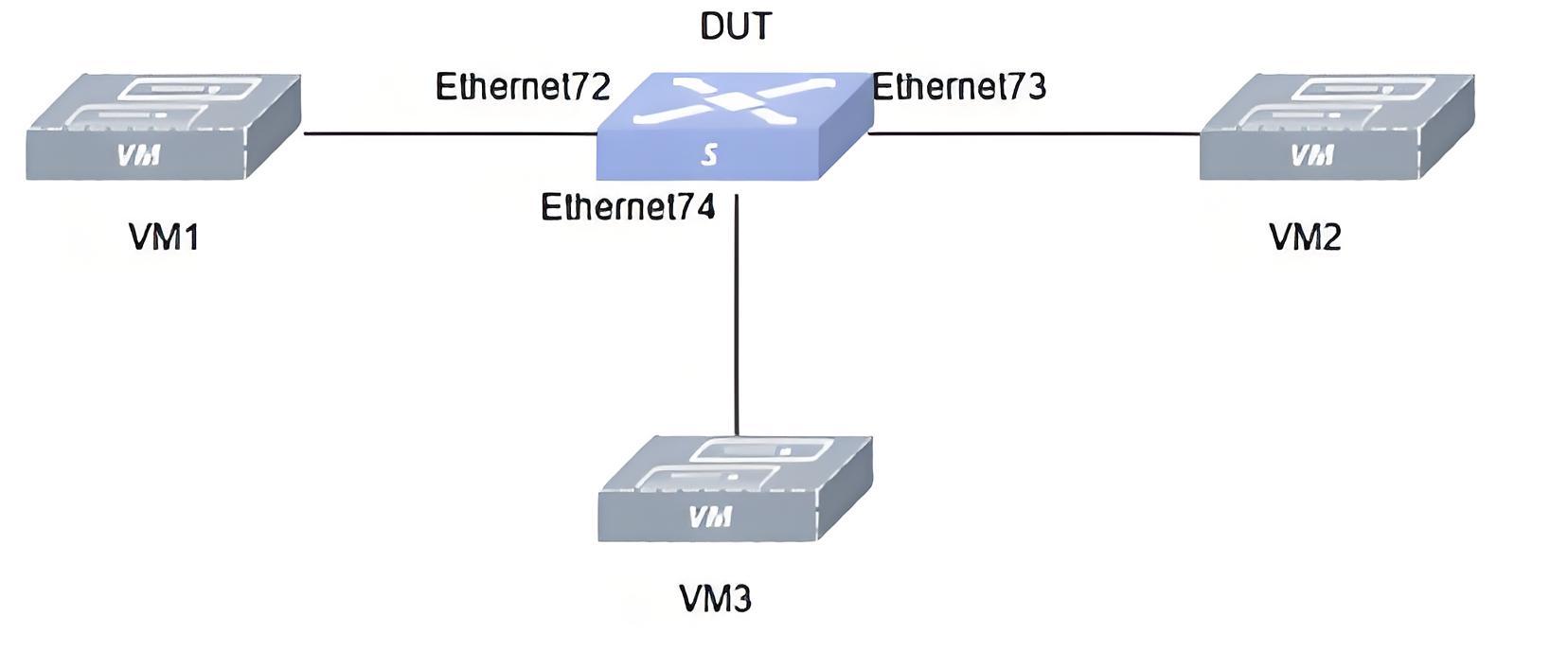
- Procedure
#Configure Interface IP.
sonic# config terminalsonic(config)# interface ethernet 0/72sonic(config-if-0/72)# ip address 72.0.0.1/24sonic(config-if-0/72)# exitsonic(config)# interface ethernet 0/73sonic(config-if-0/73)# ip address 73.0.0.1/24sonic(config-if-0/73)# exitsonic(config)# interface ethernet 0/74sonic(config-if-0/74)# ip address 74.0.0.1/24sonic(config-if-0/74)# exit#Configure PBR.
sonic# config terminalsonic(config)# pbr-map test seq 1sonic(config-pbr-map)# match src-ip 1.0.0.0/24sonic(config-pbr-map)# set nexthop 73.0.0.2sonic(config-pbr-map)# exitsonic(config)# pbr-map test seq 2sonic(config-pbr-map)# match src-ip 2.0.0.0/24sonic(config-pbr-map)# set nexthop 74.0.0.2sonic(config-pbr-map)# exitsonic(config)# interface ethernet 0/72sonic(config-if-0/72)# pbr-policy testsonic(config-if-0/72)# exit- Verify the configuration.
#Check pbr configuration
sonic# show pbr interface ethernet 0/72(106) with pbr-policy testLeaf-129# show pbr nexthop-groupsNexthop-Group: test2 Table: 10001 Valid: 0 Installed: 0 Valid: 0 nexthop 74.0.0.2Nexthop-Group: test1 Table: 10000 Valid: 0 Installed: 0 Valid: 0 nexthop 73.0.0.2Leaf-129# show pbr map pbr-map test valid: no Seq: 1 rule: 300 Installed: no Reason: Invalid NH SRC Match: 1.0.0.0/24 nexthop 73.0.0.2 Installed: no Tableid: 10000 Seq: 2 rule: 301 Installed: no Reason: Invalid NH SRC Match: 2.0.0.0/24 nexthop 74.0.0.2 Installed: no Tableid: 10001TC2 is configured with HOST1 IP: 73.0.0.2, gateway IP: 73.0.0.1. TC3 is configured with HOST2 IP: 74.0.0.2, gateway IP: 74.0.0.1. TC1 sends two streams with source IPs 1.0.0.1 and 2.0.0.1, TC2 can capture the stream with source IP 1.0.0.1, and TC3 can capture the stream with source IP 2.0.0.1.