
Traffic Behavior Configuration Guide
此内容尚不支持你的语言。
Introduction
Section titled “Introduction”QoS (Quality of Service) is a technique used to solve problems such as network latency and blocking. Complex traffic classifier in QoS can be achieved through traffic classifier in the Modular QoS Command-Line Interface (MQC), which consists of three elements, namely traffic classifier, traffic behavior and traffic policy. The traffic classifier is used to define a set of traffic matching rules for classifying packets; the traffic behavior is used to define the actions to be performed for a certain type of packet; the traffic policy is used to bind the specified traffic classifier to the traffic behavior to control the traffic.
Basic Concepts
Section titled “Basic Concepts”Flow Control
Section titled “Flow Control”The Flow Control function is based on ACL (Access Control List) and CAR (Committed Access Rate) policies to limit the speed of specific flows. The CAR policy is the basis for Flow Control. The user can define a CAR action that defines the speed at which the flow is limited. This chapter focuses on the configuration of traffic behaviour and CAR actions. The configuration of ACL complex traffic classifier is described specifically in the ACL chapter.
Token Bucket Technology
Section titled “Token Bucket Technology”The token bucket technique is a common algorithm used in QoS. Based on the way token buckets process packets, two marking algorithms are defined in the RFC: sr_tcm (single rate three color marker) and tr_tcm (two rate three color marker). Where sr_tcm denotes single rate two bucket, which is mainly concerned with bursting of packet size; tr_tcm denotes two rate two bucket, which is mainly concerned with bursting of packet rate. When using the token bucket, the following parameters are configured.
- CIR: means the committed information rate, i.e. the average rate that is guaranteed to pass.
- PIR: means peak information rate, i.e. the maximum allowable through rate.
- CBS: means committed burst size, i.e. the amount of committed burst traffic that can pass instantaneously.
- PBS: refers to peak burst size, i.e. the maximum burst of traffic allowed to pass instantaneously. CIR must be configured when using sr_tcm mode, optionally CBS. If the user does not configure CBS, the system will automatically set the default value. CIR must be configured when using tr_tcm mode, optionally CBS, PIR, PBS. if the user does not configure PIR, the switch will automatically set 1.2 times CIR. if the user does not configure CBS, PBS, the system will automatically set the default value.
Traffic Behavior Configuration
Section titled “Traffic Behavior Configuration”Traffic Behavior Default Setting
Section titled “Traffic Behavior Default Setting”The default setting of Traffic Behavior is shown in the table below.
Table 1 Traffic Behavior Default Setting
| Parameters | Default value |
|---|---|
| Traffic behavior | Not configured |
| CAR action | Not configured |
Configure Traffic Behavior
Section titled “Configure Traffic Behavior”The key to configuring Traffic Behavior is the CAR template, which can define a rate limit policy; there are two types of CAR speed limit: BYTES, which refers to byte-based speed limit mode, and PACKETS, which refers to packet-based speed limit mode. If not specified, the default is BYTES mode.
- When BYTES mode is selected, the units of the above CIR and CBS parameters are bit/s. For example, if the user wants to set a speed limit of 4Mbit/s, configure cir=4000000bit/s.
- When PACKETS mode is selected, the units of the above CIR and CBS parameters are packet/s. For example, if the user wants to set a speed limit of 4M packet/s, configure cir=4000000packet/s. The conversion formula corresponding to the unit of bit/s is: CIR(bps)=CIR(pps)*84*8 (default packet length is 84Bytes).
Table 2 Configure Traffic Behavior
| Purpose | Commands | Description |
|---|---|---|
| Enter global configuration view | configure terminal | - |
| Create traffic behavior and enter the traffic behavior view, or enter an existing traffic behavior view | traffic behavior traffic-behavior-name | - |
| Create CAR template | car {sr-tcm|tr-tcm} [meter-type {bytes|packets}] cir cir [cbs cbs] [pir pir] [pbs pbs] | cir is mandatory, pir, cbs, pbs are optional |
Configure Interface-Based Traffic Behavior
Section titled “Configure Interface-Based Traffic Behavior”Table 3 Configure Interface-Based Traffic Behavior
| Purpose | Commands | Description |
|---|---|---|
| Enter global configuration view | configure terminal | - |
| Create traffic behavior and enter the traffic behavior view, or enter an existing traffic behavior view | traffic behavior traffic-behavior-name | - |
| Create CAR template | car {sr-tcm|tr-tcm} [meter-type {bytes|packets}] cir cir [cbs cbs] [pir pir] [pbs pbs] | cir is mandatory, pir, cbs, pbs are optional |
| Exit traffic behavior view | exit | - |
| Enter interface configuration view | interface ethernet interface-name | - |
| Bind traffic behavior | traffic-behavior traffic-behavior-name | - |
Configure ACL-Based Complex Traffic Behavior
Section titled “Configure ACL-Based Complex Traffic Behavior”Table 4 Configure ACL-Based Complex Traffic Behavior
| Purpose | Commands | Description |
|---|---|---|
| Enter global configuration view | configure terminal | - |
| Create Layer 3 ACL table | access-list table_name flow_control {ingress|egress} | - |
| Configure rate limit rule for specific flows | rule rule-id rule_options traffic-behavior traffic_behavior_name | rule-id: Rule sequence number (Range: 1–500)rule_options: match fields |
Display and Maintenance
Section titled “Display and Maintenance”The following command allows you to view the configured traffic behavior.
Table 5 Traffic Behavior Display and Maintenance
| Purpose | Commands | Description |
|---|---|---|
| Display configured traffic behavior | show traffic behavior [traffic-behavior-name] | - |
Typical Configuration Example
Section titled “Typical Configuration Example”Flow Control Configuration Example
Section titled “Flow Control Configuration Example”- Networking Requirements As shown in the diagram below, Department A and Department B are connected to the Switch via Ethernet 0 and 1. There are a number of hosts under each department that access the network via the switch and the router. It is known that all hosts under department A have their IP in the 10.0.0.0/24 network segment and all hosts under department B have their IP in the 20.0.0.0/24 network segment. There is only data traffic in the network, so there is no need to prioritize the services, but the network bandwidth is limited and the overall bandwidth limit for access to department A and department B is required to achieve a speed limit for users on different network segments.
- Department A bandwidth is limited to 800 Mbps, up to a maximum of 1000 Mbit/s.
- Department B bandwidth is limited to 500Mbps, up to a maximum of 800Mbit/s.
- Topology
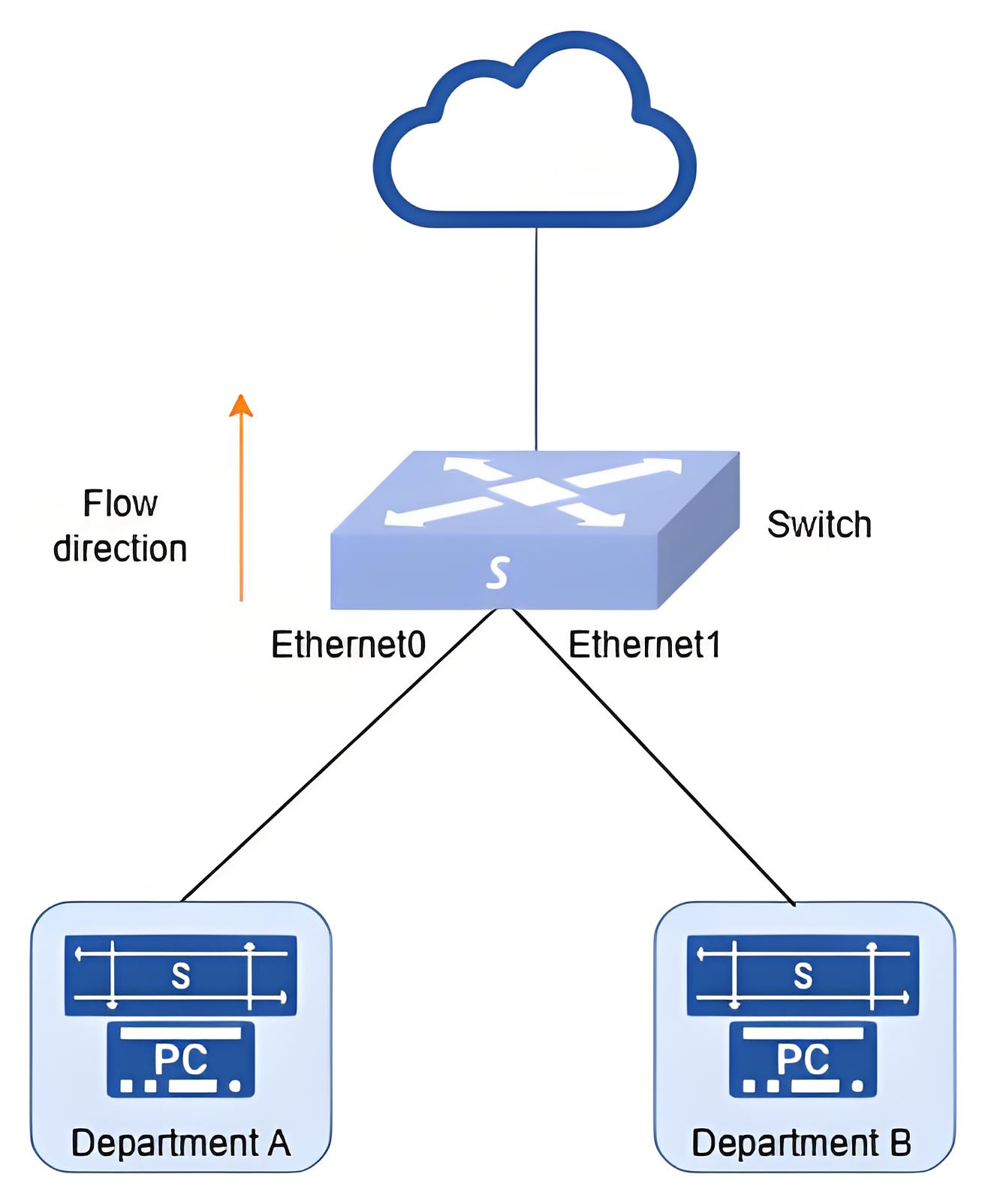
- Procedure
#Configure each interface IP to enable users to access the network through the Switch. (skipped)
#Configure traffic behavior
sonic# configure terminalsonic(config)# traffic behavior test1sonic(config-traffic-behavior-test1)# car tr-tcm cir 800000000 pir 1000000000sonic(config-traffic-behavior-test1)# exsonic(config)# traffic behavior test2sonic(config-traffic-behavior-test2)# car tr-tcm cir 500000000 pir 8000000000sonic(config-traffic-behavior-test2)# ex#Create flow_control ACL rule.
sonic(config)# access-list flow_control TABLE_1 ingresssonic(config-flow_control-acl-TABLE_1)# rule 200 source-ip 10.0.0.0/24 in-ports 0/0 traffic-behavior test1sonic(config-flow_control-acl-TABLE_1)# rule 201 source-ip 20.0.0.0/24 in-ports 0/1 traffic-behavior test2- Verify the configuration.
- Check the created policer and ACL rules.
sonic# show traffic behaviorName Type Mode CIR CBS------ ------ ------ --------- -----test1 BYTES TR_TCM 800000000 64000test2 BYTES TR_TCM 500000000 64000sonic# show acl ruleTable Rule Priority Action Match------- -------- ---------- -------------------------- -------------------TABLE_1 rule_201 201 SET_POLICER: POLICER|test2 IN_PORTS: Ethernet1 SRC_IP: 20.0.0.0/24TABLE_1 rule_200 200 SET_POLICER: POLICER|test1 IN_PORTS: Ethernet0 SRC_IP: 10.0.0.0/24- Send traffic to verify. Departments A and B are sending data traffic to the Switch using 1500Mbps and 1000Mbps respectively. The RX rate of Ethernet0 is about 800Mbps and the TX rate of Ethernet2 is about 500Mbps, and both have some packets dropped, indicating that the speed limit is successful.