
MAC Configuration Guide
此内容尚不支持你的语言。
Introduction
Section titled “Introduction”MAC (Media Access Control) address, also known as a physical address or hardware address. In the Internet, an IP address cannot specifically identify a user because anyone can change it, whereas the MAC address is written inside network card at the time of manufacture by the manufacturer of the network equipment and can uniquely identify a user. The MAC address consists of 48 bit-long, 12-bit hexadecimal numbers, of which, starting from left to right, bits 0 to 23 are codes applied by the vendor to the IETF and other bodies to identify the vendor, and bits 24 to 47 are assigned by the vendor itself. In addition to the physical MAC address, there are also broadcast MAC addresses (all 1s) and multicast MAC addresses (bit 8 is 1).
MAC Address Table
Section titled “MAC Address Table”The MAC address table records the MAC address and interface and the VLAN to which the interface belongs, etc. When the switch forwards packets, it queries the MAC table according to the destination MAC of packets. If the table contains the table entry corresponding to the destination MAC of packets, it forwards the packets directly through the egress interface in the table entry; if it does not contain the destination MAC, it forwards the packets through broadcast on all interfaces in the corresponding VLAN except the receiving interface.
Generation of MAC Address Table Entries
Section titled “Generation of MAC Address Table Entries”MAC tables can be generated in two ways: automatically, and manually.
- Automatic generation
In general, the MAC table is automatically generated by the source MAC learning. When Interface A on the switch receives a data frame, it analyses the source MAC of the frame and updates the table entry if the MAC is already included in the MAC address table; if the MAC is not included in the MAC address table, this new MAC address is added to the MAC table as a new table entry with the interface A corresponding to that MAC. To adapt to changes in the network topology, the MAC table needs to be updated constantly. Automatically generated table entries in the MAC table are not always valid, each table entry has a life cycle and any table entry that is not refreshed before it reaches that life cycle will be deleted, this life cycle is called the aging time. If a table entry is refreshed before the life cycle is reached, the aging time for that table entry is recalculated.
- Manual configuration
When the switch automatically generates MAC tables through source MAC learning, it is unable to distinguish between packets from legitimate and illegal users, which poses a security risk. If an illegal user disguises the source MAC of attack packets as the MAC of a legitimate user and enters from another interface of the switch, the switch will learn the wrong MAC address table entry and thus forward packets that should have been forwarded to the legitimate user to the illegal user. Therefore, to improve security, specific table entries can be manually added to the MAC table to bind the user device to the interface, thus preventing illegal users from spoofing the data.
Classification of MAC Address Table Entries
Section titled “Classification of MAC Address Table Entries”MAC address table entries are classified as static MAC, dynamic MAC and black hole MAC.
- Static MAC
Manually configured by the user. Table entries do not age. Static MAC priority is higher than automatically generated MAC. Table entries are not lost after reboot (save the configuration first).
- Dynamic MAC
Automatically generated by source MAC learning. Table entries can be aged. Dynamic table entries are lost after system reboot.
- Black Hole MAC
Manually configured by the user to discard packets whose source MAC or destination MAC is the same as the specified MAC. For example, a user is prohibited from sending or receiving packets. Blackhole MAC table entries do not age. Table entries are not lost after reboot (save the configuration first).
MAC Configuration
Section titled “MAC Configuration”MAC Default Setting
Section titled “MAC Default Setting”The default setting of MAC is shown in the table below.
Table 1 MAC Default Setting
| Parameters | Default value |
|---|---|
| Dynamic MAC table entry aging time | 1800 seconds |
| MAC address learning | Open |
| MAC drift detection function | Open |
Configure Static MAC
Section titled “Configure Static MAC”Table 2 Configure Static MAC
| Purpose | Commands | Description |
|---|---|---|
| Enter global configuration view. | configure terminal | - |
| Configure a static MAC. | mac-address static HH:HH:HH:HH:HH:HH vlan vlan-id interface-type interface-name | Interface type optional ethernet, link-aggregation |
Configure a Black Hole MAC
Section titled “Configure a Black Hole MAC”Table 3 Configure a Black Hole MAC
| Purpose | Commands | Description |
|---|---|---|
| Enter global configuration view | configure terminal | - |
| Configure a black hole MAC. | mac-address static HH:HH:HH:HH:HH:HH vlan vlan-id blackhole | - |
Set the Aging Time of Dynamic MAC
Section titled “Set the Aging Time of Dynamic MAC”MAC table entry aging time is a parameter that affects MAC self-learning of the switch. Dynamic MAC table entries that have exceeded the aging time are automatically deleted and the switch performs MAC learning again to construct new MAC table entries. Static MAC table entries are not affected by the aging time. Too long or too short for the aging time configuration can affect device performance. If the aging time is too long, the switch may keep many obsolete MAC table entries and thus run out of memory, resulting in the MAC table not being updated; if the aging time is too short, the switch may delete valid MAC table entries too quickly, resulting in a large number of broadcast packets and increasing the network burden. The user can configure it according to the actual situation. If the network topology is relatively stable, the aging time can be configured longer or configured as no aging; otherwise, the aging time can be configured shorter. For example, in a relatively stable network, if there is no traffic for a long time, all dynamic MAC address table entries will be deleted, which may cause the switch to suddenly broadcast a large number of data packets, resulting in security risks. Thus, the aging time of dynamic MAC address table entries can be set longer or not aging, in order to reduce broadcast packets and increase network stability and security.
Table 4 Set the Aging Time of Dynamic MAC Table Entries
| Purpose | Commands | Description |
|---|---|---|
| Enter global configuration view. | configure terminal | - |
| Set dynamic MAC aging time. | mac-address timer aging seconds | The default value is 1800s. The value range is 300-7200 seconds. |
| Configure dynamic MAC not to age. | mac-address timer no-aging | - |
Disable MAC Address Learning
Section titled “Disable MAC Address Learning”When the switch receives a large number of forged packets with different source MAC addresses, the capacity of the MAC address table may be exceeded, and MAC learning will not be possible after the over-specification, resulting in a large number of broadcast floods in the group network and taking up bandwidth. Disabling the MAC address learning function can effectively prevent this attack.
Disable Interface-based MAC Address Learning
As the MAC learning disable function is only for Layer 2 ports, it is required that the port being operated is in a VLAN.
Table 5 Disable Interface-based MAC Address Learning
| Purpose | Commands | Description |
|---|---|---|
| Enter global configuration view | configure terminal | - |
| Enter interface configuration view. | interface {ethernet interface-name|link-aggregation lagid} | Sub-interfaces are not supported currently. |
| Disable MAC Learning | no mac-address learning | - |
Disable VLAN-based MAC Address Learning
Table 6 Disable VLAN-based MAC Address Learning
| Purpose | Commands | Description |
|---|---|---|
| Enter global configuration view | configure terminal | - |
| Enter VLAN view | vlan vlan-id | - |
| Disable MAC Learning | no mac-address learning | - |
Configure MAC Table Entry Limit
Section titled “Configure MAC Table Entry Limit”Only and devices support this feature.
Table 7 Configure MAC Table Entry Limit
| Purpose | Commands | Description |
|---|---|---|
| Enter global configuration view | configure terminal | - |
| Enter interface configuration view. | interface {ethernet interface-name|vlan vlan-id} | - |
| Configure MAC table entry limit for an interface | mac-limit number | number : number of mac table entries allowed to be learnt, in the range [1,131072]. |
Configure the MAC Address of Layer 3 Interface
Section titled “Configure the MAC Address of Layer 3 Interface”By default, the interface MAC of RIF (Router Interface) is the MAC address dynamically assigned by the system or is the same as the switch MAC. This series product supports users to reconfigure the MAC of physical interfaces, VLAN interfaces and link aggregation interfaces.
Table 8 Configure the MAC Address of Layer 3 Interface
| Purpose | Commands | Description |
|---|---|---|
| Enter global configuration view | configure terminal | - |
| Enter interface configuration view. | interface {ethernet interface-name[.subinterface-number]|link-aggregation lag-id[.subinterface-number]|vlan vlan-id} | - |
| Configure the MAC address of the interface | mac-address HH:HH:HH:HH:HH:HH | - |
Display and Maintenance
Section titled “Display and Maintenance”Display the MAC Table
Section titled “Display the MAC Table”Execute the following command to display the MAC table details.
Table 9 Display MAC Table
| Purpose | Commands | Description |
|---|---|---|
| Check MAC table | show mac-address [ethernet|link-aggregation interface-name|all] | The parameter all displays the MAC addresses synchronized between local and remote VXLANs. |
Clear MAC Table
Section titled “Clear MAC Table”For daily maintenance, the following command can be executed to clear the MAC table.
Table 10 Clear the MAC Table
| Purpose | Commands | Description |
|---|---|---|
| Clear MAC table | clear mac-address [ethernet|link-aggregation interface-name] [vlan id] dynamic | - |
Typical Configuration Example
Section titled “Typical Configuration Example”- Networking Requirements
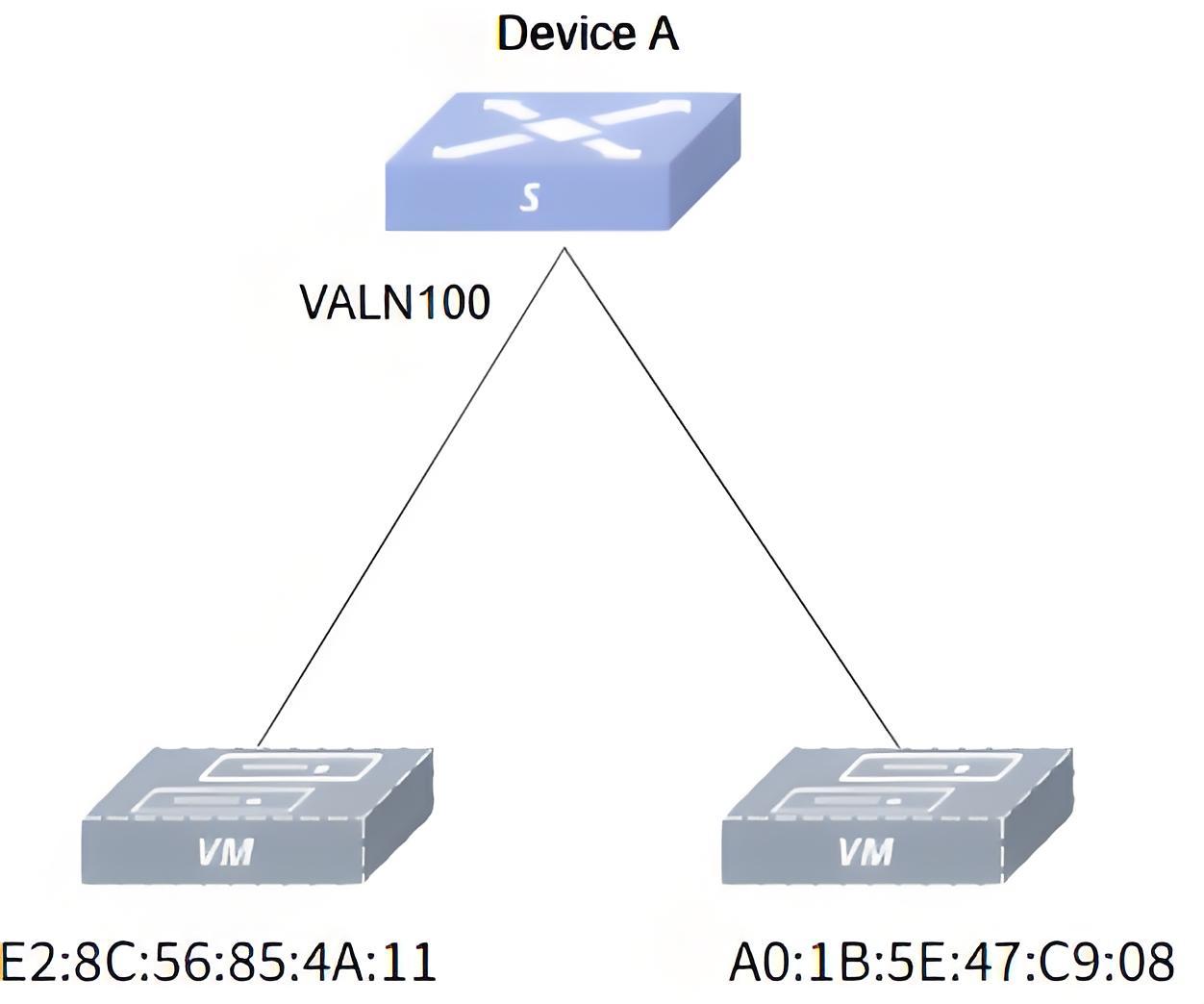
There is a user host with MAC address E2:8C:56:85:4A:11, which belongs to VLAN100 and connects to the switch port Ethernet0. To prevent illegal users from fraudulently obtaining data by impersonating their identity, you are required to add a static table entry for this user in the MAC table of the switch. Another user host, whose MAC address is A0:1B:5E:47:C9:08 and belongs to VLAN 100, has been blacklisted for having accessed the switch’s network for illegal operations and has requested that a blackhole MAC table entry be added to the switch, making it impossible for the user host to receive packets. Set dynamic MAC table entry aging time to 720sTopology.
- Topology
- Procedure
#Configuring a static MAC
sonic# configure terminalsonic(config)# mac-address static E2:8C:56:85:4A:11 ethernet 0/0 vlan 100#Configuring the black hole MAC
sonic(config)# mac-address static A0:1B:5E:47:C9:08 vlan 100 blackhole#Configuring the aging time
sonic(config)# mac-address timer aging 720- Verify the configuration.
#Check MAC table
sonic# show mac-address No. Vlan MacAddress Port Type----- ------ ----------------- --------- --------- 1 100 E2:8C:56:85:4A:11 0/0 Static 2 100 A0:1B:5E:47:C9:08 None BlackHoleTotal number of entries 2