
QinQ Configuration
Introduction
Section titled “Introduction”QinQ, short for “802.1Q in 802.1Q,” is a simple Layer 2 VPN (Virtual Private Network) protocol based on IEEE 802.1Q technology. QinQ adds an additional VLAN tag to private network packets, enabling them to carry two layers of VLAN tags. This allows packets to traverse the carrier’s core network (also known as the public network), enabling the carrier to provide services for user networks containing multiple VLANs. When packets traverse the carrier network and reach the private network device on the other side of the carrier network, flooding or FDB lookup occurs within the outer VLAN. When QinQ packets are output from the downstream port, the outer VLAN is stripped, and data forwarding occurs within the inner VLAN.
Initially, QinQ was primarily developed to expand the VLAN space. It achieves this by adding an additional layer of 802.1Q tags on top of existing 802.1Q packets, increasing the VLAN count to 4094*4094.
With the development of metropolitan Ethernet and the demand for refined operations by carriers, QinQ’s dual-layer tagging has found further applications. Its inner and outer tags can represent different information, such as the inner tag representing users and the outer tag representing services. Due to its ease of use, QinQ has been widely adopted by various carriers. Particularly, the emergence of flexible QinQ has made QinQ services more favored and endorsed by carriers, offering features such as effective separation between VLANs of different users and public network VLANs, and maximizing savings on carrier network VLAN resources.
Explanation of Principles
Section titled “Explanation of Principles”Basic QinQ
Section titled “Basic QinQ”Basic QinQ, also known as QinQ Layer 2 tunneling, is configured through interfaces. Once the basic QinQ feature is enabled on an interface, when the device receives a data packet on that interface, it attaches the VLAN tag of the default VLAN for that interface to the packet. If the received data packet already carries a VLAN tag, it becomes a double-tagged packet. If the incoming data packet lacks a VLAN tag, it will be tagged with the VLAN tag of the interface’s default VLAN.
When there is a need to utilize multiple VLANs, the basic QinQ feature can be configured by adding an outer tag to the VLAN, thereby expanding the numerical range of available VLANs and addressing the issue of limited VLAN quantity resources.
Flexible QinQ
Section titled “Flexible QinQ”Flexible QinQ is a more versatile implementation of QinQ, combining the characteristics of interfaces and VLANs. In the case of data packets received on the same interface with different inner VLAN IDs, Flexible QinQ adds distinct outer VLAN tags to them.
Compared to Basic QinQ, Flexible QinQ extends its functionality, providing greater flexibility and diversity. The key differences between the two are:
- Basic QinQ: All frames entering the Layer 2 QinQ interface receive the same outer tag.
- Flexible QinQ: Frames entering the Layer 2 QinQ interface can have different outer tags added based on their different inner tags, allowing for a more detailed segmentation of user VLANs.
QinQ Configuration
Section titled “QinQ Configuration”| Configure Tasks | Instructions |
|---|---|
| Modify Interface TPID | Optional |
| Configure Interface-based Basic QinQ Rules | Optional |
| Configure VLAN-based Flexible QinQ Functionality | Optional |
Modifying interface TPID
Section titled “Modifying interface TPID”The Tag Protocol Identifier (TPID) is a field within VLAN tags used to indicate the protocol type of the VLAN tag. By inspecting the corresponding TPID value, devices can determine whether the frame carries a service provider VLAN tag or a user VLAN tag.
Different service providers may set the TPID of the outer VLAN tag of QinQ frames to different values. To ensure compatibility with these systems, the TPID value can be modified so that QinQ frames sent to the public network carry the same TPID value as a specific service provider, enabling interoperability with devices from that service provider.
| Operation | Command | Description |
|---|---|---|
| Enter the interface configuration view | interface ethernet interface-id | |
| Modify Interface TPID | qinq protocol tpid | Default value : 0x8100 |
Configuring Interface-based Basic QinQ Rules
Section titled “Configuring Interface-based Basic QinQ Rules”When the port enables basic QinQ, all traffic entering the device from this port will be tagged with the default VLAN tag of this port.
If the received packet is untagged, a VLAN tag of the default VLAN of this port will be added to the packet.
If the received packet is tagged, another layer of the default VLAN tag of this port will be added outside the existing VLAN tag of the packet, making it a double-tagged packet.
| Operation | Command | Description |
|---|---|---|
| Enter the interface configuration view | interface ethernet interface-id | |
| Configuring Interface-based Basic QinQ Rules | qinq enable |
Configuring VLAN-based Flexible QinQ Functionality
Section titled “Configuring VLAN-based Flexible QinQ Functionality”Building upon basic QinQ, it supports matching the VLAN carried by incoming packets and encapsulating them with a specified VLAN.
If the packet does not carry a VLAN, an additional layer of the VLAN corresponding to the Port VLAN ID (PVID) will be added to it.
If the packet carries a VLAN, it will attempt to match the configured rules. If a match is found, an additional layer of the VLAN specified in the rule will be added to the packet.
| Operation | Command | Description |
|---|---|---|
| Enter the interface configuration view | interface ethernet interface-id | |
| Configuring Interface-based Basic QinQ Rules | vlan-stack tagged vlan-id stack-id [remark-tc value ] | stack-id: Specifies the outer VLAN tag after stacking remark-tc : Modifies the packet priority |
Display and Maintenance
Section titled “Display and Maintenance”| Operation | Command |
|---|---|
| View the QinQ protocol configuration on an interface | show interface qinq protocol [interface_name] |
| View the VLAN stack functionality configuration on an interface | show interface vlan-stack tagged |
Configuration Example
Section titled “Configuration Example”Network requirements
Two branches of a company communicate through the operator’s network, and the company’s internal services use VLAN 100 and 200 to interoperate. The operator’s network provides VLAN 101 and TPID 8200.
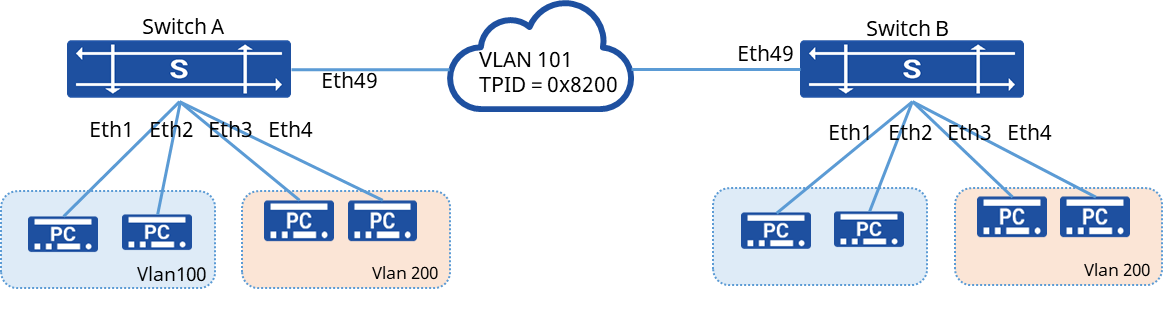
Procedure
- The configuration of Switch A and Switch B is the same, here is the example of Switch A
- Create VLAN 100, 200 and add the corresponding physical interfaces to the VLAN
sonic(config)# vlan 100sonic(config)# interface ethernet 1sonic(config-if-1)# switchport trunk vlan 100sonic(config)# interface ethernet 2sonic(config-if-2)# switchport trunk vlan 100sonic(config)# vlan 200sonic(config)# interface ethernet 3sonic(config-if-3)# switchport trunk vlan 200sonic(config)# interface ethernet 4sonic(config-if-4)# switchport trunk vlan 200- Add the user-side interface to the operator-provided VLAN in access mode
sonic(config)# vlan 101sonic(config)# port-group ethernet 1-4sonic(config-port-group-1-4)# switchport access vlan 101- Configure the operator-side interface to allow access to the VLAN provided by the operator
sonic(config)# vlan 101sonic(config)# interface ethernet 49sonic(config-if-49) switchport trunk vlan 101- Enable QinQ on the user-side interface and configure the VLAN tag to be added
sonic(config)# interface ethernet 1sonic(config-if-1)# qinq enablesonic(config)# interface ethernet 2sonic(config-if-2)# qinq enablesonic(config)# interface ethernet 3sonic(config-if-3)# qinq enablesonic(config)# interface ethernet 4sonic(config-if-4)# qinq enable- Configure the TPID of the operator’s network for the operator-side interface
sonic(config)# interface ethernet 49sonic(config-if-49)# qinq protocol 0x8200Verify configuration
The PCs in the same VLAN under Switch A and Switch B can communicate with each other.