
SyncE Configuration
SyncE Configuration
Section titled “SyncE Configuration”Introduction
Section titled “Introduction”SyncE is a synchronization technique based on carrying and recovering frequency information from physical layer code streams. It can choose whether the device uses its own crystal frequency or the crystal frequency obtained from the peer-to-peer port. It is common to use SyncE in conjunction with the PTP technique to simultaneously meet the requirements of high accuracy in both frequency and phase, and to achieve nanosecond time synchronization.
SyncE configuration
Section titled “SyncE configuration”Configuring the interface SyncE mode
Section titled “Configuring the interface SyncE mode”The interface is master by default after enabling SyncE, and it is recommended that the interface SyncE mode is the same as PTP mode.
| Operation | Command | Description |
|---|---|---|
| Enter the interface configuration view | interface ethernet interface_num | |
| Configure SyncE mode | synce mode {master|slave} |
Configuring SyncE Priority
Section titled “Configuring SyncE Priority”When more than one interface enables SyncE, the interface with the highest priority is used as the selected.
| Operation | Command | Description |
|---|---|---|
| Enter the interface configuration view | interface ethernet interface_num | |
| Configure SyncE priority | synce priority {priority} | Assignable value range 0-255, the smaller the value the higher the priority |
Display and Maintenance
Section titled “Display and Maintenance”| Operation | Command |
|---|---|
| Display SyncE status of device | show synce status |
| Display Synce information of interface | show ptp interface status interface_num |
SyncE Configuration Example
Section titled “SyncE Configuration Example”Network requirements
In this network, Device B uses the crystal frequency of the peer Device A. Configure the interface on which Device B interconnects with Device A as slave. (When multiple interfaces interconnect, select the interface with the lowest priority to synchronize the clock signals).
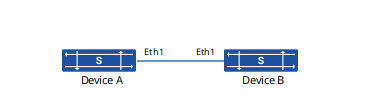
Procedure
# Device A
sonic(config)# interface ethernet 1sonic(config-if-1)# synce enablesonic(config-if-1)# synce mode master# Device B
sonic(config)# interface ethernet 1sonic(config-if-1)# synce enablesonic(config-if-1)# synce mode slavesonic(config-if-1)# synce priority 10Verify configuration
# Display SyncE information of interface on Device B
sonic# show ptp interface 1SyncE Enable: trueSyncE Mode: slaveSyncE Priority: 10# Display SyncE status on Device B
sonic# show synce status Interface Enable Mode Priority Selected----------- -------- ------ ---------- ------------ Ethernet1 true slave 10 selected