
PoE Configuration
Introduction
Section titled “Introduction”PoE (Power over Ethernet), namely “Power over Ethernet”, is a technology that can provide power to network devices through network cables. PoE technology can transmit both power and data signals simultaneously, eliminating the need for additional power cables for devices. The principle of PoE technology is to add direct current power to Ethernet cables, enabling network devices to be directly powered through network cables.
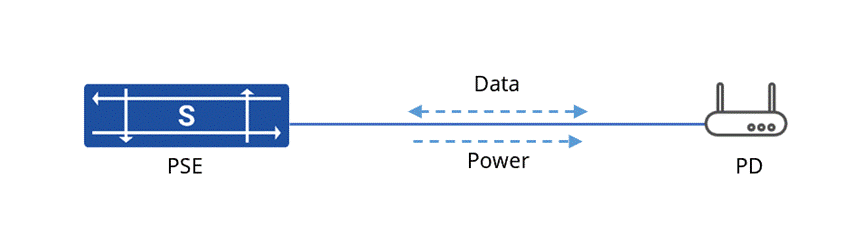
PSE (Power Sourcing Equipment): PSE equipment refers to network devices that support PoE technology, and it is one of the core components in a PoE power supply system. PSE generally comes in two forms: PoE power suppliers and PoE switches. Its main function is to transmit power and data signals through Ethernet cables and supply power to powered devices (PD).
PD (Powered Device): PD devices refer to network devices that need to receive power supply in a PoE power supply system, such as IP phones, cameras, wireless access points, etc. PD devices obtain power supply from PSE devices through Ethernet cables and conduct data communication with PSE devices.
Configure the PoE Interface
Section titled “Configure the PoE Interface”PoE Basic Configuration
Section titled “PoE Basic Configuration”| Operation | Command | Description |
|---|---|---|
| Enter the system configuration view | configure | |
| Enter the interface view | interface ethernet ID | |
| Enable the PoE power supply function of the interface | poe enable | - |
| Configure the delayed startup time for the PoE function of the interface | poe delay time | Value range: 0-3600, unit is second (s) |
| Configure the maximum POW supply power of the system | poe max-power{60w|30w|15w|30w-at} | Different hardware models have different ranges of power limit for system and interface PoE power supply that can be configured. The specific configurable power size is subject to the help information on the device. |
| Configure PoE power supply priority | poe priority {low|high|critical} | When the total power supply of the device reaches the limit, the interfaces with lower priority will be powered off according to the POE power supply priority of the interfaces. |
| Enable the device to detect the power supply compatibility of PD devices | poe legacy-detect enable | Enabling the compatibility detection function of PD devices allows the device to detect PD devices that do not comply with the 802.3af or 802.3at standards and supply power to these PD devices. If the compatibility check function of PD devices is not enabled, the device will not recognize non-standard PD devices and cannot supply power to non-standard PD devices (enabled by default). |
| Initialize PoE functions | poe reinitialize | If the device is not initialized for PoE at the factory, this command can be used for manual initialization. There is no need to restart the device after executing this command, but all PoE enablings will be automatically turned off and turned on after the initialization is completed. |
PoE Power Supply Time Configuration
Section titled “PoE Power Supply Time Configuration”To improve energy efficiency and achieve automated management, a time-based power supply strategy can be configured for PoE ports connected to terminal devices such as wireless APs and IP phones. This function can automatically cut off the power supply to the ports during non-working hours and restore it before business hours, thereby eliminating unnecessary energy consumption and manual operations.
| Operation | Command | Description |
|---|---|---|
| Enter the system configuration view | configure | |
| Configure the PoE power-off time range | time-range name from date-stop day to date-start day | Power is supplied throughout the day by default name: Configure Policy Name date-start: Start time of power supply, format: xx:xx date-stop: End of power supply time, in the format: xx:xx day: Strategy repetition method, format: xx-xx-xx |
| Configure the PoE power-off time range | time-range name date-stop to date-start day | name: Configure Policy Name date-start: Start time of power supply, format: xx:xx date-stop: End of power supply time, in the format: xx:xx day:Strategy repetition method, format: Mon/Tue/Wed/Thu/Fri/Sat/Sun: A specific day of each week daily: Repeat every day working-day: All working days off-day: All non-working days |
| Enter the interface view | interface ethernet ID | |
| Enable the PoE power supply function of the interface | poe enable | - |
| Apply the PoE power supply strategy to the specified interface | poe power-off time-range name | name: Name of Power Supply Strategy |
PoE Pd Alive-Check Configuration
Section titled “PoE Pd Alive-Check Configuration”The PoE survival detection function periodically sends ping commands to check the status of the peer device. If the PD (Powered Device) does not respond, it will restart the PD device by turning off and then turning on the PoE power supply.
Problem solved: Terminal devices in the network (such as IP cameras, wireless APs, IP phones, etc.) may enter a “stuck” state due to software bugs, excessive load, temperature changes, or other unknown reasons. That is: the device itself is powered on (the PoE light is on), but its network function is paralyzed (unable to be pinged, and services are interrupted).
Traditional processing method: It requires operation and maintenance personnel to manually detect faults, rush to the equipment site or find the corresponding switch port, and perform a physical restart (unplugging and plugging the network cable or power cable). This process is time-consuming and labor-intensive, especially when the equipment is installed in hard-to-reach locations (such as high-altitude cameras).
PoE survival detection solution: The system automatically completes the entire process of “detection-judgment-repair”.
- Detection: The switch regularly sends ping commands to the device.
- Judgment: After consecutive unresponsiveness for multiple times, the device is determined to be faulty.
- Repair: Simulate the “manual plugging and unplugging” operation by remotely controlling the POE power supply cycle (turning off and then on the power) to perform a soft restart on the device.
The application of this function can significantly shorten the fault recovery time, from the previous hour-level or day-level to minute-level, without manual intervention, achieving a “self-healing network”.
| Operation | Command | Description |
|---|---|---|
| Enter the system configuration view | configure | |
| Enter the interface view | interface ethernet ID | |
| Enable the PoE PD survival detection function of the interface | poe pd alive-check enable | - |
| Configure the IP address of the PD device | poe pd alive-check ip ip address | IP address: such as 192.168.1.100 (must be on the same network segment as the interface) |
| Configure the delay detection time after PoE is turned on/restarted | poe pd alive-check delay seconds | seconds: 5-300 (default 60) |
| Configure the time interval for ping detection | poe pd alive-check interval seconds | seconds: 10-300 (default 30) |
| Configure the maximum threshold for executing actions | poe pd alive-check err-threshold times | times: 1-10 (default 3) |
| Execution action after configuration detection failure | poe pd alive-check action action | action:-alarm:Send log alerts + write to stateDB (default)-reboot:Restart the PoE port |
| Configure the time interval between PoE turning off and turning on during restart | poe pd alive-check reboot-interval seconds | seconds:1-180 (default 10) |
Display and Maintenance
Section titled “Display and Maintenance”| Operation | Command | Description |
|---|---|---|
| Display interface PoE information | show interface poe | The information that can be displayed by this command includes: the configured maximum power, the currently consumed power, the peak power consumed, and other information. If the PoE function of the interface is not enabled, all information statuses will be N/A. |
| Display the configuration parameters and current status of the interface PoE PD Alive Check function | show interface poe pd alive-check status | Configuration of PoE PD Alive Check parameters and current status detection |
Configuration Example
Section titled “Configuration Example”Networking Requirements
In this network, the PoE switch stops supplying power from 20:00 every night to 8:00 the next day on working days, and stops supplying power all day on non-working days. The interface has the survival detection function enabled. The Eth1 port is configured with a delayed startup of 30 seconds and a power supply priority of high.
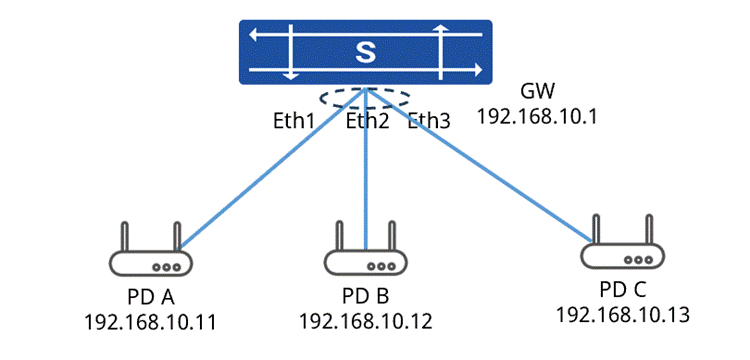
Configuration Steps
1. Configure the power-off time of the switch in the system view.
sonic(config)# time-range test1 00:00 to 08:00 working-daysonic(config)# time-range test2 20:00 to 23:59 working-daysonic(config)# time-range test3 00:00 to 23:59 off-day2. Enter the interface view to enable the PoE function, apply the power supply strategy, and configure survival detection.
sonic(config)# port-group ethernet 1-3sonic(config-port-group-1-3)# poe enableEthernet1: poe enableEthernet2: poe enableEthernet3: poe enable3. Apply the power-off time strategy for applications
sonic(config-port-group-1-3)# poe power-off time-range test1Warning: This operation may power off some PD. Continue?[Y/N]: ysonic(config-port-group-1-3)# poe power-off time-range test2Warning: This operation may power off some PD. Continue?[Y/N]: ysonic(config-port-group-1-3)# poe power-off time-range test3Warning: This operation may power off some PD. Continue?[Y/N]: y4. Configure the PoE survival detection function
sonic(config-port-group-1-3)# poe pd alive-check enablesonic(config-port-group-1-3)# poe pd alive-check delay 120sonic(config-port-group-1-3)# poe pd alive-check interval 60sonic(config-port-group-1-3)# poe pd alive-check err-threshold 5sonic(config-port-group-1-3)# poe pd alive-check action rebootsonic(config-port-group-1-3)#poe pd alive-check reboot-interval 30sonic(config-port-group-1-3)# exitsonic(config)# interface ethernet 1sonic(config-if-4)# poe pd alive-check ip 192.168.10.11sonic(config)# interface ethernet 2sonic(config-if-4)# poe pd alive-check ip 192.168.10.12sonic(config)# interface ethernet 3sonic(config-if-4)# poe pd alive-check ip 192.168.10.135. Configure the delayed startup function and power supply priority of interface 1
sonic(config)# interface ethernet 1sonic(config-if-1)# poe delay 30sonic(config-port-group-2-4)# poe delay 300sonic(config-if-1)# poe priority highWarning: This operation may power off some PD. Continue?[Y/N]: yVerification
Check the interface PoE information
sonic# show interface poe Interface poe_status Poe_delay Current(A) Voltage(V) Power(W) MaxPower(W) Power/MaxPower Power/DevicePSU Legacy_detect----------- ------------ ----------- ------------ ------------ ---------- ------------- ---------------- ----------------- --------------- Ethernet1 enable 30 0.0930 54.800 5.096 30 16.987% N/A enable Ethernet2 enable N/A 0.0940 54.800 5.151 30 17.170% N/A enable Ethernet3 enable N/A 0.0900 54.800 4.932 30 16.440% N/A enable Ethernet4 N/A N/A N/A N/A N/A N/A N/A N/A N/A… Ethernet48 N/A N/A N/A N/A N/A N/A N/A N/A N/A----------- ------------ ----------- ------------ ------------ ---------- ------------- ---------------- ----------------- ---------------The sum of the above POEs power is: 15.179 wThe maximum POEs power of the device is 150W, the ratio of (sum_POEs_power/maxPOEsPower) is :10.119%Check the interface PoE PD Alive Check information
sonic# show interface poe pd alive-check status----------------------------------------------------------------------config for delay/interval/err_threshold/action/reboot_interval+------------+---------+--------------------+---------------+---------------------+-------+-----------+| Interface | mode | config | pd-ip | last_ping_time | alive | err_count |+============+=========+====================+===============+=====================+=======+===========+| Ethernet1 | enable | 120/60/5/reboot/30 | 192.168.10.11 | 2026-02-09 10:00:32 | True | 0 |+------------+---------+--------------------+---------------+---------------------+-------+-----------+| Ethernet2 | enable | 120/60/5/reboot/30 | 192.168.10.12 | 2026-02-09 10:00:32 | True | 0 |+------------+---------+--------------------+---------------+---------------------+-------+-----------+