
IGMP Snooping Configuration
Introduction
Section titled “Introduction”IGMP is a protocol used in IPv4 networks to manage multicast group membership relationships between hosts and routers. Hosts can notify routers about their interest in specific multicast groups by sending IGMP messages, and routers maintain multicast group membership tables based on these messages. IGMP Snooping is the technology that implements this management mechanism on switches.
Explanation of Principles
Section titled “Explanation of Principles”In IGMP, ports have two roles:
Member Ports: Member ports refer to the switch ports connected to host devices such as computers, routers, etc. These ports listen to IGMP messages sent by hosts to determine which multicast groups the hosts are interested in. Based on this information, the switch can decide which member ports to forward multicast data to.
Router Ports: Router ports are switch ports connected to routers. Routers are responsible for providing multicast services to multiple subnets in the network. Router ports listen to IGMP messages sent by routers to determine which multicast groups the router is a member of. Switches forward multicast data to these ports so that routers can distribute multicast data across various subnets.
The specific handling of different IGMP actions by switches running IGMP Snooping is as follows:
General Group Query Messages
When the switch receives IGMP General Group Query messages, it forwards them out through all ports in the VLAN except the receiving port.
For the receiving port, the switch handles it as follows:
- If the dynamic router port is already included in the router port list, its aging timer is reset.
- If the dynamic router port is not yet included in the router port list, it is added to the router port list, and its aging timer is started.
Membership Report Messages
When hosts receive IGMP Query messages or want to join a multicast group, they send IGMP Membership Report messages to the IGMP querier.
When the switch receives IGMP Membership Report messages, it forwards them out through all router ports in the VLAN.
For the receiving port, the switch handles it as follows:
- If there is no forwarding table entry for the multicast group, one is created, and the port is added as a dynamic member port to the outgoing port list, and its aging timer is started.
- If there is an existing forwarding table entry for the multicast group but the port is not included in the outgoing port list, the port is added as a dynamic member port to the outgoing port list, and its aging timer is started.
- If there is an existing forwarding table entry for the multicast group and the port is already included in the outgoing port list as a dynamic member port, its aging timer is reset.
Leaving Multicast Groups
When hosts running IGMPv2 or IGMPv3 leave multicast groups, they send IGMP Leave Group messages to notify the multicast router that they are leaving a specific multicast group.
- If the switch does not have a forwarding table entry for the multicast group or if the port is not included in the outgoing port list for the corresponding multicast group, the switch does not forward the Leave Group message to any port and discards it directly.
- If there is a forwarding table entry for the multicast group and the port is included in the outgoing port list for the corresponding multicast group, the switch forwards the Leave Group message out through all router ports in the VLAN. Additionally, since the switch does not know if there are other members of the multicast group on the receiving port, it does not immediately remove the port from the outgoing port list for the multicast group. Instead, it resets the aging timer for the port.
IGMP Snooping Configuration
Section titled “IGMP Snooping Configuration”Configuring Static Multicast
Section titled “Configuring Static Multicast”Configuring Static Multicast Member
Section titled “Configuring Static Multicast Member”| Operation | Command | Description |
|---|---|---|
| Enter the VLAN view | vlan ID | |
| Enable IGMP Snooping function | igmp-snooping enable | |
| Configure a static router port | igmp-snooping mrouter ethernet ID | |
| Enter the interface configuration view | interface ethernet ID | |
| Configure static member ports | ip igmp join ip-address | ip-address: Multicast group addresses statically added by the interface |
Display and Maintenance
Section titled “Display and Maintenance”| Operation | Command |
|---|---|
| View IGMP enablement information: | show vlan igmp-snooping [vlan-id vlan-id ] |
| Display IGMP Snooping router port information | show vlan igmp-snooping mrouter |
| View membership information for multicast groups | show l2-multicast-table |
| Check the aging time for IGMP Snooping router ports | show vlan igmp-snooping mrouter-aging |
IGMP Snooping Configuration
Section titled “IGMP Snooping Configuration”Configuring Basic IGMP Snooping Functionality
Section titled “Configuring Basic IGMP Snooping Functionality”| Operation | Command | Description |
|---|---|---|
| Enter the VLAN view | vlan ID | |
| Enable IGMP Snooping function | igmp-snooping enable | |
| Enable IGMP Snooping querier | igmp-snooping querier enable | |
| Configure the source address for IGMP queries | igmp-snooping querier-ip ip-address |
Configuring IGMP Snooping Port Aging Time
Section titled “Configuring IGMP Snooping Port Aging Time”After receiving different IGMP protocol messages, the device starts aging timers for member ports with different durations:
When member ports of the device receive Report messages from downstream hosts, the port aging time is set to: Robustness factor × General Query Interval + Maximum Response Time.
When member ports of the device receive Leave messages from downstream hosts, the port aging time is set to: Specific Query Interval × Robustness factor.
| Operation | Command | Description |
|---|---|---|
| Enter the VLAN view | vlan ID | |
| Configure the IGMP Snooping general query interval | igmp-snooping query-interval value | |
| Configure the IGMP Snooping maximum response time | igmp-snooping query-max-response-time value | |
| Configure the IGMP Snooping specific query interval | igmp-snooping last-member-query-interval value | |
| Configure the IGMP Snooping robustness factor | igmp-snooping robustness value |
Enabling Fast Leave on Member Interfaces
Section titled “Enabling Fast Leave on Member Interfaces”Fast Leave on a port means that when the switch receives an IGMP leave message from a host indicating it is leaving a multicast group, the switch immediately removes that port from the outgoing port list for the corresponding forwarding table entry. Subsequently, when the switch receives a specific IGMP query message for that multicast group, it will no longer forward it out of that port.
| Operation | Command | Description |
|---|---|---|
| Enter the interface view | Interface interface_ ID | |
| Enable fast leave on member interface | igmp-snooping fast-leave enable |
Enabling IGMP Snooping Proxy Function
Section titled “Enabling IGMP Snooping Proxy Function”When there are numerous member hosts in the network or when member hosts frequently join/leave multicast groups, a large number of IGMP join/leave messages may be generated, resulting in significant processing pressure on the access devices. To reduce the number of IGMP join and leave messages received by upstream devices, IGMP Snooping Proxy functionality can be configured on edge devices to allow them to act as proxies for downstream hosts to send join and leave messages to upstream devices.
Handling of join messages
Upon receiving a join message for a multicast group on a port, if a forwarding table entry exists for that group and its outgoing port list already includes the dynamic member port, reset the aging timer for that entry.
If a forwarding table entry exists for the multicast group but its outgoing port list does not include the port, add the port as a dynamic member port to the outgoing port list and start its aging timer.
If no forwarding table entry exists for the multicast group on the device, create one, add the port as a dynamic member port to the outgoing port list, start its aging timer, and send a report message for that group to all router ports.
Handling of leave messages
Upon receiving a leave message for a multicast group on a port, send a specific query message for that group to the port.
Only send a leave message for the group to all router ports when removing the last member port from the corresponding forwarding table entry for that multicast group.
Handling of general group query messages
Upon receiving a general group query message, forward it to all ports in the VLAN except the receiving port.
Generate report messages based on locally maintained group membership relationships and forward them to all router ports simultaneously.
| Operation | Command | Description |
|---|---|---|
| Enter the VLAN view | vlan ID | |
| Enable IGMP Snooping function | igmp-snooping enable | |
| Enable IGMP Snooping Proxy function | igmp-snooping-proxy enable |
Configuration Example
Section titled “Configuration Example”Static Multicast Configuration Example
Section titled “Static Multicast Configuration Example”Network requirements
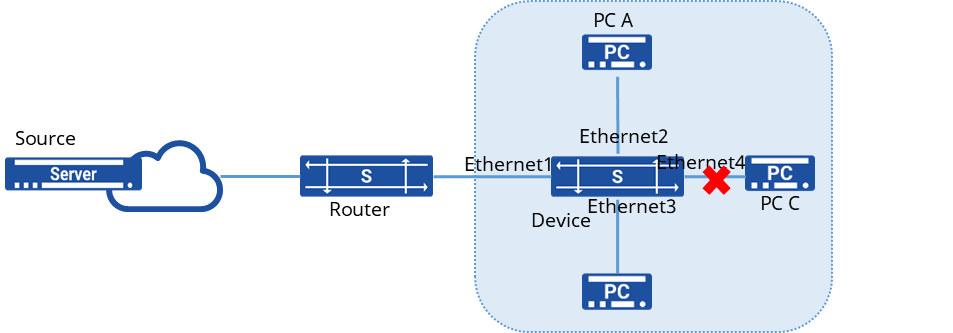
Router through the Device connected to the user network, the network has A, B, C three users, where only two users A and B need to receive multicast data from multicast group 224.1.1.1, C does not need to receive.
Procedure
- Create a VLAN and add member interfaces
sonic(config)# vlan 100sonic(config)# port-group ethernet 1-4sonic(config-port-group-1-4)# switchport access vlan 100- Enable IGMP Snooping on the interface and add interfaces Ethernet2, 3 to the multicast group in a static manner
sonic(config)# interface ethernet 1sonic(config-if-1)# igmp snooping enablesonic(config)# interface ethernet 2sonic(config-if-2)# igmp snooping enablesonic(config)# interface ethernet 3sonic(config-if-3)# igmp snooping enablesonic(config)# interface ethernet 4sonic(config-if-4)# igmp snooping enableVerify configuration
- View multicast group information.
sonic# show l2-multicast-tableTotal L2_multicast_forwarding_group counters: 2(Source,Group) Interface Vlan-------------------- ----------- ------(0.0.0.0, 224.1.1.1) Ethernet2 100 Ethernet3 100- Send a multicast message with destination IP 224.1.1.1 to confirm that only A and B can receive the multicast message and C cannot receive the multicast message
IGMP Snooping Configuration
Section titled “IGMP Snooping Configuration”Network requirements
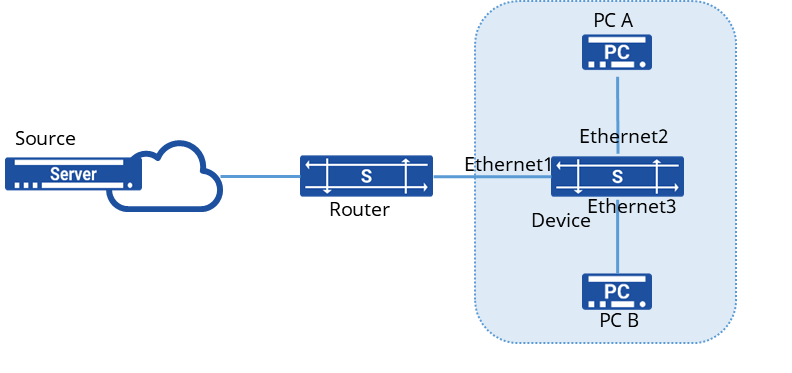
Router connects to user network as IGMP querier through Device, there are two users in the network, PC A and PC B. IGMP Snooping is running on Device, multicast source sends data to multicast group 224.1.1.1,225.1.1.1.
Procedure
Create VLANs and add member interfaces
sonic(config)# vlan 100sonic(config-vlan-100)# igmp snooping enablesonic(config)# port-group ethernet 1-3sonic(config-port-group-1-3)# switchport access vlan 100Verify configuration
- View Multicast Group Information
sonic# show l2-multicast-tableTotal L2_multicast_forwarding_group counters: 2(Source,Group)       Interface   Vlan-------------------- ----------- ------(0.0.0.0, 224.1.1.1) Ethernet2    100          Ethernet3    100
(0.0.0.0, 225.1.1.1) Ethernet2 100 Ethernet3 100- Send multicast messages with destination IP 224.1.1.1 and 225.1.1.1 respectively to confirm that A and B can receive the multicast messages.