
PIM-ASM Configuration
Introduction
Section titled “Introduction”PIM stands for Protocol Independent Multicast, which means it can utilize the unicast routing table generated by static routing or any unicast routing protocol (including RIP, OSPF, IS-IS, BGP, etc.) to provide routing for IP multicast. Multicast routing is independent of the unicast routing protocol used, as long as the corresponding multicast routing table entries can be generated through the unicast routing protocol. As a multicast routing solution, it directly leverages the routing information from the unicast routing table to perform RPF (Reverse Path Forwarding) checks on multicast packets. Once the checks are passed, multicast routing table entries are created to forward the multicast packets. As an intra-domain multicast routing protocol, PIM supports two modes: dense mode (PIM-DM) and sparse mode (PIM-SM).
PIM-SM (ASM) operates as a sparse network model, and its implementation involves the following key aspects:
- Maintenance of a critical PIM router in the network: the Rendezvous Point (RP), which serves any group members or multicast sources that may appear. All PIM routers in the network are aware of the RP’s location.
- When a group member appears (a user host joins a multicast group G via IGMP), the last-hop router sends a Join message toward the RP. This process creates (*, G) entries hop-by-hop, forming a Rendezvous Point Tree (RPT) rooted at the RP.
- When an active multicast source emerges (the source sends the first multicast packet to group G), the first-hop router encapsulates the multicast data in Register messages and unicasts them to the RP. The RP then creates (S, G) entries, registering the source information.
Basic Concepts
Section titled “Basic Concepts”RPT Check
Section titled “RPT Check”The router looks up the egress interface corresponding to the multicast source or RP in the unicast routing table (when using SPT, it looks up the egress interface for the multicast source; when using RPT, it looks up the egress interface for the RP). This egress interface is the RPF interface. If the multicast packet is received from the RPF interface, the RPF check passes, and the packet is forwarded to downstream interfaces; otherwise, it is discarded. In addition to correctly forwarding packets according to the multicast routing configuration, the RPF check can also prevent potential loops.
Neighbor Discovery
Section titled “Neighbor Discovery”On a PIM router, every interface enabled with the PIM protocol will send out Hello messages. The Hello message is encapsulated in a multicast packet with a destination address of 224.0.0.13 (representing all PIM routers on the same network segment), a source address of the interface’s IP address, and a TTL value of 1.
The purpose of the Hello message is to: discover PIM neighbors, negotiate various PIM protocol parameters, and maintain neighbor relationships.
DR Election
Section titled “DR Election”On a network segment where multicast sources or group members are located, multiple PIM routers are typically connected. These PIM routers become neighbors by exchanging Hello messages, which carry DR priority and the interface address of the segment. Each PIM router compares its own conditions with the information in the received Hello messages to elect a Designated Router (DR), which will be responsible for sending and receiving multicast packets on behalf of the source or group members. The election rules are as follows:
- The router with the higher DR priority wins (provided all PIM routers on the segment support DR priority).
- If DR priorities are equal, or if at least one PIM router on the segment does not support carrying DR priority in Hello messages, the router with the higher IP address wins.If the current DR fails, PIM neighbor relationships will timeout, triggering a new round of DR election among the remaining PIM neighbors.
In the ASM model, the DR primarily serves the following functions:
- On a shared segment connected to a multicast source, the DR is responsible for sending Register messages to the RP. The DR connected to the multicast source is referred to as the source-side DR.
- On a shared segment connected to group members, the DR is responsible for sending Join messages toward the RP. The DR connected to group members is referred to as the member-side DR.
RP Discovery
Section titled “RP Discovery”The Rendezvous Point (RP) is a critical PIM router in the network, responsible for processing registration messages from source-side DRs and handling join requests from group members. All PIM routers in the network must be aware of the RP’s address, which functions as a central hub for coordinating multicast supply and demand information.
A single RP can serve multiple multicast groups simultaneously, but each multicast group can be associated with only one RP. Currently, the RP can be configured using the following methods:
Static RP: The same RP address is manually configured on all PIM routers in the network, statically defining the location of the RP.
Dynamic RP: Several PIM routers within the PIM domain are configured as Candidate-RPs (C-RPs) to dynamically participate in RP election. Additionally, a Candidate-BSR (C-BSR) must be configured and elected as the Bootstrap Router (BSR). The BSR collects advertisement messages from C-RPs and distributes the RP information to all PIM routers within the PIM-SM domain.
RPT Construction
Section titled “RPT Construction”The PIM-SM RPT (Rendezvous Point Tree) is a multicast distribution tree with the RP as its root and PIM routers connected to group members as leaves. When a group member appears (e.g., a user host joins multicast group G via IGMP), the member-side DR sends a Join message toward the RP. This process creates (*, G) entries hop-by-hop along the path to the RP, forming an RPT rooted at the RP.
During RPT construction, each PIM router performing the Join message forwarding conducts an RPF check: it looks up the unicast route to the RP, where the egress interface of this route is considered the upstream interface, and the next hop becomes the RPF neighbor. The Join message is then forwarded hop by hop from the member-side DR until it reaches the RP.
Multicast Source Registration
Section titled “Multicast Source Registration”In a PIM-SM network, any newly active multicast source must first “register” with the RP before its multicast traffic can be delivered to group members. The detailed process is as follows:
- The multicast source sends multicast packets to the source-side DR.
- Upon receiving these multicast packets, the source-side DR encapsulates them within Register messages and forwards them to the RP.
- After receiving the Register message, the RP decapsulates it, creates an (S, G) entry, and forwards the multicast data along the RPT to reach group members.
Assert
Section titled “Assert”When multiple PIM routers connected to the same network segment pass the RPF check and attempt to forward multicast packets to that segment, the Assert mechanism is used to ensure that only one PIM router forwards multicast packets to the segment. After receiving identical multicast packets from a neighbor router, a PIM router multicasts an Assert message to all PIM routers on the local segment, using the permanent group address 224.0.0.13 as the destination. Upon receiving the Assert message, other PIM routers compare their own parameters with those carried in the received message to participate in an Assert election. The election rules are as follows:
The router with the higher unicast routing protocol priority wins.
- If priorities are equal, the router with the lower cost to the multicast source wins.
- If all of the above are identical, the router with the highest IP address on the downstream interface wins.
Based on the Assert election result, routers perform the following actions:
- The winning router’s downstream interface is called the Assert Winner and is responsible for forwarding subsequent multicast packets to the segment.
- The losing router’s downstream interface is called the Assert Loser and will cease forwarding multicast packets to the segment. The PIM router also removes this interface from the downstream interface list in the (S, G) entry.
After the Assert election, only one downstream interface remains active on the segment, forwarding only one copy of the multicast traffic. All Assert Losers may periodically resume multicast packet forwarding, triggering recurring Assert elections.
PIM Basic Configuration
Section titled “PIM Basic Configuration”PIM Interface
Section titled “PIM Interface”| Operation | Command | Description |
|---|---|---|
| Enter the system configuration view | configure terminal | |
| Enter interface view | interface ethernet interface_id | interface_id refers to the interface identifier, which can also be a VLANIf/LAGIf interface. |
| Enable PIM | ip pim | Enable PIM on the interface |
| Enable multicast routing forwarding | multicast-enable | Enable multicast routing forwarding on the interface |
Static RP Configuration
Section titled “Static RP Configuration”| Operation | Command | Description |
|---|---|---|
| Enter the system configuration view | configure terminal | |
| Config statis RP address | ip pim rp A.B.C.D A.B.C.D/M | A.B.C.D represents the RP address; A.B.C.D/M represents the multicast group address. |
Dynamic RP Configuration
Section titled “Dynamic RP Configuration”| Operation | Command | Description |
|---|---|---|
| Enter the system configuration view | configure terminal | |
| Config C-BSR address | ip pim bsr candidate-bsr source interface | Specify the IP address of the C-BSR. |
| Config C-BSR priority | ip pim bsr candidate-bsr priority priority | Configure C-BSR priority, default 64, range: 0-255; a larger value indicates higher priority. The rules for C-BSR to compete for BSR are as follows: 1. C-BSR priority, the larger the ID, the higher the priority. 2. C-BSR IP address, the larger the address, the higher the priority. |
| Config C-RP address | ip pim bsr candidate-rp source interface inteval interval priority priority | Specify the C-RP IP address, advertisement interval, and priority. Priority defaults to 192, range 0-255; a smaller value indicates higher priority. The rules for C-RP to compete for RP are as follows: 1. Mask length of the multicast group range covered by the C-RP 2. C-RP priority, the smaller the ID, the higher the priority 3. Hash value, the larger the value, the higher the priority 4. C-RP IP address, the larger the address, the higher the priority |
| Configure the multicast group address range covered by the C-RP | ip pim bsr candidate-rp group A.B.C.D/M | A.B.C.D/M is the multicast group address segment. During C-RP election, the longest mask match of the multicast address range has higher priority. |
Source-side DR Configuration
Section titled “Source-side DR Configuration”| Operation | Command | Description |
|---|---|---|
| Enter the system configuration view | configure terminal | |
| Enter interface view | interface ethernet interface_id | Interface connected to the multicast source. |
| Enable PIM functionality. | ip pim | Enable PIM on the interface. |
| Enable multicast routing and forwarding. | multicast-enable | Enable multicast routing and forwarding on the interface. |
| Enable source‑side DR registration. | unknown-multicast trap | Enable unknown multicast traffic to be sent to the CPU for source‑side DR registration. |
Static Mroute Configuration
Section titled “Static Mroute Configuration”| Operation | Command | Description |
|---|---|---|
| Enter the system configuration view | configure terminal | |
| Enter interface view | interface ethernet interface_id | interface_id refers to the interface identifier, which can also be a VLANIf/LAGIf interface. |
| Config static Mroute entry | ip mroute ethernet interface_id A.B.C.D A.B.C.D | interface_id refers to the outgoing interface in the multicast routing table entry; A.B.C.D represent the parameters of the (S, G) entry. When configuring static multicast routes, ensure that both the interface and outgoing interface have PIM enabled. |
Source-side DR Configuration
Section titled “Source-side DR Configuration”| Operation | Command | Description |
|---|---|---|
| Enter the system configuration view | configure terminal | |
| Enter interface view | interface ethernet interface_id | Interface connected to the multicast source. |
| Enable PIM functionality. | ip pim | Enable PIM on the interface. |
| Enable multicast routing and forwarding. | multicast-enable | Enable multicast routing and forwarding on the interface. |
| Enable source‑side DR registration. | unknown-multicast trap | Enable unknown multicast traffic to be sent to the CPU for source‑side DR registration. |
member-side DR Configuration
Section titled “member-side DR Configuration”| Operation | Command |
|---|---|
| View the PIM interface | show ip pim interface |
| View the PIM neighbors | show ip pim neighbors |
| View the RP address | show ip pim rp-info |
| View the Mroute entries | show ip mroute |
| View the RPF interface | show ip pim rpf |
Configuration Example
Section titled “Configuration Example”Static RP Configuration Example
Section titled “Static RP Configuration Example”The host and the multicast source are interconnected at Layer 3 through three switches, with all switches running the OSPF protocol. The requirement is to enable the host (PC) to access video services from the multicast source via the Layer 3 network through video-on-demand.
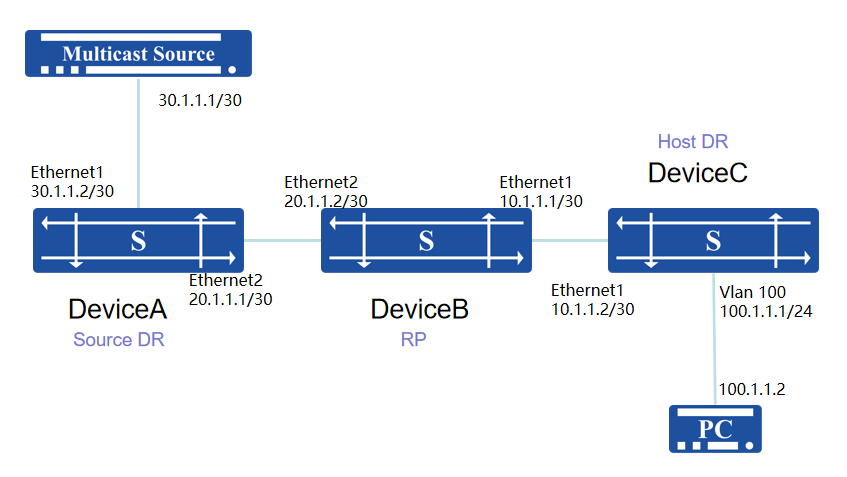
Procedure
- Device A # Configure ip address of interfaces
sonic(config)# interface ethernet 1sonic(config-if-1)# ip address 30.1.1.2/30sonic(config)# interface ethernet 2sonic(config-if-2)# ip address 20.1.1.1/30# Configure ospf neighbor and distribute route
sonic(config)# router ospfsonic(config-router)# ospf router-id 30.1.1.2sonic(config-router)# network 30.1.1.0/30 area 0.0.0.0sonic(config-router)# network 20.1.1.0/30 area 0.0.0.0# Configure the PIM interface, enable multicast routing and forwarding, set a static RP address, and activate the source-side DR’s capability to forward unknown multicast traffic.
sonic(config)# interface ethernet 1sonic(config-if-1)# multicast-enablesonic(config-if-1)# ip pimsonic(config)# interface ethernet 2sonic(config-if-2)# multicast-enablesonic(config-if-2)# ip pimsonic(config)# ip pim rp 20.1.1.2 224.1.1.0/24sonic(config)# unknown-multicast trap- Device B # Configure ip address of interfaces
sonic(config)# interface ethernet 1sonic(config-if-1)# ip address 10.1.1.1/30sonic(config)# interface ethernet 2sonic(config-if-2)# ip address 20.1.1.2/30# Configure ospf neighbor and distribute route
sonic(config)# router ospfsonic(config-router)# ospf router-id 20.1.1.2sonic(config-router)# network 10.1.1.0/30 area 0.0.0.0sonic(config-router)# network 20.1.1.0/30 area 0.0.0.0# Configure the PIM interface, enable multicast routing and forwarding, set a static RP address, and activate the source-side DR’s capability to forward unknown multicast traffic.
sonic(config)# interface ethernet 1sonic(config-if-1)# multicast-enablesonic(config-if-1)# ip pimsonic(config)# interface ethernet 2sonic(config-if-2)# multicast-enablesonic(config-if-2)# ip pimsonic(config)# ip pim rp 20.1.1.2 224.1.1.0/24- Device C # Configure ip address of interfaces
sonic(config)# vlan 100sonic(config)# interface ethernet 10sonic(config-if-10)# switchport access vlan 100sonic(config)# interface ethernet 1sonic(config-if-1)# ip address 10.1.1.2/30sonic(config)# interface vlan 100sonic(config-vlanif-100)# ip address 100.1.1.1/24sonic(config-vlanif-100)# exit# Configure ospf neighbor and distribute route
sonic(config)# router ospfsonic(config-router)# ospf router-id 10.1.1.2sonic(config-router)# network 100.1.1.0/24 area 0.0.0.0sonic(config-router)# network 10.1.1.0/30 area 0.0.0.0# Configure the PIM interface, enable multicast routing and forwarding, set a static RP address, and activate the source-side DR’s capability to forward unknown multicast traffic.
sonic(config)# interface ethernet 1sonic(config-if-1)# multicast-enablesonic(config-if-1)# ip pimsonic(config)# interface vlan 100sonic(config-vlanif-100)# ip igmpsonic(config-vlanif-100)# ip pimsonic(config)# ip pim rp 20.1.1.2 224.1.1.0/24Verify configuration
The PC initiates a video-on-demand request for multicast source video services. Devices A, B, and C can dynamically establish PIM entries and perform guided forwarding.
Dynamic RP Configuration Example
Section titled “Dynamic RP Configuration Example”The host and multicast source are interconnected via four Layer-3 switches, all running OSPF protocol. The host PC is required to be able to request video services from the multicast source over the Layer-3 network. The network uses dynamic RP; if the RP fails, a new RP can be elected to continue providing services.
Taking the following topology as an example: Device B and Device C are configured as C-RPs covering the multicast range 224.1.1.0/24. By setting priorities, Device B is elected as the RP, and Device C serves as the backup C-RP. When Device B fails, Device C can be elected as the new RP to continue service.
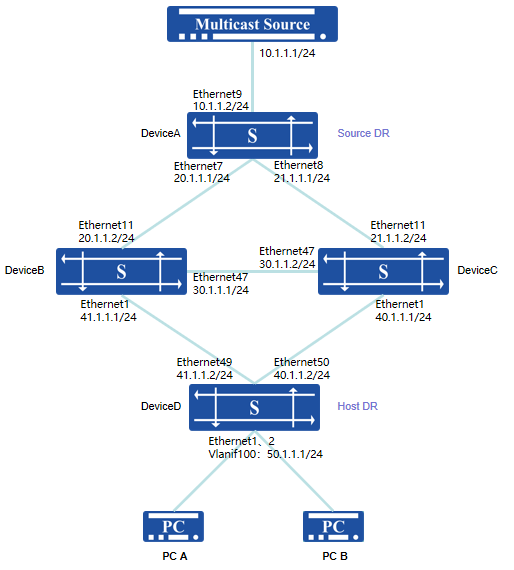
Procedure:
Device A
# Configure an IP address and Loopback0 address for the interface.
sonic(config)# interface ethernet 9sonic(config-if-9)# ip address 10.1.1.2/24sonic(config)# interface ethernet 7sonic(config-if-7)# ip address 20.1.1.1/24sonic(config)# interface ethernet 8sonic(config-if-8)# ip address 21.1.1.1/24sonic(config)# interface loopback 0sonic(config-loif-0)# ip address 120.1.1.217/32# Configure OSPF neighbors and advertise routes.
sonic(config)# router ospfsonic(config-router)# ospf router-id 120.1.1.217sonic(config-router)# network 10.1.1.0/24 area 0.0.0.0sonic(config-router)# network 20.1.1.0/24 area 0.0.0.0sonic(config-router)# network 21.1.1.0/24 area 0.0.0.0sonic(config-router)# network 120.1.1.217/32 area 0.0.0.0# Configure PIM on the interface, enable multicast routing and forwarding, and enable source-side DR to forward unknown multicast traffic to the CPU.
sonic(config)# interface ethernet 9sonic(config-if-9)# multicast-enablesonic(config-if-9)# ip pimsonic(config)# interface ethernet 7sonic(config-if-7)# multicast-enablesonic(config-if-7)# ip pimsonic(config)# interface ethernet 8sonic(config-if-8)# multicast-enablesonic(config-if-8)# ip pimsonic(config)# interface loopback 0sonic(config-loif-0)# ip pimsonic(config)# unknown-multicast trap# Configure C-BSR, specifying the priority and IP address of the C-BSR.
sonic(config)# ip pim bsr candidate-bsr source interface loopback 0 priority 200Device B
# Configure an IP address and Loopback0 address for the interface.
sonic(config)# interface ethernet 11sonic(config-if-11)# ip address 20.1.1.2/24sonic(config)# interface ethernet 47sonic(config-if-47)# ip address 30.1.1.1/24sonic(config)# interface ethernet 1sonic(config-if-1)# ip address 41.1.1.1/24sonic(config)# interface loopback 0sonic(config-loif-0)# ip address 120.1.1.80/32# Configure OSPF neighbors and advertise routes.
sonic(config)# router ospfsonic(config-router)# ospf router-id 120.1.1.80sonic(config-router)# network 20.1.1.0/24 area 0.0.0.0sonic(config-router)# network 30.1.1.0/24 area 0.0.0.0sonic(config-router)# network 41.1.1.0/24 area 0.0.0.0sonic(config-router)# network 120.1.1.80/32 area 0.0.0.0# Configure PIM on the interface, enable multicast routing and forwarding.
sonic(config)# interface ethernet 11sonic(config-if-11)# multicast-enablesonic(config-if-11)# ip pimsonic(config)# interface ethernet 47sonic(config-if-47)# multicast-enablesonic(config-if-47)# ip pimsonic(config)# interface ethernet 1sonic(config-if-1)# multicast-enablesonic(config-if-1)# ip pimsonic(config)# interface loopback 0sonic(config-loif-0)# ip pim# Configure C-BSR, specifying the IP address. Configure C-RP, specifying the IP address, covered multicast group address, and priority.
sonic(config)# ip pim bsr candidate-bsr source interface loopback 0sonic(config)# ip pim bsr candidate-rp source interface loopback 0 priority 98sonic(config)# ip pim bsr candidate-rp group 224.1.1.0/24Device C
# Configure an IP address and Loopback0 address for the interface.
sonic(config)# interface ethernet 11sonic(config-if-11)# ip address 21.1.1.2/24sonic(config)# interface ethernet 47sonic(config-if-47)# ip address 30.1.1.2/24sonic(config)# interface ethernet 1sonic(config-if-1)# ip address 40.1.1.1/24sonic(config)# interface loopback 0sonic(config-loif-0)# ip address 120.1.1.81/32# Configure OSPF neighbors and advertise routes.
sonic(config)# router ospfsonic(config-router)# ospf router-id 120.1.1.81sonic(config-router)# network 21.1.1.0/24 area 0.0.0.0sonic(config-router)# network 30.1.1.0/24 area 0.0.0.0sonic(config-router)# network 40.1.1.0/24 area 0.0.0.0sonic(config-router)# network 120.1.1.81/32 area 0.0.0.0# Configure PIM on the interface, enable multicast routing and forwarding.
sonic(config)# interface ethernet 11sonic(config-if-11)# multicast-enablesonic(config-if-11)# ip pimsonic(config)# interface ethernet 47sonic(config-if-47)# multicast-enablesonic(config-if-47)# ip pimsonic(config)# interface ethernet 1sonic(config-if-1)# multicast-enablesonic(config-if-1)# ip pimsonic(config)# interface loopback 0sonic(config-loif-0)# ip pim# Configure C-BSR, specifying the IP address. Configure C-RP, specifying the IP address, covered multicast group address, and priority.
sonic(config)# ip pim bsr candidate-bsr source interface loopback 0sonic(config)# ip pim bsr candidate-rp source interface loopback 0 priority 99sonic(config)# ip pim bsr candidate-rp group 224.1.1.0/244. Device D
# Configure an IP address and Loopback0 address for the interface.
sonic(config)# interface ethernet 49sonic(config-if-49)# ip address 41.1.1.2/24sonic(config)# interface ethernet 50sonic(config-if-50)# ip address 40.1.1.2/24sonic(config)# interface loopback 0sonic(config-loif-0)# ip address 120.1.1.122/32# Configure an IP address for the service interface and enable IGMP functionality.
sonic(config)# mcast-snooping enablesonic(config)# vlan 100sonic(config-vlan-100)# igmp-snooping enablesonic(config-vlan-100)# igmp-snooping version 3sonic(config)# interface ethernet 1sonic(config-if-1)# switchport access vlan 100sonic(config)# interface ethernet 2sonic(config-if-2)# switchport access vlan 100sonic(config)# interface vlan 100sonic(config-vlanif-100)# ip address 50.1.1.1/24sonic(config-vlanif-100)# ip igmp# Configure OSPF neighbors and advertise routes.
sonic(config)# router ospfsonic(config-router)# ospf router-id 120.1.1.122sonic(config-router)# network 40.1.1.0/24 area 0.0.0.0sonic(config-router)# network 41.1.1.0/24 area 0.0.0.0sonic(config-router)# network 50.1.1.0/24 area 0.0.0.0sonic(config-router)# network 120.1.1.122/32 area 0.0.0.0# Configure PIM on the interface, enable multicast routing and forwarding.
sonic(config)# interface ethernet 49sonic(config-if-49)# multicast-enablesonic(config-if-49)# ip pimsonic(config)# interface ethernet 50sonic(config-if-50)# multicast-enablesonic(config-if-50)# ip pimsonic(config)# interface loopback 0sonic(config-loif-0)# ip pimsonic(config)# interface vlan 100sonic(config-vlanif-100)# multicast-enablesonic(config-vlanif-100)# ip pim# Configure C‑BSR, specifying the IP address.
sonic(config)# ip pim bsr candidate-bsr source interface loopback 0Verify configuration
Check the BSR election result and RP address on each device respectively.
# Device A
sonic# show ip pim bsrPIMv2 Bootstrap Router informationCurrent preferred BSR address: 120.1.1.217Priority        Fragment-Tag       State           UpTime  200             12463           BSR_ELECTED      20:08:29sonic#sonic# show ip pim rp-infoRP address       group/prefix-list   OIF               I am RP    Source120.1.1.80       224.1.1.0/24        Ethernet7         no           BSR
sonic#sonic# show ip pim bsrp-infoBSR Address 120.1.1.217Group Address 224.1.1.0/24-------------------------- Rp Address  priority  Holdtime  Hash (ACTIVE) 120.1.1.80  98        151       1767032558 120.1.1.81  99        151       663517313(PENDING)Pending RP count :0Partial List is empty
# Device B
sonic# show ip pim bsrPIMv2 Bootstrap Router informationCurrent preferred BSR address: 120.1.1.217Priority Fragment-Tag State UpTime 200 12467 ACCEPT_PREFERRED 18:28:46Last BSM seen: 00:00:47sonic#sonic# show ip pim rp-infoRP address group/prefix-list OIF I am RP Source120.1.1.80 224.1.1.0/24 Loopback0 yes BSRsonic#sonic# show ip pim bsrp-infoBSR Address 120.1.1.217Group Address 224.1.1.0/24-------------------------- Rp Address priority Holdtime Hash (ACTIVE) 120.1.1.80 98 151 1767032558 120.1.1.81 99 151 663517313(PENDING)Pending RP count :0Partial List is empty# Device C
sonic# show ip pim bsrPIMv2 Bootstrap Router informationCurrent preferred BSR address: 120.1.1.217Priority Fragment-Tag State UpTime200 12469 ACCEPT_PREFERRED 18:30:53Last BSM seen: 00:00:55sonic#
sonic# show ip pim rp-infoRP address       group/prefix-list   OIF               I am RP    Source120.1.1.80       224.1.1.0/24        Ethernet47        no           BSR
sonic#sonic# show ip pim bsrp-infoBSR Address 120.1.1.217Group Address 224.1.1.0/24-------------------------- Rp Address  priority  Holdtime  Hash (ACTIVE) 120.1.1.80  98        151       1767032558 120.1.1.81  99        151       663517313
(PENDING)Pending RP count :0Partial List is empty
Device D
sonic# show ip pim bsrPIMv2 Bootstrap Router informationCurrent preferred BSR address: 120.1.1.217Priority Fragment-Tag State UpTime 200 12471 ACCEPT_PREFERRED 17:36:24Last BSM seen: 00:00:21sonic#sonic# show ip pim rp-infoRP address group/prefix-list OIF I am RP Source120.1.1.80 224.1.1.0/24 Ethernet49 no BSRsonic#sonic# show ip pim bsrp-infoBSR Address 120.1.1.217Group Address 224.1.1.0/24-------------------------- Rp Address priority Holdtime Hash (ACTIVE) 120.1.1.80 98 151 1767032558 120.1.1.81 99 151 663517313(PENDING)Pending RP count :0Partial List is emptyThe dynamic RP network converges correctly, with DeviceA elected as the BSR and DeviceB elected as the RP for the multicast address range 224.1.1.0/24. At this point, the PC can initiate on-demand services within the 224.1.1.0/24 segment normally, and DeviceB can establish multicast forwarding entries to guide data forwarding. After DeviceB fails, the dynamic RP convergence results on each device are as follows:
Device A
sonic# show ip pim bsrPIMv2 Bootstrap Router informationCurrent preferred BSR address: 120.1.1.217Priority Fragment-Tag State UpTime 200 12483 BSR_ELECTED 20:23:13Last BSM seen: 00:00:16sonic#sonic# show ip pim rp-infoRP address group/prefix-list OIF I am RP Source120.1.1.81 224.1.1.0/24 Ethernet8 no BSRsonic#sonic# show ip pim bsrp-infoBSR Address 120.1.1.217Group Address 224.1.1.0/24-------------------------- Rp Address priority Holdtime Hash (ACTIVE) 120.1.1.81 99 151 663517313(PENDING)Pending RP count :0Partial List is emptyDevice C
sonic# show ip pim bsrPIMv2 Bootstrap Router informationCurrent preferred BSR address: 120.1.1.217Priority Fragment-Tag State UpTime 200 12484 ACCEPT_PREFERRED 18:42:11Last BSM seen: 00:00:01sonic#sonic# show ip pim rp-infoRP address group/prefix-list OIF I am RP Source120.1.1.81 224.1.1.0/24 Loopback0 yes BSRsonic#sonic# show ip pim bsrp-infoBSR Address 120.1.1.217Group Address 224.1.1.0/24-------------------------- Rp Address priority Holdtime Hash (ACTIVE) 120.1.1.81 99 151 663517313(PENDING)Pending RP count :0Partial List is emptyDevice D
sonic# show ip pim bsrPIMv2 Bootstrap Router informationCurrent preferred BSR address: 120.1.1.217Priority Fragment-Tag State UpTime 200 12488 ACCEPT_PREFERRED 00:01:09Last BSM seen: 00:00:09sonic#sonic# show ip pim rp-infoRP address group/prefix-list OIF I am RP Source120.1.1.81 224.1.1.0/24 Ethernet50 no BSRsonic#sonic# show ip pim bsrp-infoBSR Address 120.1.1.217Group Address 224.1.1.0/24-------------------------- Rp Address priority Holdtime Hash (ACTIVE) 120.1.1.81 99 151 663517313(PENDING)Pending RP count :0Partial List is emptyThe dynamic RP network has converged correctly, with DeviceC elected as the RP for the multicast address range 224.1.1.0/24. At this point, the PC can normally initiate on‑demand services within the 224.1.1.0/24 segment, and DeviceC can establish multicast forwarding entries to guide data forwarding.
Multicast Load Balancing Configuration Example
Section titled “Multicast Load Balancing Configuration Example”Networking Requirements
On the basis of the basic PIM-ASM configuration, there are multiple equivalent links in the network. Require multicast traffic to automatically load share on these equivalent links, and when some links fail/recover, the remaining traffic should be evenly distributed to other healthy links to avoid local congestion.
Configuration Points
Enable IP Pim ECMP Rebalance globally on all PIM routers with equivalent paths.
In multicast scenarios that require load balancing, it is recommended to configure the RP address on a Loopback interface. Using it as the RP address can avoid RP oscillation caused by physical interface failures, thereby ensuring service stability

Configuration Steps
- Device A
#Configure IP address for interface, OSPF, PIM, and enable multicast routing forwarding function
1sonic(config)# interface ethernet 492sonic(config-if-49)# ip addres 10.1.49.1/303sonic(config-if-49)# multicast-enable4sonic(config-if-49)# ip ospf area 05sonic(config-if-49)# ip pim6sonic(config-if-49)# exit78sonic(config)# interface ethernet 19sonic(config-if-1)# ip addres 10.1.1.1/3010sonic(config-if-1)# multicast-enable11sonic(config-if-1)# ip ospf area 012sonic(config-if-1)# ip pim13sonic(config-if-1)# exit1415sonic(config)# interface ethernet 216sonic(config-if-2)# ip addres 10.1.2.1/3017sonic(config-if-2)# multicast-enable18sonic(config-if-2)# ip ospf area 019sonic(config-if-2)# ip pim20sonic(config-if-2)# exit2122sonic(config)# interface loopback 023sonic(config-loif-0)# ip addres 10.1.0.161/3224sonic(config-loif-0)# ip ospf area 025sonic(config-loif-0)# ip pim26sonic(config-loif-0)# exit2728sonic(config)# router ospf29sonic(config-router)# ospf router-id 10.1.0.161Enable unknown multicast upload function, configure static RP address, and configure multicast ECMP elastic rebalancing
sonic(config)# unknown-multicast trapsonic(config)# ip pim rp 10.1.0.161 224.1.1.0/24sonic(config)# ip pim ecmp rebalance- Device B
The configuration methods for Device B and Device C are similar. Here, Device B is taken as an example
#Configure IP address for interface, OSPF, PIM, and enable multicast routing forwarding function
sonic(config)# interface ethernet 1sonic(config-if-1)# ip addres 10.1.1.2/30sonic(config-if-1)# multicast-enablesonic(config-if-1)# ip ospf area 0sonic(config-if-1)# ip pimsonic(config-if-1)# exit
sonic(config)# interface ethernet 3sonic(config-if-3)# ip addres 10.1.3.1/30sonic(config-if-3)# multicast-enablesonic(config-if-3)# ip ospf area 0sonic(config-if-3)# ip pimsonic(config-if-3)# exit
sonic(config)# interface loopback 0sonic(config-loif-0)# ip addres 10.1.0.187/32sonic(config-loif-0)# ip ospf area 0sonic(config-loif-0)# ip pimsonic(config-loif-0)# exit
sonic(config)# router ospfsonic(config-router)# ospf router-id 10.1.0.187
Enable unknown multicast upload function and configure static RP address
sonic(config)# unknown-multicast trapsonic(config)# ip pim rp 10.1.0.161 224.1.1.0/24- Device D
#Configure IP address for interface, OSPF, PIM, enable downlink IGMP function, and enable multicast routing forwarding function
“text sonic(config)# interface ethernet 50 sonic(config-if-50)# ip addres 10.1.50.2/30 sonic(config-if-50)# multicast-enable sonic(config-if-50)# ip ospf area 0 sonic(config-if-50)# ip pim sonic(config-if-50)# ip igmp sonic(config-if-50)# exit
sonic(config)# interface ethernet 3 sonic(config-if-3)# ip addres 10.1.3.2/30 sonic(config-if-3)# multicast-enable sonic(config-if-3)# ip ospf area 0 sonic(config-if-3)# ip pim sonic(config-if-3)# exit
sonic(config)# interface ethernet 4 sonic(config-if-4)# ip addres 10.1.4.2/30 sonic(config-if-4)# multicast-enable sonic(config-if-4)# ip ospf area 0 sonic(config-if-4)# ip pim sonic(config-if-4)# exit
sonic(config)# interface loopback 0 sonic(config-loif-0)# ip addres 10.1.0.119/32 sonic(config-loif-0)# ip ospf area 0 sonic(config-loif-0)# ip pim sonic(config-loif-0)# exit
sonic(config)# router ospf sonic(config-router)# ospf router-id 10.1.0.119
Enable unknown multicast upload function, configure static RP address, and configure multicast ECMP elastic rebalancing
```textsonic(config)# unknown-multicast trapsonic(config)# ip pim rp 10.1.0.161 224.1.1.0/24sonic(config)# ip pim ecmp rebalance
Verification
Assuming that the multicast source sends out four types of multicast traffic: 224.1.1.1, 224.1.1.2224.1.1, 224.1.1, and 2244.1.1.4, and the receiving host sends an IGMP join group message. Expected result: Traffic can be divided into two paths:
A: Device A ->Device B > Device D
B: Device A ->Device C > Device D
View the results on Device A:
sonic# show ip mrouteIP Multicast Routing TableFlags: S - Sparse, C - Connected, P - Pruned       R - SGRpt Pruned, F - Register flag, T - SPT-bit set
Source          Group           Flags    Proto  Input            Output           TTL  Uptime*               224.1.1.1       S        PIM    Loopback0        Ethernet1        1    00:00:0049.1.1.2        224.1.1.1       SF       PIM    Ethernet49       pimreg           1    00:00:28                                         STAR                    Ethernet1        1*               224.1.1.2       S        PIM    Loopback0        Ethernet1        1    00:00:0049.1.1.2        224.1.1.2       SF       PIM    Ethernet49       pimreg           1    00:00:21                                         STAR                    Ethernet1        1*               224.1.1.3       S        PIM    Loopback0        Ethernet2        1    00:00:0049.1.1.2        224.1.1.3       SF       PIM    Ethernet49       pimreg           1    00:00:15                                         STAR                    Ethernet2        1*               224.1.1.4       S        PIM    Loopback0        Ethernet2        1    00:00:0049.1.1.2        224.1.1.4       SF       PIM    Ethernet49       pimreg           1    00:00:09                                         STAR                    Ethernet2        1