
Port Isolation Configuration
Introduction
Section titled “Introduction”Port isolation allows the isolation of ports within the same VLAN. By adding ports to an isolation group, isolation between Layer 2 data packets and multicast packets can be achieved for the ports within the isolation group. Traffic between ports within the isolation group and ports not added to the isolation group is not affected by the isolation group and can flow bidirectionally.
Configuring Port Isolation Groups
Section titled “Configuring Port Isolation Groups”| Operation | Command | Description |
|---|---|---|
| Enter the system configuration view | configure | |
| Create and enter isolation group view | port-isolate-group ID | |
| Enter interface view | interface ethernet ID | |
| Add interface to isolation group | port-isolate ID |
Configuration Example
Section titled “Configuration Example”Network requirements
A cell has multiple users, and now requires that the users cannot interoperate with each other’s Layer 2 messages, but all can access the external network.
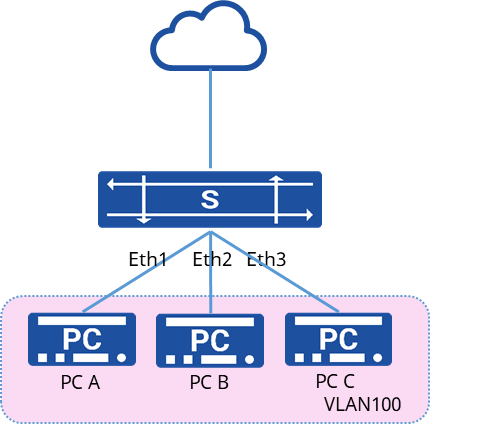
Procedure
- Create a VLAN and add the interface to the VLAN
sonic(config)# vlan 100sonic(config)# port-group ethernet 1-4sonic(config-port-group-1-4)# switchport access vlan 100- Create port isolation group
sonic(config)# port-isolate-group 1sonic(config-port-isolate-group-1)# interface 1,2,3Verify configuration
- View the port ioslation group configuration
sonic# show port-isolate-group+------------+-------------+--------+| Group ID | Interface | Mode |+============+=============+========+| 1 | Ethernet1 | L2 || | Ethernet2 | || | Ethernet3 | |+------------+-------------+--------+- No interoperability between PCs, all PCs can access the external network