
Policy Routing Configuration
Introduction
Section titled “Introduction”Traditional route forwarding used to involve looking up the routing table based on the destination address of the packet and then forwarding the packet. However, an increasing number of users now wish to forward and select routes for packets based on their own defined policies in addition to traditional route forwarding.
There are two different types of policy-based routing supported by the device:
ACL-based Policy Routing: Primarily used to control the flow of packets. ACL allows or denies packets passing through network devices and can filter based on conditions such as source IP address, destination IP address, port numbers, etc. ACL can be combined with policy routing to determine the direction of traffic by matching specific conditions of packets, thus implementing policy routing.
PBR-based Policy Routing: Mainly used to select different paths or next hops based on specific policies, rather than solely based on the traditional routing table. PBR allows defining the direction of traffic based on conditions such as source IP, destination IP, protocol, port, etc. It is a more flexible policy routing mechanism.
When dealing with smaller network scales and requiring simple traffic filtering and routing control, ACL-based policy routing can be chosen. When there is a need to implement more flexible routing policies such as multipath selection, failover, etc., PBR-based policy routing can be chosen.
Explanation of Principle
Section titled “Explanation of Principle”Policy routing is achieved by configuring redirection in the flow behavior, and it only takes effect on packets incoming on the interface. It is a mechanism for forwarding packets based on user-defined policies, with a priority higher than directly connected routes, static routes, and routes generated through dynamic routing protocols. After configuring policy routing on the device, if the received packet (including layer 2 packets) matches the rules of policy routing, it will be forwarded according to the rules; if the match fails, it will be forwarded according to the normal forwarding process based on the destination address.
Configuration
Section titled “Configuration”| Configuration Tasks | Description |
|---|---|
| Create and enter the policy routing view | Mandatory |
| Create matching conditions for policy routing | Mandatory |
| Specify the next hop for policy routing | Optional |
| Create a next hop address group and enter the view | Optional |
| Bind the policy routing to a specified interface | Optional |
Creating Policy Route
Section titled “Creating Policy Route”| Operation | Command | Description |
|---|---|---|
| Enter the system configuration view | configure terminal | |
| Create and enter the policy routing view | pbr-map name seq number | name: Specifies the name of the policy. number: Policy ID, with a range of 1-700. The lower the number, the higher the priority. |
Creating Matching Conditions for Policy Route
Section titled “Creating Matching Conditions for Policy Route”| Operation | Command | Description |
|---|---|---|
| Enter policy route view | pbr-map name seq number | |
| Create matching conditions for policy route | match {dst-ip ip-address |dst-port port |ip-protocol protocol |src-ip ip-address |src-port port } | dst-ip ip-address: Match the destination IP address of the packet. dst-port port: Match the destination port number of the packet. ip-protocol protocol: Match the protocol type of the packet. src-ip ip-address: Match the source IP address of the packet. src-port port: Match the source port number of the packet. |
Specifying the Next Hop for Policy Route
Section titled “Specifying the Next Hop for Policy Route”The “nexthop” command supports configuring up to 4 next hops. When multiple next hops are configured, packets are redirected and forwarded in a primary-backup manner. The primary and backup links are determined based on the configuration order, where the next hop IP address configured first has a higher priority as the primary link. In the event of a failure in the primary link, the backup link is automatically selected in order of configuration as the new primary link.
| Operation | Command | Description |
|---|---|---|
| Enter policy route view | pbr-map name seq number | |
| Specify the next hop for policy route | set {nexthop ip-address |nexthop-group name } | nexthop ip-address: Specifies the IP address of the next hop. nexthop-group: Specifies the name of the next hop address group. |
Creating Next Hop Address Group and Entering the View
Section titled “Creating Next Hop Address Group and Entering the View”When the next hop for policy routing is an address group, packets will be load balanced among the different next hops within the address group.
| Operation | Command | Description |
|---|---|---|
| Enter the system configuration view | configure terminal | |
| Create next hop address group | nexthop-group name | |
| Configure member addresses in the next hop address group | nexthop ip-address |
Binding the policy route to a specified interface
Section titled “Binding the policy route to a specified interface”| Operation | Command | Description |
|---|---|---|
| Enter the interface view | interface ethernet interface-id | |
| Bind the policy route to a specified interface | pbr-policy name |
Display and Maintenance
Section titled “Display and Maintenance”| Operation | Command |
|---|---|
| View the Binding Relationship between Policy Routing and Interfaces | show pbr interface [interface-name] |
| View Configured Policy Routes | show pbr map [MAP-NAME] |
| View Next Hop Address Groups for Policy Routing | show pbr nexthop-groups |
Configuration Example
Section titled “Configuration Example”Network Requirements
Control the packets received from interface Vlan11 of Switch A using policy-based routing:
Specify the next hop for all TCP packets as 1.1.2.2
Forward other packets using the traditional route table lookup method.
Switch A is directly connected to Switch B and Switch C. There is no reachable route between Switch B and Switch C. Host A can successfully Telnet to Switch B but cannot Telnet to Switch C. Additionally, Host A can ping both Switch B and Switch C.
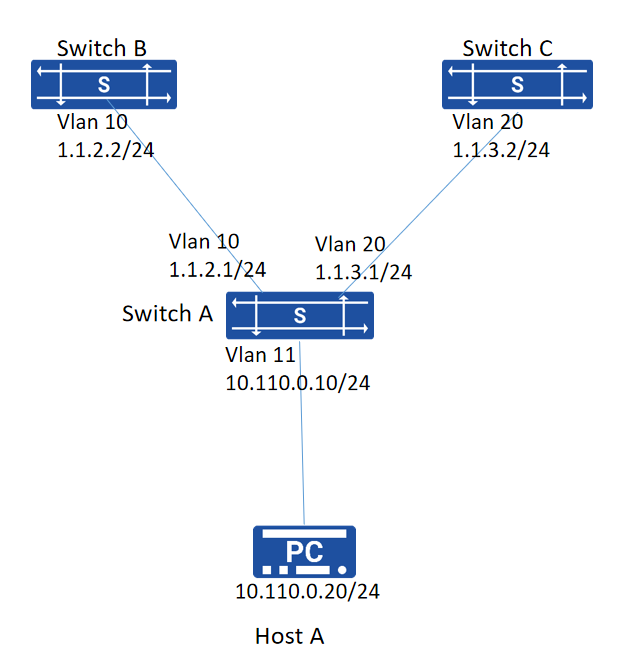
Procedure
- IP addresses and VLAN configuration omitted
- Configuration on Switch A:
# Create PBR rule
sonic(config)# pbr-map aaa seq 5sonic(config-pbr-map)# match ip-protocol tcpsonic(config-pbr-map)# set nexthop 1.1.2.2sonic(config-pbr-map)# exit# Apply the policy route map to interface
sonic(config)# interface vlan 11sonic(config-vlanif-11)# ip address 10.110.0.10/24sonic(config-vlanif-11)# pbr-policy aaasonic(config-vlanif-11)# exit# Configuration on Switch B and Switch C for static routes to Host A
sonic(config)# ip route 10.110.0.0/24 1.1.2.1sonic(config)# ip route 10.110.0.0/24 1.1.3.1Verify configuration
- Verify the configuration
sonic# show pbr map detailpbr-map aaa valid: yes Seq: 5 rule: 304 Installed: 2(1) Reason: Valid IP Protocol Match: tcp nexthop 1.1.2.2 Installed: 1(1) Tableid: 10000- Perform Telnet and Ping from Host A, and verify if the results match the expectations: Telnet from Host A to Switch B (telnet 1.1.2.2): Success Telnet from Host A to Switch C (telnet 1.1.3.2): Failure Ping from Host A to Switch C (ping 1.1.3.2): Success