
ND Snooping Configuration
Introduction
Section titled “Introduction”The ND Snooping (Neighbor Discovery Snooping) feature is designed for Layer 2 switching environments and serves a similar purpose to DHCP Snooping in IPv6 networks. It records information such as the source IPv6 address, source MAC address, and incoming port of packets. The entries generated by this feature coexist in the Snooping table along with those created by DHCP Snooping.
Explanation of Principles
Section titled “Explanation of Principles”The device supports learning ND Snooping entries through two methods:
l By listening to Duplicate Address Detection (DAD) packets received on interfaces where ND Snooping is enabled. This process helps establish the ND Snooping dynamic binding table.
l By monitoring the Neighbor Discovery Protocol (NDP) table entries on the device. These entries can also be used to update the ND Snooping dynamic binding table.
Through the creation of the ND Snooping dynamic binding table, the device can filter out unauthorized ND packets received from untrusted interfaces. This effectively prevents potential ND attacks.
ND Snooping Configuration
Section titled “ND Snooping Configuration”| Operation | Command | Description |
|---|---|---|
| Enter the system configuration view | configure terminal | |
| Enable ND Snooping function | nd snooping enable | |
| Enter VLAN view | vlan ID | |
| Enable ND Snooping function | nd snooping enable |
Configuration Example
Section titled “Configuration Example”Network requirements
In order to facilitate the management wish to unify the allocation of IPv6 addresses by means of automatic configuration, it is also required:
- Support for obtaining IPv6 addresses through stateful means.
- Support for obtaining IPv6 addresses in a stateless manner.
- Disable users from accessing the network through statically configured IPv6 addresses.
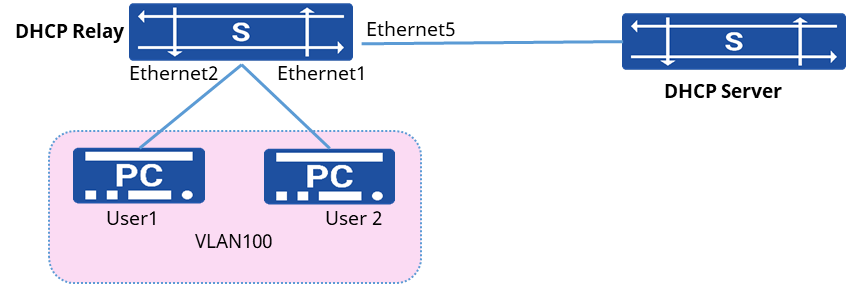
Procedure
- Create VLAN 100 and configure the IP address
sonic(config)# vlan 100sonic(config)# interface ethernet 1sonic(config-if-1)# switchport access vlan 100sonic(config)# interface ethernet 2sonic(config-if-2)# switchport access vlan 100sonic(config)# interface vlan 100sonic(config-vlanif-100)# ip address fd00:100::1/64- Configure the parameters of RA messages sent by the device
sonic(config-vlanif-100)# ipv6 nd ra managed-flag onsonic(config-vlanif-100)# ipv6 nd ra autonomous onsonic(config-vlanif-100)# ipv6 nd ra other-flag onsonic(config-vlanif-100)# ipv6 nd ra prefix fd00:200::1/64sonic(config-vlanif-100)# ipv6 nd ra route-information ::/0 highsonic(config-vlanif-100)# ipv6 nd ra route-information fd00:100::1/64sonic(config-vlanif-100)# ipv6 nd ra route-information fd00:200::1/64- Configure the DHCPv6 relay function of the device
sonic(config)# dhcp-relay test v6sonic(config-dhcp-relay-test__v6)# down_link interface vlan 100sonic(config-dhcp-relay-test__v6)# up_link interface 5sonic(config-dhcp-relay-test__v6)# server_ip fd00:1001:1501::2001sonic(config-dhcp-relay-test__v6)# loopback_interface loopback 0sonic(config-dhcp-relay-test__v6)# exit- Enable DHCP Snooping, ND Snooping function
sonic(config)# dhcp snooping enablesonic(config)# nd snooping enablesonic(config)# interface vlan 100sonic(config-vlanif-100)# dhcp-snooping enablesonic(config-vlanif-100)# nd snooping enable- Configure the interface to which the DHCP Server is connected as a trusted port
sonic(config)# interface ethernet 5sonic(config-if-5)# dhcp-snooping enablesonic(config-if-5)# dhcp-snooping trusted- Enable the security function to check the legitimacy of user messages
sonic(config)# interface vlan 100sonic(config-vlanif-100)# ipv4-source-check enablesonic(config-vlanif-100)# arp anti-attack-check enablesonic(config-vlanif-100)# ipv6-source-check enablesonic(config-vlanif-100)# savi enableVerify configuration
- View the obtained IP address on the PC.
C:\Users\test>ipconfigWindows IP ConfigurationEthernet Adapters Ethernet: Connect to a specific DNS suffix . . : IPv6 address . . . . . . . . . . . . : fd00:100::a570 IPv6 address . . . . . . . . . . . . : fd00:200::a495:f96e:6573:c383 Temporary IPv6 address . . . . . . . : fd00:200::6d18:d132:77ef:42da Local Link IPv6 Address. . . . . . . : fe80::a495:f96e:6573:c383%12 IPv4 address . . . . . . . . . . . . : 192.168.0.144 subnet mask . . . . . . . . . . . . .: 255.255.240.0 Default Gateway. . . . . . . . . . . : fe80::201:2ff:fe03:800192.168.0.1- Use the show snooping table command to view the Snooping table entries on the device, the stateful IP addresses and stateless IP addresses have corresponding Snooping table entries.
- Modify the IP address on the user’s PC to a static configuration, ping the external network address and the IPv6 address of the device’s SVI port, respectively, can not ping through.
- View the packet loss statistics of the security features on the device.
sonic# show user-bind counterInterface Drop Packets----------- --------------Vlan100 48