
RA Guard Configuration
Introduction
Section titled “Introduction”RA Guard functionality is used on Layer 2 access devices to prevent Router Advertisement (RA) message spoofing attacks.
When a Layer 2 access device receives an RA message with a unicast or multicast MAC address, the RA Guard functionality processes the RA message as follows:
- If the port is not configured with a port role, the RA message is directly forwarded.
- If the port role is a router, the RA message is directly forwarded.
- If the port role is a user, the RA message is directly discarded.
- If the port role is hybrid, the port’s RA Guard policy is matched.
- If the RA Guard policy has configured matching rules, the RA message must match all rules successfully to be forwarded. Otherwise, the message is discarded.
- If the RA Guard policy does not have matching rules configured, all RA messages are discarded.
Configuration Example
Section titled “Configuration Example”Network requirements
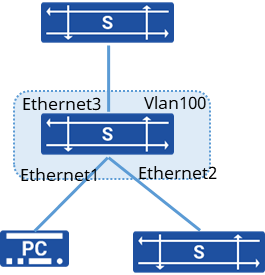
To prevent Route Announcement Message (RA message) spoofing attack, you need to configure RA Guard policy rules on the Device.
Interface Ethernet 2 is connected to an unknown device, and the user wants the interface to match and filter RA messages according to RA Guard policy rules.
Interface Ethernet 1 is connected to a user who wants the RA messages received on this interface to be discarded directly.
Interface Ethernet 3 is connected to a Device and the user wants the interface to fully trust RA messages to be forwarded directly.
Procedure
- Create a VLAN and add an interface
sonic(config)# vlan 100sonic(config)# port-group ethernet 1-3sonic(config-port-group 1-3)# switchport access vlan 100- Configure the interface role
sonic(config)# interface ethernet 1sonic(config-if-1)# raguard role usersonic(config)# interface ethernet 2sonic(config-if-1)# raguard role hybridsonic(config)# interface ethernet 3sonic(config-if-1)# raguard role router- Configure RA Guard policy
sonic(config)# vlan 100sonic(config-vlan-100)# raguard policy src-ip fe80::1a17:25ff:fe37:6722