
VxLAN Configuration
Introduction
Section titled “Introduction”The current VXLAN tunnel establishment method supported by the device is: manual creation, specifying the source IP address of the tunnel as the local Loopback port IP address, and binding the VLAN to the VNI. The packets received from the local site are judged to belong to the VXLAN tunnel according to the VLAN information, and for the VXLAN messages received from the VXLAN tunnel, the Layer 2 broadcast domain to which the packets belong is judged according to the VNI ID.
Establishing VXLAN tunnel by static method
Section titled “Establishing VXLAN tunnel by static method”Network requirements
An enterprise needs to build its own campus network, using static configuration to achieve Layer 2 interoperability through VXLAN virtual networks for users in different physical locations in the same department.
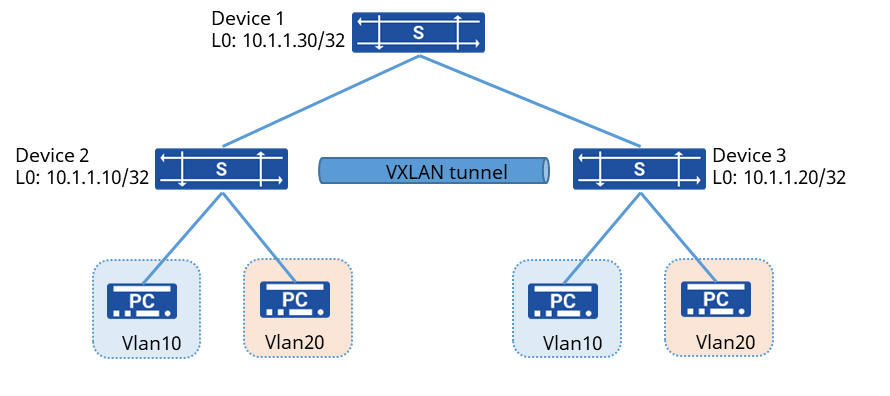
Procedure
- Device 2 configuration # Create VLAN add add member interface
sonic(config)# vlan 10sonic(config-vlan-10)# vni 10sonic(config-vlan-10)# exitsonic(config)# interface ethernet 1sonic(config-if-1)# switchport access vlan 10sonic(config)# vlan 20sonic(config-vlan-20)# vni 20sonic(config-vlan-20)# exitsonic(config)# interface ethernet 2sonic(config-if-2)# switchport access vlan 20# Establish BGP neighbors with Device 1
sonic(config)# interface ethernet 49sonic(config-if-49)# ip address 10.1.1.1/30sonic(config)# interface loopback 0sonic(config-loif-0)# ip address 10.1.1.10/32sonic(config)# router bgp 65100sonic(config-router)# bgp router-id 10.1.1.10sonic(config-router)# no bgp ebgp-requires-policysonic(config-router)# no bgp default ipv4-unicastsonic(config-router)# neighbor 10.1.1.2 remote-as 65101sonic(config-router)# neighbor 10.1.1.2 description Device1sonic(config-router)# address-family ipv4 unicastsonic(config-router-af)# neighbor PEER_V4_EBGP activatesonic(config-router-af)# network 10.1.1.10/32sonic(config-router-af)# exit# Create a VXLAN tunnel and specify the remote VTEP IP
sonic(config)# interface vxlan 0sonic(config-vxlanif-0)# source 10.1.1.10This setting need save config and restart to take effect.sonic(config-vxlanif-0)# vni 10 peer 10.1.1.20sonic(config-vxlanif-0)# vni 20 peer 10.1.1.20sonic(config-vxlanif-0)# exitsonic# writesave running-config...Existing files will be overwritten, continue? [y/N]: yRunning command: /usr/local/bin/sonic-cfggen -d --print-data > /etc/sonic/config_db.jsonsonic# reboot- Device 3 Configuration # Interface configuration IP address section and BGP configuration is the same as Device 1, omitted here # Create a VXLAN tunnel and specify the remote VTEP IP
sonic(config)# interface vxlan 0sonic(config-vxlanif-0)# source 10.1.1.20This setting need save config and restart to take effect.sonic(config-vxlanif-0)# vni 10 peer 10.1.1.10sonic(config-vxlanif-0)# vni 20 peer 10.1.1.10sonic(config-vxlanif-0)# exitsonic# writesave running-config...Existing files will be overwritten, continue? [y/N]: yRunning command: /usr/local/bin/sonic-cfggen -d --print-data > /etc/sonic/config_db.jsonsonic# reboot- Device 1 Configuration # Configure IP address omitted here # Establish BGP neighbors with device 2, device 3
sonic(config)# router bgp 65101sonic(config-router)# bgp router-id 10.1.1.30sonic(config-router)# no bgp ebgp-requires-policysonic(config-router)# no bgp default ipv4-unicastsonic(config-router)# neighbor PEER_V4_EBGP peer-groupsonic(config-router)# neighbor 10.1.1.2 remote-as 65100sonic(config-router)# neighbor 10.1.1.2 description Device2sonic(config-router)# neighbor 10.1.1.2 peer-group PEER_V4_EBGPsonic(config-router)# neighbor 10.1.1.5 remote-as 65100sonic(config-router)# neighbor 10.1.1.5 description Device3sonic(config-router)# neighbor 10.1.1.5 peer-group PEER_V4_EBGPsonic(config-router)# address-family ipv4 unicastsonic(config-router-af)# neighbor PEER_V4_EBGP activatesonic(config-router-af)# neighbor PEER_V4_EBGP as-overridesonic(config-router-af)# exitVerify configuration
- Check the VXLAN tunnel information
sonic(config)# do show evpn tunnel+---------------------------+-------+| tunnel | vni |+===========================+=======+| VTTNL10.1.1.10_10.1.1.20 | 10 || | 20 |+---------------------------+-------+- PC1 and PC3, PC2 and PC4 can communicate with each other
- Check the MAC table entries
sonic(config)# do show mac-address No. vlan MacAddress Port Type----- ------ ----------------- --------------------------- ------- 1 10 00:00:02:01:01:02 VTTNL10.1.1.10_10.1.1.20 Dynamic 2 10 00:00:02:01:01:03 Ethernet1 Dynamic 3 20 00:00:12:01:01:02 VTTNL10.1.1.10_10.1.1.20 Dynamic 4 20 00:00:12:01:01:03 Ethernet2 DynamicEstablishing VXLAN tunnel by EVPN
Section titled “Establishing VXLAN tunnel by EVPN”Network requirements
An enterprise needs to build its own campus network, using static configuration to achieve Layer 2 interoperability through VXLAN virtual networks for users in different physical locations in the same department.
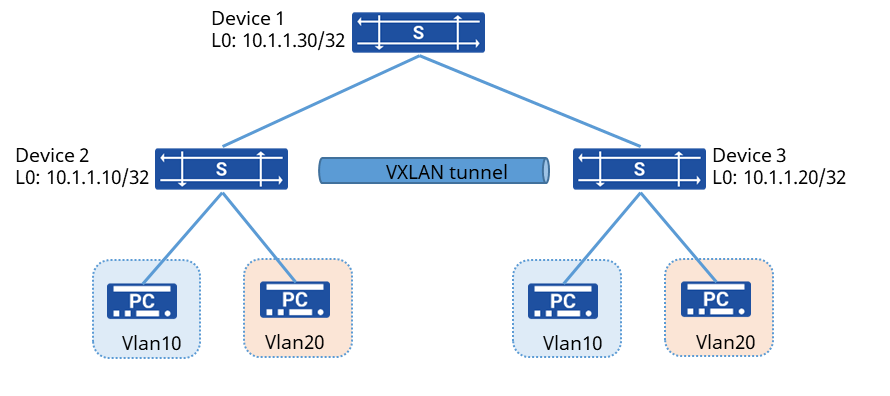
Procedure
- Device 2 configuration # Create VLAN add add member interface
sonic(config)# vlan 10sonic(config-vlan-10)# vni 10sonic(config-vlan-10)# exitsonic(config)# interface ethernet 1sonic(config-if-1)# switchport access vlan 10sonic(config)# vlan 20sonic(config-vlan-20)# vni 20sonic(config-vlan-20)# exitsonic(config)# interface ethernet 2sonic(config-if-2)# switchport access vlan 20# Establish BGP neighbors with Device 1
sonic(config)# interface ethernet 49sonic(config-if-49)# ip address 10.1.1.1/30sonic(config)# interface loopback 0sonic(config-loif-0)# ip address 10.1.1.10/32sonic(config)# router bgp 65100sonic(config-router)# bgp router-id 10.1.1.10sonic(config-router)# no bgp ebgp-requires-policysonic(config-router)# no bgp default ipv4-unicastsonic(config-router)# neighbor 10.1.1.2 remote-as 65101sonic(config-router)# neighbor 10.1.1.2 description Device1sonic(config-router)# address-family ipv4 unicastsonic(config-router-af)# neighbor PEER_V4_EBGP activatesonic(config-router-af)# network 10.1.1.10/32sonic(config-router-af)# exit# Enable L2 VPN
sonic(config-router)# address-family l2vpn evpnsonic(config-router-af)# neighbor 10.1.1.2 activatesonic(config-router-af)# advertise-all-vnisonic(config-router-af)# exit# Create VXLAN tunnel
sonic(config)# interface vxlan 0sonic(config-vxlanif-0)# source 10.1.1.10This setting need save config and restart to take effect.sonic(config-vxlanif-0)# exitsonic# writesave running-config...Existing files will be overwritten, continue? [y/N]: yRunning command: /usr/local/bin/sonic-cfggen -d --print-data > /etc/sonic/config_db.jsonsonic# reboot- Device 3 configuration # Interface configuration IP address section and EVPN configuration is the same as Device 1, omitted here # Create VXLAN tunnel
sonic(config)# interface vxlan 0sonic(config-vxlanif-0)# source 10.1.1.20This setting need save config and restart to take effect.sonic(config-vxlanif-0)# exitsonic# writesave running-config...Existing files will be overwritten, continue? [y/N]: yRunning command: /usr/local/bin/sonic-cfggen -d --print-data > /etc/sonic/config_db.jsonsonic# reboot- Device 1 configuration # Omit the IP address configuration process # Establish EVPN neighbors with device 2,3
sonic(config)# router bgp 65101sonic(config-router)# bgp router-id 10.1.1.30sonic(config-router)# no bgp ebgp-requires-policysonic(config-router)# no bgp default ipv4-unicastsonic(config-router)# neighbor PEER_V4_EBGP peer-groupsonic(config-router)# neighbor 10.1.1.2 remote-as 65100sonic(config-router)# neighbor 10.1.1.2 description Device2sonic(config-router)# neighbor 10.1.1.2 peer-group PEER_V4_EBGPsonic(config-router)# neighbor 10.1.1.5 remote-as 65100sonic(config-router)# neighbor 10.1.1.5 description Device3sonic(config-router)# neighbor 10.1.1.5 peer-group PEER_V4_EBGPsonic(config-router)# address-family ipv4 unicastsonic(config-router-af)# neighbor PEER_V4_EBGP activatesonic(config-router-af)# neighbor PEER_V4_EBGP as-overridesonic(config-router-af)# exit# Enable L2VPN
sonic(config-router)# address-family l2vpn evpnsonic(config-router-af)# neighbor PEER_V4_EBGP activatesonic(config-router-af)# advertise-all-vnisonic(config-router-af)# exitVerify configuration
- Check the VXLAN tunnel information
sonic(config)# do show evpn tunnel+---------------------------+-------+| tunnel | vni |+===========================+=======+| VTTNL10.1.1.10_10.1.1.20 | 10 || | 20 |+---------------------------+-------+- PC1 and PC3, PC2 and PC4 can communicate with each other
- Check the MAC table entries
sonic(config)# do show mac-address No. vlan MacAddress Port Type----- ------ ----------------- --------------------------- ------- 1 10 00:00:02:01:01:02 VTTNL10.1.1.10_10.1.1.20 Dynamic 2 10 00:00:02:01:01:03 Ethernet1 Dynamic 3 20 00:00:12:01:01:02 VTTNL10.1.1.10_10.1.1.20 Dynamic 4 20 00:00:12:01:01:03 Ethernet2 DynamicEstablishing Multicast-VXLAN tunnel
Section titled “Establishing Multicast-VXLAN tunnel”Network requirements
The enterprise has established a relatively mature multimedia transmission network, with servers distributed across different departments. Currently, BUM (Broadcast, Unknown Unicast, Multicast) traffic from audio and video collection devices is transmitted using a tunnel-based head-end replication method, which leads to bandwidth inefficiency. The customer now wishes to build a virtual network over the existing transmission infrastructure with the following requirements:
Deliver audio and video services (BUM traffic) from collection devices scattered across different departments to respective target departments on demand, enabling flexible service deployment.
Numerous VMs are deployed on each server. Layer 2 connectivity is required between servers in the same subnet. The VXLAN Layer 3 gateway function is moved down to the VXLAN access devices, where a distributed gateway architecture is adopted to optimize forwarding paths.
As shown in the diagram, for the audio and video BUM traffic from the collection side on DeviceB:BUM traffic in VLAN 10 should be forwarded via tunnel only to the servers under DeviceC.BUM traffic in VLAN 20 should be forwarded via tunnel to servers under both DeviceC and DeviceD.

Procedure
- Configure routing protocol
# Configure the IP addresses for each interface on DeviceA. The configuration for DeviceB, DeviceC, and DeviceD is similar to DeviceA.Establish BGP neighbors between DeviceA and DeviceB, DeviceC, and DeviceD respectively. Advertise the Loopback interface addresses to ensure reachability between Loopback addresses of all devices (e.g., via ping).Enable PIM and IP multicast forwarding on the relevant interfaces.
sonic(config)# interface ethernet 49sonic(config-if-49)# ip address 20.1.1.1/30sonic(config-if-49)# ip pimsonic(config-if-49)# multicast-enablesonic(config)# interface ethernet 50sonic(config-if-50)# ip address 30.1.1.1/30sonic(config-if-50)# ip pimsonic(config-if-50)# multicast-enablesonic(config)# interface ethernet 51sonic(config-if-51)# ip address 40.1.1.1/30sonic(config-if-51)# ip pimsonic(config-if-51)# multicast-enablesonic(config)# interface loopback 0sonic(config-loif-0)# ip address 10.1.1.1/32sonic(config-loif-0)# ip pimsonic(config)# router bgp 65100sonic(config-router)# bgp router-id 10.1.1.1sonic(config-router)# no bgp ebgp-requires-policysonic(config-router)# no bgp default ipv4-unicastsonic(config-router)# neighbor 20.1.1.2 remote-as 65101sonic(config-router)# neighbor 20.1.1.2 description DeviceBsonic(config-router)# neighbor 30.1.1.2 remote-as 65101sonic(config-router)# neighbor 30.1.1.2 description DeviceCsonic(config-router)# neighbor 40.1.1.2 remote-as 65101sonic(config-router)# neighbor 40.1.1.2 description DeviceDsonic(config-router)# address-family ipv4 unicastsonic(config-router-af)# neighbor 20.1.1.2 activatesonic(config-router-af)# neighbor 30.1.1.2 activatesonic(config-router-af)# neighbor 40.1.1.2 activatesonic(config-router-af)# network 10.1.1.1/32sonic(config-router-af)# exitsonic(config-router)# address-family l2vpn evpnsonic(config-router-af)# neighbor 10.1.1.2 activatesonic(config-router-af)# neighbor 10.1.1.3 activatesonic(config-router-af)# neighbor 10.1.1.4 activatesonic(config-router-af)# advertise-all-vni- Configure VLAN access settings on DeviceB, DeviceC, and DeviceD respectively.
sonic(config)# vlan 10sonic(config-vlan-10)# vni 10sonic(config-vlan-10)# arp-trap enablesonic(config)# vlan 20sonic(config-vlan-20)# vni 20sonic(config-vlan-20)# arp-trap enablesonic(config)# interface ethernet 1sonic(config-if-1)# switchport trunk vlan 10sonic(config-if-1)# switchport trunk vlan 20sonic(config)# interface vlan 10sonic(config-vlanif-10)# ip address 100.1.1.1/24sonic(config-vlanif-10)# arp-proxy mode evpnsonic(config)# interface vlan 20sonic(config-vlanif-20)# ip address 200.1.1.1/24sonic(config-vlanif-20)# arp-proxy mode evpn- Configure VXLAN tunnel settings on DeviceB, DeviceC, and DeviceD respectively, specifying the destination address and corresponding VNI. The following example uses DeviceB for illustration:
sonic(config)# interface vxlan 0sonic(config-vxlanif-0)# source 10.1.1.2sonic(config-vxlanif-0)# vni 10 peer 10.1.1.3sonic(config-vxlanif-0)# vni 10 peer 10.1.1.4sonic(config-vxlanif-0)# vni 20 peer 10.1.1.3sonic(config-vxlanif-0)# vni 20 peer 10.1.1.4- Configure Multicast VXLAN tunnels on DeviceB, DeviceC, and DeviceD.
sonic(config)# interface vxlan 0sonic(config-vxlanif-0)# vni 10 mcast-group 224.1.1.10sonic(config-vxlanif-0)# vni 20 mcast-group 224.1.1.20- Configure static multicast route on DeviceB.
sonic(config)# interface loopback 0sonic(config-loif-0)# ip mroute ethernet 49 224.1.1.10 10.1.1.2sonic(config-loif-0)# ip mroute ethernet 49 224.1.1.20 10.1.1.2- Configure static multicast routes on DeviceA:Forward BUM traffic from VLAN10 to DeviceC.Forward BUM traffic from VLAN20 to both DeviceC and DeviceD.
sonic(config)# interface ethernet 49sonic(config-if-49)# ip mroute ethernet 50 224.1.1.10 10.1.1.2sonic(config-if-49)# ip mroute ethernet 50 224.1.1.20 10.1.1.2sonic(config-if-49)# ip mroute ethernet 51 224.1.1.20 10.1.1.2Verify configuration
- BUM traffic from VLAN 10 on DeviceB is forwarded only to servers in VLAN 10 under DeviceC through the multicast tunnel.
- BUM traffic from VLAN 20 on DeviceB is forwarded to servers in VLAN 20 under both DeviceC and DeviceD through the multicast tunnel.
- Unicast traffic between endpoints connected to DeviceB, DeviceC, and DeviceD continues to be forwarded using unicast tunnels.