
ARP Attack Detection Configuration
Introduction
Section titled “Introduction”ARP attack detection is one of the common methods to prevent ARP spoofing. It is used to detect ARP packets based on DHCP Snooping and static binding entries on access devices, preventing ARP attacks from unauthorized users.
Explanation of Principles
Section titled “Explanation of Principles”The method for user legitimacy check involves matching the sender’s IP address and source MAC address in the ARP packet with the static binding entries and DHCP Snooping secure entries on the device. If there is a match between the sender’s IP address and source MAC address in the ARP packet and any of the entries on the device, the ARP packet is considered legitimate and will be forwarded. Otherwise, if no match is found, the packet is considered illegitimate and will be dropped.
ARP trust interfaces do not undergo user legitimacy checks, while ARP untrusted interfaces require user legitimacy checks to prevent attacks from spoofed users.
ARP Attack Detection Configuration
Section titled “ARP Attack Detection Configuration”| Configure Tasks | Instructions |
|---|---|
| Enable ARP Attack Detection | Required |
| Configure ARP Attack Detection trusted ports | Optional |
Enabling ARP Attack Detection
Section titled “Enabling ARP Attack Detection”| Operation | Command | Description |
|---|---|---|
| Enter the system configuration view | configure terminal | |
| Enter the VLAN view | VLAN ID | |
| Enable ARP Attack Detection | arp anti-attack-check enable |
Configuring ARP Attack Detection Trusted Ports
Section titled “Configuring ARP Attack Detection Trusted Ports”For interfaces configured as trusted for ARP attack detection, if a specific VLAN on that interface has ARP attack detection enabled, then ARP packets carrying that VLAN ID will bypass ARP attack detection and be forwarded without any checks.
| Operation | Command | Description |
|---|---|---|
| Enter the system configuration view | configure terminal | |
| Enter the interface view | interface ethernet interface-id | |
| Configure ARP Attack Detection trusted ports | arp anti-attack-check trusted-interface vlan vlan-id |
Configuration Examples
Section titled “Configuration Examples”Network requirements
Users access the network through the switch, all users are known to be under the same VLAN100, and all users obtain IP addresses through DHCP Server. The administrator wants to enable the DAI function on the switch to prevent any illegal users from attacking the device by sending illegal ARP messages, which requires:
- PC 1 is a dumb terminal and requires static IP address configuration
- PC 4 is a trusted user and does not perform DAI checks
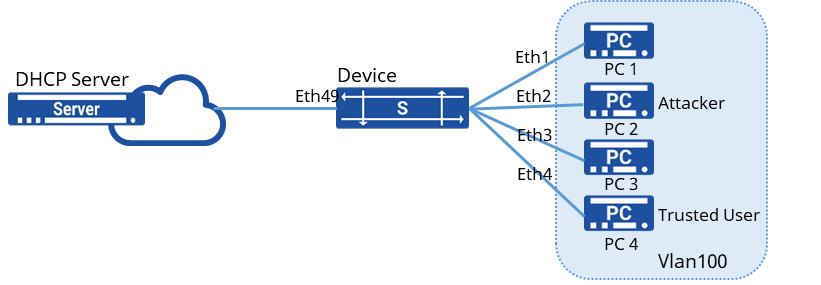
Procedure
- Omit VLAN creation and VLANif interface configuration
- Enable DHCP relay function
sonic(config)# dhcp-relay test v4sonic(config-dhcp-relay-test__v4)# down_link interface vlan 100sonic(config-dhcp-relay-test__v4)# up_link interface 49sonic(config-dhcp-relay-test__v4)# server_ip 10.10.1.1sonic(config-dhcp-relay-test__v4)# loopback_interface loopback 0sonic(config-dhcp-relay-test__v4)# exit- Enable DHCP Snooping
sonic(config)# dhcp snooping enablesonic(config)# interface vlan 100sonic(config-vlanif-100)# dhcp-snooping enable- Configure the interface to which the DHCP Server is connected as a trusted port
sonic(config)# interface ethernet 49sonic(config-if-49)# dhcp-snooping enablesonic(config-if-49)# dhcp-snooping trusted- Enable DAI function and configure Ethernet4 port as a trusted port
sonic(config)# vlan 100sonic(config-vlan-100)# arp anti-attack-check trusted-interface Ethernet4sonic(config-vlan-100)# arp anti-attack-check enable- Add a static table entry corresponding to the IP address and MAC of PC 1
sonic(config)# user-bind rule 10.100.3.1 00:00:00:01:00:01 1 100Verify configuration
- View device configuration. # View Snooping static binding table entries
sonic# show user-bind ruleVLAN     MAC              IP        Interface------- ----------------- -------   -----------Vlan100 00:00:00:01:00:01 10.100.3.1 Ethernet1
Total : 1
# View DAI function configuration
sonic# show anti-attack-check config+--------------+--------------+| Interfaces | Check mode |+==============+==============+| Vlan100 | true |+--------------+--------------+- PC 2 as the attacker, all outgoing ARP messages are discarded