
BGP Configuration
Introduction
Section titled “Introduction”BGP (Border Gateway Protocol) is a distance-vector routing protocol that facilitates routing reachability and selection of the best routes between Autonomous Systems (ASes).
To manage the ever-expanding networks more effectively, networks are divided into different Autonomous Systems. In 1982, Exterior Gateway Protocol (EGP) was used to dynamically exchange routing information between ASes. However, EGP was designed with simplicity and only announced reachable network routes without route selection or loop avoidance mechanisms. It quickly became insufficient to meet the needs of network management. This led to the development of BGP, which allows for route selection, loop prevention, efficient route propagation, and management of a large number of routes.
BGP Basic Configuration
Section titled “BGP Basic Configuration”Basic Concepts
Section titled “Basic Concepts”Autonomous System (AS)
Section titled “Autonomous System (AS)”An Autonomous System (AS) refers to an IP network under the control of a single administrative entity with a common routing policy. Each AS in a BGP network is assigned a unique AS number, which is used to distinguish different ASes. AS numbers come in 2-byte and 4-byte formats, with the range of 2-byte AS numbers being 1 to 65535, and 4-byte AS numbers ranging from 1 to 4294967295. Devices that support 4-byte AS numbers can be compatible with devices that support 2-byte AS numbers.
BGP Classification
Section titled “BGP Classification”BGP is categorized into Exterior BGP (EBGP) and Interior BGP (IBGP) based on its operational context.
- IBGP (Internal BGP)
IBGP operates within the same AS. To prevent loops within the AS, BGP devices do not advertise routes learned from IBGP peers to other IBGP peers. Full connections are established with all IBGP peers. When deploying IBGP, Route Reflectors (RRs) can be introduced to simplify full connection configurations. All Leaf devices establish BGP peer relationships only with the RR. The RR discovers and accepts BGP connections initiated by VTEPs, forming a client list, and reflects routes received from a VTEP to all other VTEPs. RRs can be deployed on Spine devices, Leaf devices, or as standalone devices.
- EBGP (Exterior BGP)
EBGP operates between different ASes. To prevent loops between ASes, BGP devices discard routes received from EBGP peers that contain the local AS number. When deploying EBGP, RRs are not needed. BGP automatically sends EVPN messages received from EBGP neighbors to other EBGP and IBGP neighbors, effectively making the Spine device function as a RR.
In most cases, devices within a network have different AS numbers, making EBGP a common choice in SONiC. If redundant Leafs are used with the same ASN, IBGP can be used.
Roles in BGP Message Exchange
Section titled “Roles in BGP Message Exchange”In BGP message exchange, there are two roles: Speaker and Peer.
Speaker: The device that sends BGP messages is referred to as a BGP speaker. It receives or generates new message information and advertises it to other BGP speakers.
Peer: Speakers that exchange messages with each other are referred to as peers. Several related peers can form a peer group.
Router ID
Section titled “Router ID”The Router ID is a 32-bit value used to identify a BGP device. It is typically represented in the form of an IPv4 address and is carried in the Open message sent during BGP session establishment. When establishing a BGP session between peers, each BGP device must have a unique Router ID. Without a unique Router ID, BGP connections between peers cannot be established.
BGP Configuration
Section titled “BGP Configuration”| Configure Tasks | Instructions | Index |
|---|---|---|
| Enable BGP | Required | 5.1.3.1 |
| Configure Router ID | Required | 5.1.3.2 |
| Configure BGP Neighbors | Optional | 5.1.3.3 |
| Configure BFD Integration with BGP | Optional | 5.1.3.4 |
Enabling BGP neighbors
Section titled “Enabling BGP neighbors”| Operation | Command | Description |
|---|---|---|
| Enter the system configuration view | configure terminal | |
| Enter the BGP view | router bgp asn | |
| Enable BGP session for a specific neighbor | no neighbor {ipaddr | hostname} shutdown | By default, BGP sessions are in the enabled state |
| Enable all BGP session | no bgp shutdown |
Configuring Router ID
Section titled “Configuring Router ID”The Router ID uniquely identifies a device within the entire Autonomous System. By default, the IP address of the loopback interface is used as the Router ID.
| Operation | Command | Description |
|---|---|---|
| Enter the system configuration view | configure terminal | |
| Enter the BGP view | router bgp asn | |
| Configure router ID | bgp router-id ip_addr |
Configuring BGP Neighbor
Section titled “Configuring BGP Neighbor”| Operation | Command | Description |
|---|---|---|
| Enter the system configuration view | configure terminal | |
| Enter the BGP view | router bgp asn | |
| Add BGP neighbor | neighbor neighbor_ip remote-as asn |
Configuring BFD Integration with BGP
Section titled “Configuring BFD Integration with BGP”| Operation | Command | Description |
|---|---|---|
| Enter the system configuration view | configure terminal | |
| Enter the BGP view | router bgp asn | |
| Configure BFD Integration with BGP | neighbor {ipaddr | hostname} bfd |
Display and Maintenance
Section titled “Display and Maintenance”| Operation | Command | Descriptionb |
|---|---|---|
| Display detailed information of BGP neighbor | show ip bgp neighbors {ipaddr|hostname} [OPTION] | ipaddr: Specifies the IP address of the neighbor. hostname: Specifies the hostname of the neighbor. Options for displaying specific information include: routes: Displays routes learned from the neighbor. advertised-routes: Displays routes advertised to the neighbor. received-routes: Displays routes received from the neighbor. prefix-counts: Displays detailed prefix count information. filtered-routes: Displays filtered routes received from the neighbor. bestpath-routes: Displays routes selected based on the best path. received: Displays received information from the neighbor. flap-statistics: Displays flap statistics of routes learned from the neighbor. dampened-routes: Displays dampened routes received from the neighbor. json: Displays information in JSON format. |
| Display BGP Neighbor Network Information | show ip bgp [A.B.C.D/M |A.B.C.D] | |
| Display BGP Neighbor Summary Information: | show ip bgp summary [established|failed|json] | established: Displays a summary of established BGP neighbors. failed: Displays a summary of failed BGP neighbors. json: Displays the summary information in JSON format. |
Configuration Example
Section titled “Configuration Example”Network requirements
Hosts in different network segments are connected through three switches, all of which run the BGP protocol. It is required to configure IBGP and EBGP neighbors so that PC1 under Device A and PC2 under Device C can interoperate.
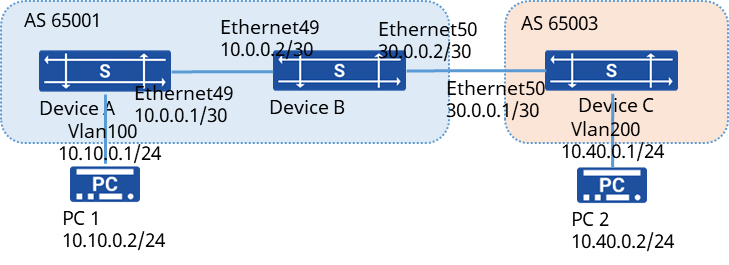
Procedure
-
Take Device A as an example to configure the IP address of each interface
# Create VLANs and add member interfaces
sonic(config)# vlan 100sonic(config)# interface ethernet 1sonic(config-if-1)# switchport access vlan 100sonic(config)# interface ethernet 2sonic(config-if-2)# switchport access vlan 100# Configuring IP addresses for interfaces
sonic(config)# interface vlan 100sonic(config-vlanif-100)# ip address 10.10.0.2/24sonic(config-vlanif-100)# exitsonic(config)# interface ethernet 49sonic(config-if-49)# ip address 10.0.0.1/30sonic(config-if-49)# exitconfig-routerinterface loopback 0sonic(config-loif-0)# ip address 10.1.15.10/32- Configure IBGP connection # Device A
sonic(config)# router bgp 65001sonic(config-router)# bgp router-id 10.1.15.10sonic(config-router)# no bgp ibgp-requires-policysonic(config-router)# neighbor 10.0.0.2 remote-as 65001sonic(config-router)# neighbor 10.0.0.2 bfdsonic(config-router)# neighbor 10.0.0.2 description DeviceB# Declare the directly connected route on Device A
sonic(config-router)# address-family ipv4 unicastsonic(config-router-af)# redistribute connected# Device B
sonic(config)# router bgp 65001sonic(config-router)# bgp router-id 10.1.15.20sonic(config-router)# no bgp ibgp-requires-policysonic(config-router)# neighbor 10.0.0.1 remote-as 65001sonic(config-router)# neighbor 10.0.0.1 bfdsonic(config-router)# neighbor 10.0.0.1 description DeviceA- Configure EBGP connection # Device B
sonic(config)# router bgp 65001sonic(config-router)# no bgp ebgp-requires-policysonic(config-router)# neighbor 30.0.0.1 remote-as 65003sonic(config-router)# neighbor 30.0.0.1 bfdsonic(config-router)# neighbor 30.0.0.1 description DeviceC# Device C
sonic(config)# router bgp 65003sonic(config-router)# bgp router-id 10.1.15.30sonic(config-router)# no bgp ebgp-requires-policysonic(config-router)# no bgp ibgp-requires-policysonic(config-router)# neighbor 30.0.0.2 remote-as 65001sonic(config-router)# neighbor 30.0.0.2 bfdsonic(config-router)# neighbor 30.0.0.2 description DeviceB# Declare a directly connected route on Device C
sonic(config-router)# address-family ipv4 unicastsonic(config-router-af)# redistribute connectedVerify configuration
- Take Device B as an example to check whether the BGP connection is established successfully.
sonic# show ip bgp summaryIPv4 Unicast Summary:BGP router identifier 10.1.15.20, local AS number 65001 vrf-id 0BGP table version 1474RIB entries 37, using 7104 bytes of memoryPeers 4, using 85 KiB of memoryPeer groups 6, using 384 bytes of memory
Neighbor V AS MsgRcvd MsgSent TblVer InQ OutQ Up/Down State/PfxRcd PfxSnt10.0.0.1 4 65001 30274 3672 0 0 0 01:16:37 17 2230.0.0.1 4 65003 29184 3712 0 0 0 01:00:07 16 22- PC1 and PC2 can ping each other
BGP Route Policy Configuration
Section titled “BGP Route Policy Configuration”In BGP networks, route policy is a crucial approach that allows flexible control over the propagation and reception of routes by modifying their attributes. It involves the following steps:
- Define a set of matching rules to identify the characteristics of the routes for which the route policy will be applied. These characteristics can include destination addresses, originating router addresses, and more.
- Create specific policies based on the matching rules, which may involve modifying route attributes or restricting the route propagation.
- Apply the defined policies to various stages of route handling, such as route advertisement, reception, and introduction, to effectively control the behavior of routes. By implementing route policies, network administrators can fine-tune the behavior of BGP routes according to their specific requirements, ultimately optimizing network performance and reliability.
Configuration Example
Section titled “Configuration Example”Network requirements
Device A and Device B are connected via BGP. Set the routing policy to be applied when introducing directly connected routes, so that directly connected routes in the 192.168.1.1/24 and 192.168.2.1/24 segments are visible and routes in the 192.168.10.1/24 segment are blocked.
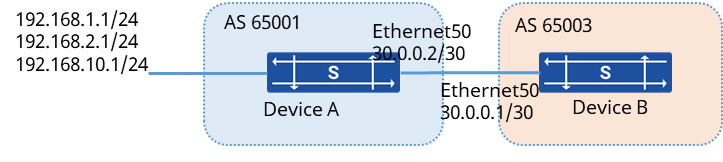
Procedure
- Configuring Device A # Configure the interface IP address
sonic(config)# interface vlan 100sonic(config-vlanif-100)# ip address 192.168.1.1/24sonic(config-vlanif-100)# exitsonic(config)# interface vlan 200sonic(config-vlanif-200)# ip address 192.168.2.1/24sonic(config-vlanif-200)# exitsonic(config)# interface vlan 300sonic(config-vlanif-300)# ip address 192.168.10.1/24sonic(config-vlanif-300)# exitsonic(config)# interface ethernet50sonic(config-if-50)# ip address 30.0.0.2/30# Establishing a BGP connection
sonic(config)# router bgp 65001sonic(config-router)# bgp router-id 10.1.15.10sonic(config-router)# no bgp ebgp-requires-policysonic(config-router)# neighbor 30.0.0.1 remote-as 65003sonic(config-router)# neighbor 30.0.0.1 bfdsonic(config-router)# neighbor 30.0.0.1 description DeviceB# Configuring Routing Policies
sonic(config)# ip prefix-list test permit 192.168.10.1/24sonic(config)# route-map connect_filter deny 30000sonic(config-route-map)# match ip address prefix-list test# Introduce directly connected routes in BGP neighbors and apply routing policies for filtering
sonic(config)# router bgp 65001sonic(config-router)# address-family ipv4 unicastsonic(config-router-af)# redistribute connectedsonic(config-router-af)# redistribute kernel route-map connect_filter- Configuring Device B # Omit IP address configuration # Establishing a BGP connection
sonic(config)# router bgp 65003sonic(config-router)# bgp router-id 10.1.15.20sonic(config-router)# no bgp ebgp-requires-policysonic(config-router)# neighbor 30.0.0.2 remote-as 65001sonic(config-router)# neighbor 30.0.0.2 bfdsonic(config-router)# neighbor 30.0.0.2 description DeviceAVerify configuration
View the routing table on Device B
sonic# show ip routeCodes: K - kernel route, C - connected, S - static, R - RIP, O - OSPF, I - IS-IS, B - BGP, E - EIGRP, N - NHRP, T - Table, v - VNC, V - VNC-Direct, A - Babel, D - SHARP, F - PBR, f - OpenFabric, > - selected route, * - FIB route, q - queued, r - rejected, b - backupB>* 192.168.1.1/24 [20/0] via 30.0.0.2, ethernet 50, weight 1, 01:41:43B>* 192.168.2.1/24 [20/0] via 30.0.0.2, ethernet 50, weight 1, 01:41:43C>* 30.0.0.1/30 is directly connected, ethernet 50, 1d00h59m