
sFlow Configuration
sFlow Configuration
Section titled “sFlow Configuration”Introduction
Section titled “Introduction”sFlow is a network monitoring technology that collects network packet samples and sends them to a remote collector encapsulated in UDP packets.
sFlow technology implements the following two sampling methods:
Flow Sampling: This method samples data packets from interfaces with sFlow enabled according to a specific sampling method and ratio. It captures the first 128 bytes of the original packet, encapsulates it in an sFlow packet, and sends it to the collector. The current version only supports Flow Sampling.
Counter Sampling: The sFlow agent device periodically obtains traffic statistics from the interface and encapsulates them in an sFlow packet to be sent to the collector. The collector is only concerned with the number of packets on the interface and not the specific details of the packets.
sFlow Configuration
Section titled “sFlow Configuration”Configuring sFlow Agent and sFlow Collector Information
Section titled “Configuring sFlow Agent and sFlow Collector Information”| Operation | Command | Description |
|---|---|---|
| Enter system configuration view | configure terminal | |
| Enable sFlow | sflow enable | |
| Specify sFlow collector information | sflow collector name IP-address [port] | |
| Specify sFlow agent information | sflow agent-id {ethernet|vlan|loopback} id | Specify the source IP address of the sFlow agent as a specific interface IP |
Configuring sFlow Sampling Methods
Section titled “Configuring sFlow Sampling Methods”The device supports two types of Flow sampling:
Interface-based Flow Sampling: Enable Flow sampling on an interface and set the sampling ratio. Packets in the specified sampling direction on this interface will be sampled according to the specified ratio.
| Operation | Command | Description |
|---|---|---|
| Enter system configuration view | configure terminal | |
| Enter interface configuration view | interface ethernet id | |
| Configure interface sampling rate | sflow sample-rate number |
Display and Maintenance
Section titled “Display and Maintenance”| Operation | Command | Description |
|---|---|---|
| View sFlow configuration information | show sflow | |
| View interface sampling rates | show sflow interface |
Configuration Example
Section titled “Configuration Example”Network requirements
The PC is connected to the network through SwitchA, and the network administrator needs to monitor the traffic information of the PC to ensure the security of the network.
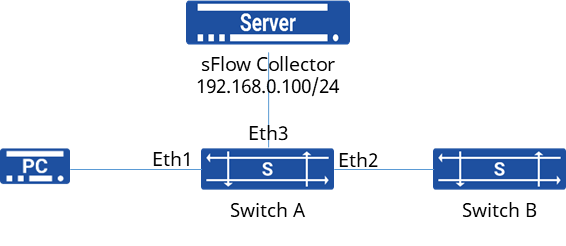
Procedure
- Configure SwitchA’s IP Address
sonic(config)# interface ethernet 1sonic(config-if-1)# ip address 10.1.10.1/24sonic(config)# interface ethernet 2sonic(config-if-2)# ip address 10.1.20.1/24sonic(config)# interface ethernet 3sonic(config-if-3)# ip address 192.168.0.1/24- Enable sFlow Functionality
sonic(config)# sflow enablesonic(config)# sflow collector test 192.168.0.100sonic(config)# sflow agent-id ethernet 3- Enable Interface-based sFlow
sonic(config)# interface ethernet 1sonic(config-if-1)# sflow sample-rate 10000