
MACsec configuration
Introduction
Section titled “Introduction”MACsec (Media Access Control Security) is a security technology based on the link layer (L2) and defined in the IEEE 802.1AE standard. It achieves data confidentiality and tamper resistance at the physical link layer by encrypting and protecting the integrity of data frames on Ethernet links.
MACsec encrypts the payload of Ethernet frames using symmetric key encryption algorithms (such as AES-GCM) and appends an integrity check value (ICV) to each frame to prevent man-in-the-middle attacks and replay attacks. Key negotiation is performed by the MKA (MACsec Key Agreement) protocol, which supports static pre-shared keys and dynamic key distribution (such as via 802.1X).
MACsec is suitable for point-to-point links, is easy to deploy, transparent to the IP layer, and is widely used in scenarios such as data center interconnection and enterprise LAN link protection.
Configuration Example
Section titled “Configuration Example”Switch A and Switch B are connected via a physical link. Two subnets, Group 1 and Group 2, of a private network running the IP protocol are interconnected by establishing a tunnel between the two switches using MACsec. Switch A and Switch B are interconnected.
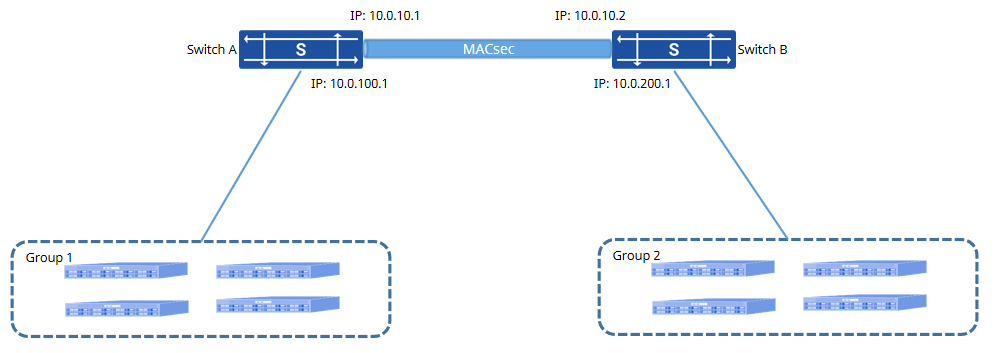
Procedure
- Switch A configuration # Configure MACsec profile
sonic(config)# macsec enablesonic(config)# macsec profile testsonic(config-macsec-test)# mka cipher_suite GCM-AES-128sonic(config-macsec-test)# mka policy securitysonic(config-macsec-test)# mka priority 10sonic(config-macsec-test)# mka psk ckn 01234567890123456789012345678900 cak 01234567890123456789012345678900sonic(config-macsec-test)# mka rekey_period 30sonic(config-macsec-test)# mka send_sci enablesonic(config-macsec-test)# exit# Configure the interface IP address and bind the MACsec profile
sonic(config)# interface ethernet 10sonic(config-if-10)# ip address 10.0.10.1/24sonic(config-if-10)# macsec bind testsonic(config-if-10)# exitsonic(config)# interface ethernet 15sonic(config-if-15)# ip address 10.0.100.1/24sonic(config-if-15)# exit- Switch B configuration # Configure MACsec profile
sonic(config)# macsec enablesonic(config)# macsec profile testsonic(config-macsec-test)# mka cipher_suite GCM-AES-128sonic(config-macsec-test)# mka policy securitysonic(config-macsec-test)# mka priority 30sonic(config-macsec-test)# mka psk ckn 01234567890123456789012345678900 cak 01234567890123456789012345678900sonic(config-macsec-test)# mka rekey_period 30sonic(config-macsec-test)# mka send_sci enablesonic(config-macsec-test)# exit# Configure the interface IP address and bind the MACsec profile
sonic(config)# interface ethernet 10sonic(config-if-10)# ip address 10.0.10.2/24sonic(config-if-10)# macsec bind testsonic(config-if-10)# exitsonic(config)# interface ethernet 15sonic(config-if-15)# ip address 10.0.200.1/24sonic(config-if-15)# exit- Routing configuration for Switch A and Switch B # Configure static routes on Switch A
sonic(config)# ip route 100.0.200.0/24 10.0.10.2# Configure static routes on Switch B
sonic(config)# ip route 100.0.100.0/24 10.0.10.1Verify Configuration
- View device MACsec configuration
sonic# show macsec profileMacsec Profile: testPriority: 30Cipher Suite : GCM-AES-XPN-128Primary CAK : 01234567890123456789012345678900Primary CKN : 01234567890123456789012345678900Policy : securityReplay Protect : falseReplay Window : 100Rekey Period : 1sSend Sci : true- Ping each other on Switch A and Switch B. You can ping normally through the MACsec tunnel.
sonic# ping 10.0.10.2PING 10.0.10.2 (10.0.10.2) 56(84) bytes of data.64 bytes from 10.0.10.2: icmp_seq=1 ttl=64 time=1.58 ms64 bytes from 10.0.10.2: icmp_seq=2 ttl=64 time=0.638 ms64 bytes from 10.0.10.2: icmp_seq=3 ttl=64 time=0.670 ms64 bytes from 10.0.10.2: icmp_seq=4 ttl=64 time=0.685 ms64 bytes from 10.0.10.2: icmp_seq=5 ttl=64 time=0.653 ms--- 10.0.10.2 ping statistics ---5 packets transmitted, 5 received, 0% packet loss, time 4076msrtt min/avg/max/mdev = 0.638/0.846/1.587/0.371 ms
sonic# ping 10.0.10.1PING 10.0.10.1 (10.0.10.1) 56(84) bytes of data.64 bytes from 10.0.10.1: icmp_seq=1 ttl=64 time=0.694 ms64 bytes from 10.0.10.1: icmp_seq=2 ttl=64 time=0.642 ms64 bytes from 10.0.10.1: icmp_seq=3 ttl=64 time=0.665 ms64 bytes from 10.0.10.1: icmp_seq=4 ttl=64 time=0.657 ms64 bytes from 10.0.10.1: icmp_seq=5 ttl=64 time=0.629 ms--- 10.0.10.1 ping statistics ---5 packets transmitted, 5 received, 0% packet loss, time 4087msrtt min/avg/max/mdev = 0.629/0.657/0.694/0.031 ms- Use the terminal PCs under Group 1 and Group 2 to ping each other, and you can successfully ping through.
sonic# ping 10.0.100.2PING 10.0.100.2 (10.0.100.2) 56(84) bytes of data.64 bytes from 10.0.100.2: icmp_seq=1 ttl=62 time=1.18 ms64 bytes from 10.0.100.2: icmp_seq=2 ttl=62 time=1.13 ms64 bytes from 10.0.100.2: icmp_seq=3 ttl=62 time=1.70 ms64 bytes from 10.0.100.2: icmp_seq=4 ttl=62 time=1.05 ms64 bytes from 10.0.100.2: icmp_seq=5 ttl=62 time=1.71 ms--- 10.0.100.2 ping statistics ---5 packets transmitted, 5 received, 0% packet loss, time 4003msrtt min/avg/max/mdev = 1.057/1.360/1.713/0.292 ms
sonic# ping 10.0.200.2PING 10.0.200.2 (10.0.200.2) 56(84) bytes of data.64 bytes from 10.0.200.2: icmp_seq=1 ttl=62 time=1.05 ms64 bytes from 10.0.200.2: icmp_seq=2 ttl=62 time=0.917 ms64 bytes from 10.0.200.2: icmp_seq=3 ttl=62 time=1.07 ms64 bytes from 10.0.200.2: icmp_seq=4 ttl=62 time=0.977 ms64 bytes from 10.0.200.2: icmp_seq=5 ttl=62 time=0.862 ms--- 10.0.200.2 ping statistics ---5 packets transmitted, 5 received, 0% packet loss, time 4004msrtt min/avg/max/mdev = 0.862/0.978/1.079/0.084 ms