
ACL Configuration
Introduction
Section titled “Introduction”Communication between information points and communication between internal and external networks are essential business requirements in enterprise networks. To ensure the security of the internal network, it is necessary to use security policies to ensure that unauthorized users can only access specific network resources. An Access Control List (ACL) consists of a series of rules that form a packet processing policy. These rules typically consist of conditional statements describing packet matching conditions, such as source MAC, destination MAC, source IP, destination IP, source port number, destination port number, etc. Switches use these rules to filter packets. After configuring ACL rules, switches allow specific packets to pass through while blocking certain packets, achieving access control and traffic filtering. In short, ACL serves as a network technology means of controlling access, enhancing network security, and ensuring reliable network transmission.
Explanation of Principles
Section titled “Explanation of Principles”ACL Table
Section titled “ACL Table”The ACL table is a collection of ACL rules that are bound to specific interfaces in the form of tables. The “stage” indicates the direction, which can be “ingress” or “egress,” corresponding to whether the ACL table is applied in the inbound or outbound direction. For CX series products, different directions have different available matches. The match fields in the ingress direction are not available in the egress direction. The available ACL Table types on the current device are as follows, representing filtering for different services:
- L3: Regular IPv4 business packets received/sent by service interfaces
- L3V6: Regular IPv6 business packets received/sent by service interfaces
- CTRLPLANE: Used to filter SSH management packets and SNMP protocol packets for device login
- CTRLPLANEv6: Used to filter SSH management packets and SNMP protocol IPv6 type packets for device login
- nexthop-group: Used when configuring policy-based routing based on PBR to specify the next hop address group.
ACL Rule
Section titled “ACL Rule”An ACL rule pertains to a table. Within a rule, you define the priority, matching conditions, and actions upon a match. An ACL rule can only be added to one table, but a table can contain multiple rules, creating a “many-to-one” relationship between rules and tables.
ACL Rule Priority
Section titled “ACL Rule Priority”Priority indicates the priority of a rule. The larger the numerical value, the higher the priority. The priority value must be less than 500. Priority is used when multiple rules can match; the rule with the highest priority is selected. The same table cannot have rules with the same priority. When rules are named non-numerically, the priority is determined based on the order of configuration. The rule configured first has a higher priority.
ACL Rule Actions
Section titled “ACL Rule Actions”Ingress Direction
| Actions | Keyword | Description |
|---|---|---|
| Basic action | packet_action | permit: Allows forwarding of the packet. drop: Discards the packet. trap: Sends the packet to the CPU for processing without forwarding. copy: Sends a copy of the packet to the CPU for processing while also forwarding the original packet. |
| Redirect | redirect_action | Redirect to interface/next hop/next hop group |
| QoS Marking | traffic-behavior | Implement port-based traffic rate limiting based on ACL and traffic behavior |
Egress Direction
| Actions | Keywords | Description |
|---|---|---|
| Basic action | packet_action | permit: Allows forwarding of the packet. drop: Discards the packet. trap: Sends the packet to the CPU for processing without forwarding. copy: Sends a copy of the packet to the CPU for processing while also forwarding the original packet. |
ACL Rule Matching Filter
Section titled “ACL Rule Matching Filter”L3/L3v6 Matching Filter
| Keywords | Description |
|---|---|
| ethernet-type | 16-bit Ethernet type value, HEX<0-FFFF>, e.g., 0x0800 |
| src-mac | Source MAC address, format nn:nn:nn:nn:nn:nn |
| outer-vlan | Outer VLAN ID |
| vlan-pri | VLAN priority |
| ip-protocol | IP protocol type, can be configured using either the numeric value or protocol name |
| icmpv6-type | ICMPv6 message type, range 1-137 |
| src-ip | Source IP address (with subnet mask), e.g., “10.1.1.1/24” |
| dst-ip | Destination IP address (with subnet mask), e.g., “10.1.1.1/24” |
| icmp-type | 8-bit ICMP type value, range 0-16 |
| src-port | Protocol source port number |
| dst-port | Protocol destination port number |
| ip-type | NON_IP for filtering non-IP packets IPV4ANY for filtering IPv4 packets IPV6ANY for filtering IPv6 packets ARP for filtering ARP packets |
CTRLPLANE/ CTRLPLANEv6 Matching Filter
Section titled “CTRLPLANE/ CTRLPLANEv6 Matching Filter”| Keywords | Description |
|---|---|
| src-ip | Source IP address |
| dst-ip | Destination IP address |
Configuration Example
Section titled “Configuration Example”L3 IPv4 ACL configuration example
Section titled “L3 IPv4 ACL configuration example”Network requirements
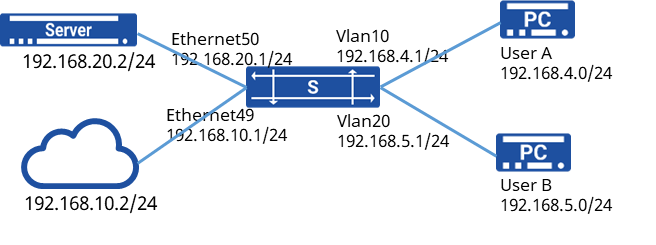
A company interconnects all departments through Switch, and the server Server stores the company’s confidential technical data, while backing up to the cloud.
To ensure information security, it is required to properly configure ACL rules to achieve:
Block user group A from accessing resources on the server and the cloud.
User group B is prohibited from accessing the server resources directly, but can access the information by accessing the cloud.
Procedure
- Omit the VLAN configuration process
- Configure the interface IP address
sonic(config)# interface ethernet 49sonic(config-if-49)# ip address 192.168.10.1/24sonic(config)# interface ethernet 50sonic(config-if-50)# ip address 192.168.20.1/24sonic(config)# interface vlan 10sonic(config-vlanif-10)# ip address 192.168.4.1/24sonic(config)# interface vlan 20sonic(config-vlanif-20)# ip address 192.168.5.1/24- Configure ACL rules
sonic(config)# access-list l3 TABLE_1 ingresssonic(config-l3-acl-table_1)# rule 1 src-ip 192.168.4.0/24 dst-ip 192.168.20.0/24 packet-action denysonic(config-l3-acl-table_1)# rule 2 src-ip 192.168.4.0/24 dst-ip 192.168.10.0/24 packet-action deny
sonic(config)# access-list l3 TABLE_2 ingresssonic(config-l3-acl-table_2)# rule 3 src-ip 192.168.5.0/24 dst-ip 192.168.20.0/24 packet-action deny- Binding rules
sonic(config)# interface vlan 10sonic(config-vlanif-10)# acl TABLE_1sonic(config)# interface vlan 20sonic(config-vlanif-20)# acl TABLE_2Verify configuration
User A can access User B and other network resources normally, but cannot access the cloud and server resources. User B can access User A, and the cloud resources normally, but not the server resources.
CTRLPLANE ACL configuration example
Section titled “CTRLPLANE ACL configuration example”Network requirements
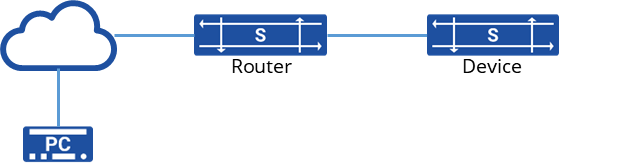
The PC accesses the login device through the cloud and goes out to the network security consideration, all users need to jump through the springboard machine to login the device. You need to configure ACL filtering rules on the device to prohibit other IPs other than the hopper IP from accessing the device.
Procedure
sonic(config)# access-list CTRLPLANE SSH ingress srv SSH,SNMPsonic(config-CTRLPLANE-acl-SSH)# rule 100 src-ip 192.168.0.0/20sonic(config-CTRLPLANE-acl-SSH)# rule 90 src-ip 10.11.1.0/24Verify configuration
PC can only log into the device normally through the springboard machine, other ways are unable to log in and the normal business functions of the device are not affected by the rule.****