
Snooping Table Synchronization Configuration
Introduction
Section titled “Introduction”Snooping entries include DHCP Snooping entries, ND Snooping entries, and user static binding entries, collectively referred to as SNP entries. These entries play a crucial role in performing security functions and MAC detection. In a typical clustered networking environment, Leaf devices act as distributed gateways, connecting multiple APs. Mobile terminals may migrate between APs under different Leaf devices. To minimize migration time, Snooping entries can be synchronized across all devices in the network. Consequently, after migration, there is no need to acquire IP addresses or relearn Snooping entries; legitimate access to the network can be achieved through security authentication. Similarly, user statically configured binding entries can also be synchronized using the SNP synchronization mechanism, reducing the need for redundant configuration across different devices.
Explanation of Principles
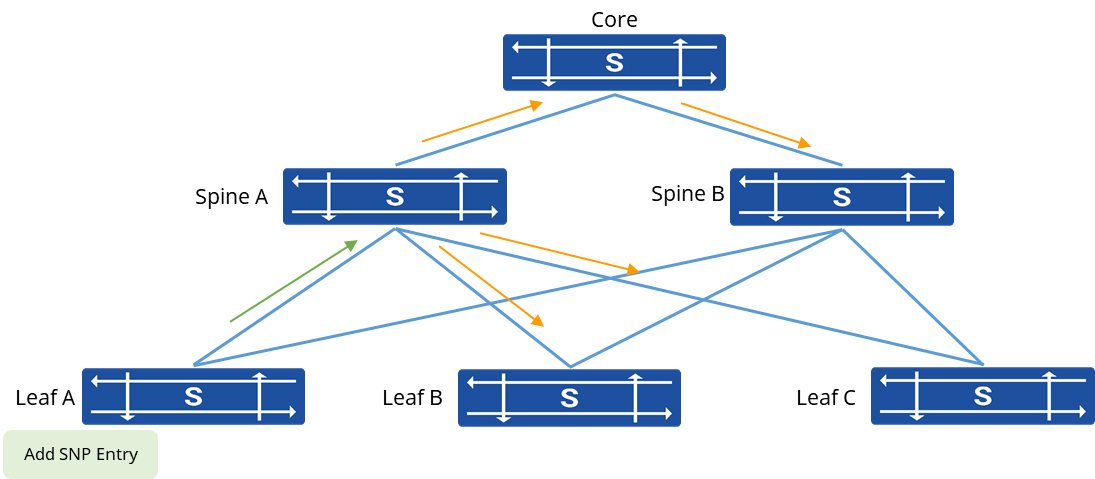
Section titled “Explanation of Principles”A protocol interaction is established between Leaf devices and Spine devices to facilitate SNP table synchronization. Typically, a more powerful Spine device is chosen as the server for SNP table synchronization, while the Leaf devices act as clients. When a client receives a DHCP ACK message or an ND protocol’s DAD message, it learns new entries for the SNP table and simultaneously sends update messages to the designated Spine server. The Spine device then propagates these update messages to the remaining Leaf devices within the network. Consequently, all devices within the network gain access to the updated SNP table entries. Generally, interaction messages for table synchronization between devices are encapsulated using Loopback addresses, ensuring that the Loopback addresses between devices are reachable at the layer 3 within the network.
SNP Server Configuration
Section titled “SNP Server Configuration”| Configure Tasks | Instructions |
|---|---|
| Enable SNP table synchronization function | Required |
| Configure the SNP Neighbor IP address | Required |
| Configure the SNP Peer IP address | Required |
Enabling SNP Table Synchronization Table Synchronization
Section titled “Enabling SNP Table Synchronization Table Synchronization”Enable the SNP table synchronization function on the device and specify the device attributes. By default, the IPv4 address of the device’s Loopback0 interface is used as the source IP address for protocol interaction messages. It’s also possible to specify a specific interface IP as the source address.
| Operation | Command | Description |
|---|---|---|
| Enter the system configuration view | configure terminal | |
| Enable SNP Table Synchronization function | snp-sync enable server [ip-address] |
Configuring SNP Neighbor Address
Section titled “Configuring SNP Neighbor Address”The SNP Neighbor is another device with the SNP Server attribute. It’s important to note that this IP address should match the source IP address configured when enabling SNP Table Synchronization on the neighbor device.
| Operation | Command | Description |
|---|---|---|
| Enter the system configuration view | configure terminal | |
| Configure SNP neighbor IP address | snp-sync neighbor ip-address |
Configuring SNP Peer Address
Section titled “Configuring SNP Peer Address”SNP Peer is a device with the attribute of being a Client, typically a Leaf device. Please note that this IP address should be consistent with the source IP address used when enabling SNP table synchronization for the configured peer device.
| Operation | Command | Description |
|---|---|---|
| Enter the system configuration view | configure terminal | |
| Configure SNP peer IP address | snp-sync peer ip-address |
SNP Client Configuration
Section titled “SNP Client Configuration”In most cases, the Leaf device directly connected to end-user terminals is chosen as the Client in the SNP table synchronization process.
| Operation | Command | Description |
|---|---|---|
| Enter the system configuration view | configure terminal | |
| Configure SNP neighbor IP address | snp-sync neighbor ip-address | The Neighbor is the Server device in the SNP context. |
Display and Maintenance
Section titled “Display and Maintenance”| Operation | Command | Description |
|---|---|---|
| Display SNP table synchronization status | show snooping status |
Configuration Example
Section titled “Configuration Example”Network requirements
Terminals accessed by different devices belong to the same network segment, and the gateway information of terminals remains unchanged during migration, and IP addresses are not reassigned via DHCP. It is required that SNP table entries can be synchronized between devices, and the new device can still open the security function to check the legality of messages sent by terminals after migration.
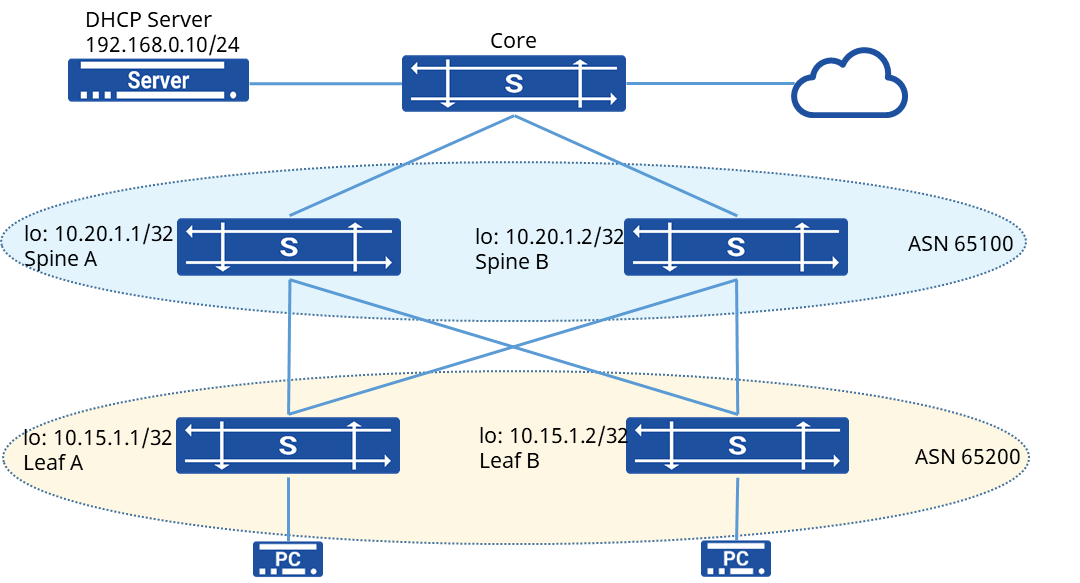
Procedure
- Leaf A configuration
# Omit the interface and IP address configuration process
# Establish BGP neighbors
sonic(config)# router bgp 65200sonic(config-router)# bgp router-id 10.15.1.1sonic(config-router)# no bgp ebgp-requires-policysonic(config-router)# neighbor PEER_V4_EBGP peer-groupsonic(config-router)# neighbor 10.20.1.1sonic(config-router)# neighbor 10.20.1.1 bfdsonic(config-router)# neighbor 10.20.1.1 description SpineAsonic(config-router)# neighbor 10.20.1.1 peer-group PEER_V4_EBGPsonic(config-router)# neighbor 10.20.1.2sonic(config-router)# neighbor 10.20.1.2 bfdsonic(config-router)# neighbor 10.20.1.2 description SpineBsonic(config-router)# neighbor 10.20.1.2 peer-group PEER_V4_EBGPsonic(config-router)# address-family ipv4 unicast# Declare the route aboute Loopback0 address
sonic(config-router-af)# network 30.11.0.85/32sonic(config-router-af)# neighbor PEER_V4_EBGP activate# Configure SNP entry synchronization
sonic(config)# snp-sync enable client 10.15.1.1 10.15.1.1sonic(config)# snp-sync neighbor 10.20.1.1sonic(config)# snp-sync neighbor 10.20.1.2# Enable the DHCP Relay and DHCP Snooping functions
sonic(config)# dhcp-relay test v4sonic(config-dhcp-relay-test__v4)# down_link interface vlan 100sonic(config-dhcp-relay-test__v4)# up_link interface 5sonic(config-dhcp-relay-test__v4)# server_ip 192.168.0.10sonic(config-dhcp-relay-test__v4)# loopback_interface loopback 0sonic(config-dhcp-relay-test__v4)# exitsonic(config)# dhcp snooping enablesonic(config)# interface vlan 100sonic(config-vlanif-100)# dhcp-snooping enable# Configure the interface to which the DHCP Server is connected as a trusted port
sonic(config)# interface ethernet 5sonic(config-if-5)# dhcp-snooping enablesonic(config-if-5)# dhcp-snooping trusted- Leaf B and Leaf A are similar in configuration
- Spine A configuration # Omit the interface and IP address configuration process # Establish BGP neighbors
sonic(config)# router bgp 65100sonic(config-router)# bgp router-id 10.20.1.1sonic(config-router)# no bgp ebgp-requires-policysonic(config-router)# neighbor PEER_V4_EBGP peer-groupsonic(config-router)# neighbor 10.15.1.1sonic(config-router)# neighbor 10.15.1.1 bfdsonic(config-router)# neighbor 10.15.1.1 description LeafAsonic(config-router)# neighbor 10.15.1.1 peer-group PEER_V4_EBGPsonic(config-router)# neighbor 10.15.1.2sonic(config-router)# neighbor 10.15.1.2 bfdsonic(config-router)# neighbor 10.15.1.2 description LeafBsonic(config-router)# neighbor 10.15.1.2 peer-group PEER_V4_EBGPsonic(config-router)# address-family ipv4 unicast# Declare the route aboute Loopback0 address
sonic(config-router-af)# network 10.20.1.1/32sonic(config-router-af)# neighbor PEER_V4_EBGP activate# Configure SNP entry synchronization
sonic(config)# snp-sync enable server 10.20.1.1 10.20.1.1sonic(config)# snp-sync peer 10.20.1.2sonic(config)# snp-sync neighbor 10.10.1.1sonic(config)# snp-sync neighbor 10.10.1.2Verify configuration
- View the SNP entry synchronization status of the Leaf device
sonic# show snooping statusSwitch ID : 10.15.1.1Source IP address :10.15.1.1Coherent Status : yesSequence Number : 10526Device Mode : clientNeighbors Status Summary :Switch ID Active Sequence Number Connect_active_number------------------------------neighbors----------------------------------10.20.1.1 yes 10526 210.20.1.2 yes 10526 2Total number of Snooping Table :2- View the SNP entry synchronization status of the Spine device
sonic# show snooping statusSwitch ID : 10.20.1.1Source IP address :10.20.1.1Coherent Status : yesSequence Number : 10526Connect Active number : 2Device Mode : serverNeighbors and Peers Status Summary :Switch ID Active Sequence Number Connect_active_number--------------------------------peers------------------------------------10.20.1.2 yes 10526 2------------------------------neighbors----------------------------------10.15.1.1 yes 10526 110.15.1.2 yes 10526 1