
Multicast VLAN Configuration
Introduction
Section titled “Introduction”When users in different VLANs have the same multicast data requirements, the upstream router needs to send multiple copies of the same multicast packet, each carrying a different VLAN, to different VLANs. With multicast VLAN functionality deployed on Layer 2 devices, the upstream router no longer needs to replicate the multicast stream in each user VLAN. Instead, the data stream is duplicated within the multicast VLAN and then sent to the Layer 2 devices. This approach avoids unnecessary duplication of multicast streams on the upstream router, saving network bandwidth and reducing the burden on the upstream router.
Explanation of Principles
Section titled “Explanation of Principles”In a multicast VLAN, VLANs are divided into multicast VLANs and user VLANs. The multicast VLAN is the VLAN to which the interfaces connected to multicast sources belong, used to aggregate multicast streams. The user VLAN is the VLAN to which multicast member hosts belong, used to receive multicast traffic from the multicast VLAN. Multiple user VLANs can be bound to a multicast VLAN.
The implementation process of multicast VLAN functionality consists of two parts: protocol message forwarding and multicast data forwarding:
Protocol Message Forwarding
- Replace the Tag of IGMP Report messages from user VLANs with the Tag of the corresponding multicast VLAN and send them out from the router ports of the multicast VLAN.
- Replace the Tag of IGMP Query messages from the multicast VLAN with the Tag of the corresponding user VLAN and send them out from the member ports of the user VLAN.
- Merge the learned entries from IGMP Snooping in user VLANs into the multicast VLAN.
Multicast Data Forwarding
- If the forwarding table entry corresponding to the multicast VLAN is found, the outgoing ports and outgoing port VLAN IDs can be determined. Then, the data packet is copied and sent to each member port in each user VLAN.
- If the corresponding forwarding table entry is not found, the data packet will be discarded or broadcast according to user policy.
Multicast VLAN Configuration
Section titled “Multicast VLAN Configuration”| Operation | Command | Description |
|---|---|---|
| Enter the system configuration view | configure | |
| Configure the multicast vlan | igmp-snooping mvlan multicast-vlan user-vlan | multicast-vlan: Multicast VLAN user-vlan: User VLAN, supports configuring multiple VLANs separated by commas ’,’ or configuring a range using ’-‘ |
Display and Maintenance
Section titled “Display and Maintenance”| Operation | Command |
|---|---|
| View multicast VLAN configuration | show vlan igmp-snooping mvlan |
Configuration Example
Section titled “Configuration Example”Network requirements
The service VLAN used to transmit multicast data between Router and Device is VLAN 10, while the downstream user hosts belong to VLAN 100 and VLAN 200 respectively, and all need to receive multicast data from Multicast Source. By configuring the multicast VLAN one-to-one multifunction based on user VLANs, for multiple copies of the same multicast demand from different user hosts, Router only needs to send one copy of multicast data to VLAN 10, reducing the bandwidth waste between Router and Device.
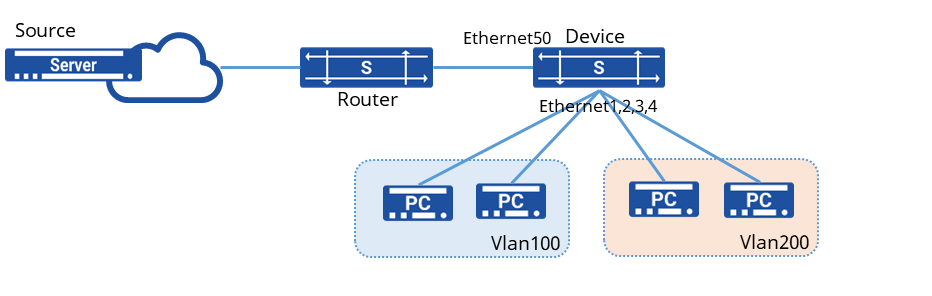
Procedure
- Create a VLAN and enable IGMP Snooping
sonic(config)# vlan 100sonic(config-vlan-100)# igmp snooping enablesonic(config)# vlan 200sonic(config-vlan-200)# igmp snooping enable- Create a multicast VLAN and enable IGMP Snooping
sonic(config)# vlan 10sonic(config-vlan-10)# igmp snooping enable- Add the interface to the specified VLAN
sonic(config)# vlan 100sonic(config)# vlan 200sonic(config)# vlan 10sonic(config)# interface ethernet 1sonic(config-if-1) switchport access vlan 100sonic(config)# interface ethernet 2sonic(config-if-2) switchport access vlan 100sonic(config)# interface ethernet 3sonic(config-if-3) switchport access vlan 200sonic(config)# interface ethernet 4sonic(config-if-4) switchport access vlan 200sonic(config)# interface ethernet 50sonic(config-if-50) switchport access vlan 10- Bind user Vlan100, Vlan200 under multicast VLAN
sonic(config)# vlan mvlan 20 200,201Verify configuration
View multicast VLAN configuration
sonic# show vlan mvlan+-------------+-------------+| MVLAN ID | UVLAN IDS |+=============+=============+| 20 | 200 || | 100 |+-------------+-------------+